Index >> Audio & Multimedia >> Video Tools >> AVD Video Processor
Report SpywareAVD Video Processor 8.3

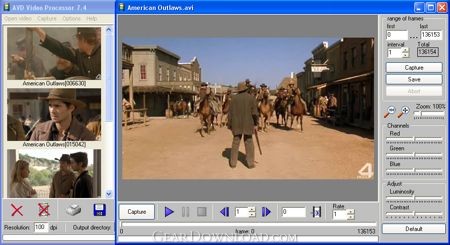 Click to enlarge screenshot
Software Description:
AVD Video Processor - A tool to capture snapshots from video and create animated GIFs
AVD Video Processor is an easy to learn and use tool for capturing snapshots from video files and creating professional-looking GIF animations. So, whether you crave for a photo of your favorite actor or want to brighten your website or multimedia project with animated GIF files or banners, AVD Video Processor is the way to go.
AVD Video Processor is designed to work with almost all popular video and graphic formats available now, including AVI, MPEG, MPG, DivX as well as FAX, TIFF, GIF, JPEG, PNG, BMP, PCX, PDF, PS, WBMP, DIB, RLE, TGA, PBM, PGM and PPM, PDF, PostScript (PS, EPS), Adobe Photoshop PSD. This allows you to process video without the need to convert it into a suitable format in external applications.
The program features the VCR-like video navigation controls to let you quickly review a video file in the direct or reverse direction, jump to any frame needed, take a snapshot and save an output file to the hard drive. For creating animated GIF files, there’s nothing better that the built-in editor. It offers you many stylistic options to create animations. You can customize a large variety of settings for your animation, including screen size, background color, delay time, offset and more.
For all its technical sophistication, AVD Video Processor is extremely easy in use and requires minimum time to learn. An animation can be created in three simple steps. Firstly, you should open an AVI file in AVD Video Processor and capture the required frames or a series of frames. Secondly, you go to the GIF manager and load the captured frames into it. Finally, you specify the required GIF settings such as size, delay, and click on the Save GIF button. Your GIF animation is ready.
What's New: capture tools has been added
Limitations: 20 Days Trial
AVD Video Processor is an easy to learn and use tool for capturing snapshots from video files and creating professional-looking GIF animations. So, whether you crave for a photo of your favorite actor or want to brighten your website or multimedia project with animated GIF files or banners, AVD Video Processor is the way to go.
AVD Video Processor is designed to work with almost all popular video and graphic formats available now, including AVI, MPEG, MPG, DivX as well as FAX, TIFF, GIF, JPEG, PNG, BMP, PCX, PDF, PS, WBMP, DIB, RLE, TGA, PBM, PGM and PPM, PDF, PostScript (PS, EPS), Adobe Photoshop PSD. This allows you to process video without the need to convert it into a suitable format in external applications.
The program features the VCR-like video navigation controls to let you quickly review a video file in the direct or reverse direction, jump to any frame needed, take a snapshot and save an output file to the hard drive. For creating animated GIF files, there’s nothing better that the built-in editor. It offers you many stylistic options to create animations. You can customize a large variety of settings for your animation, including screen size, background color, delay time, offset and more.
For all its technical sophistication, AVD Video Processor is extremely easy in use and requires minimum time to learn. An animation can be created in three simple steps. Firstly, you should open an AVI file in AVD Video Processor and capture the required frames or a series of frames. Secondly, you go to the GIF manager and load the captured frames into it. Finally, you specify the required GIF settings such as size, delay, and click on the Save GIF button. Your GIF animation is ready.
What's New: capture tools has been added
Limitations: 20 Days Trial
Feature List:
- batch capture: automatically capture a series of frames
- auto-save: one-click capture, enhance and save a frame to a sequentially named image file
- You can process the captured frames and execute effects
- Cropping
- Resample, scale to a specific size
- Rotate through any angle
- Horizontal and vertical mirror
- Automatic histogram equalization
- Colors inverting
- RGB Red Green Blue
- HSV Hue Saturation Value
- HSL Hue Saturation Luminosity
- Fast action
- can create animated GIF images, animated buttons and banners for your Web site's design and promotion
100% Clean:
 AVD Video Processor 8.3 is 100% clean
This download (advp.exe) was tested thoroughly and was found 100% clean. Click "Report Spyware" link on the top if you found this software contains any form of malware, including but not limited to: spyware, viruses, trojans and backdoors.
Related Software:
- Fx Movie Joiner 6.2.11 - Join videos of various size, type and frame rate.
- Motion Hunter 1.01 - Motion Detection Software. Take the advantage of being informed! Be sure!
- Flash to Video Studio 1.0 - Tool to convert Macromedia Flash SWF files to AVI, VCD, SVCD, DVD video files
- H264 WebCam 3.99 - 4-ch H264 webcam surveillance software.Broadcast audio and video to internet.
- Hornsoft Online TV 3.8 - Watch 1,000+ Online TVs for Free! Listen to 2,000+ Online Radios for Free!
- Allok Video Joiner 4.6.0529 - join AVI, Divx, XviD, MPEG, WMV, ASF, RM, MOV, 3GP, MP4 into one large file.
- Flash Player Pro 5.6 - Adobe flash player, manager and flash screensaver maker
- CDH Media Wizard 11.0 - All-in-one audio and video converter, editor, recorder, burner, and much more!
- Zuma Pro v4.0 - Real-Time 3d VJ Entertainment, Performance and Authoring Software
- VideoConstructor 1.5.0.19 - Convert, join and split your video files, rip DVDs, create DVD-ready slideshows.
top 10 most downloaded


recommended software
-
- Moyea PPT to DVD Burner Pro
- With Moyea PPT to DVD Burner Pro, you can easily convert your any PowerPoint presentations to Blu-ray/DVD movies and save them on recordable Blu-ray/D...
-
- Moyea PPT to DVD Burner Lite
- Moyea PPT to DVD Burner Lite is an easy-to-use tool in converting PowerPoint to Blu-ray/DVD and PowerPoint to Video. In converting PowerPoint to Blu-r...