Index >> Audio & Multimedia >> Other >> Ashampoo MyAutoplay Menu
Report SpywareAshampoo MyAutoplay Menu 1.0.5

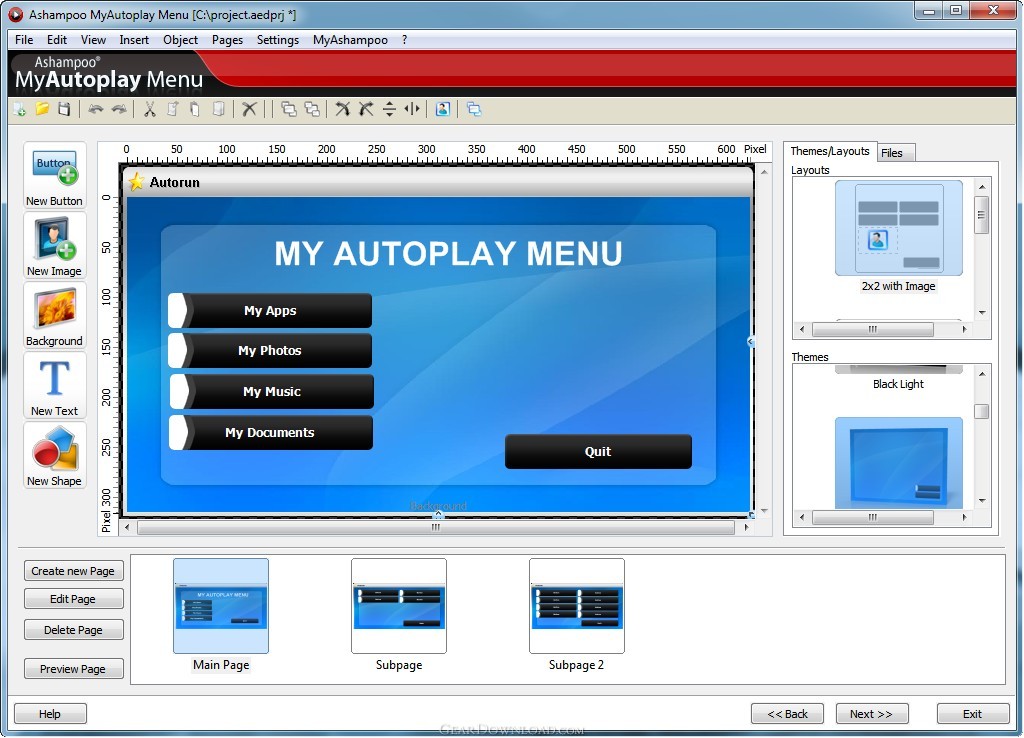 Click to enlarge screenshot
Software Description:
Ashampoo MyAutoplay Menu - Build your own Autoplay discs and thumb drives with menus
When you insert a commercial program disc it will often start automatically with a graphical menu that lets you make choices like installing a program, displaying a web page, viewing documentation or information material and so on.
Building these discs and menus manually is a lot of work and requires programming skills - and even if you have the skills it takes a long time.
Ashampoo MyAutoplay Menu takes all the work out of building Autoplay discs with a simple point-and-click interface. And it includes CD and DVD burning so that you can create your finished discs without leaving the program.
Features:
- Build your own CDs, DVDs or USB thumb drives that run on insertion - include any programs or content you want
- Create a multi-page interactive user control interface that runs as a stand-alone application or displays in a web browser
- Includes CD/DVD burning functions with Ashampoo`s advanced disc burning technology
- User-designable splash screen for automatic display
- Add background music or sounds that play once or loop while the menu is open
- Add buttons for navigation and functions (switch between menu pages, start programs, open files and folders, display web pages, send email, quit etc.)
- Advanced graphical menu editor with background images, images, buttons, geometric shapes, text, circular text (text on a curve), tables etc.
- Live preview function - test the finished menu directly with full functionality before building
- Acquire images: Load images directly from a scanner, camera, Windows clipboard, the Internet, files or other sources
- Selection of predesigned themes and button layouts for your menus, splash screens and buttons
- Animated transitions between menu screens
- Use your own icons for the program and the disc/thumb drives
Limitations: 40 Days Trial
When you insert a commercial program disc it will often start automatically with a graphical menu that lets you make choices like installing a program, displaying a web page, viewing documentation or information material and so on.
Building these discs and menus manually is a lot of work and requires programming skills - and even if you have the skills it takes a long time.
Ashampoo MyAutoplay Menu takes all the work out of building Autoplay discs with a simple point-and-click interface. And it includes CD and DVD burning so that you can create your finished discs without leaving the program.
Features:
- Build your own CDs, DVDs or USB thumb drives that run on insertion - include any programs or content you want
- Create a multi-page interactive user control interface that runs as a stand-alone application or displays in a web browser
- Includes CD/DVD burning functions with Ashampoo`s advanced disc burning technology
- User-designable splash screen for automatic display
- Add background music or sounds that play once or loop while the menu is open
- Add buttons for navigation and functions (switch between menu pages, start programs, open files and folders, display web pages, send email, quit etc.)
- Advanced graphical menu editor with background images, images, buttons, geometric shapes, text, circular text (text on a curve), tables etc.
- Live preview function - test the finished menu directly with full functionality before building
- Acquire images: Load images directly from a scanner, camera, Windows clipboard, the Internet, files or other sources
- Selection of predesigned themes and button layouts for your menus, splash screens and buttons
- Animated transitions between menu screens
- Use your own icons for the program and the disc/thumb drives
Limitations: 40 Days Trial
100% Clean:
 Ashampoo MyAutoplay Menu 1.0.5 is 100% clean
This download (ashampoo_myautoplay_menu_sm.exe) was tested thoroughly and was found 100% clean. Click "Report Spyware" link on the top if you found this software contains any form of malware, including but not limited to: spyware, viruses, trojans and backdoors.
Related Software:
- UltraISO Premium 9.5.3.2901 - Easy-to-use utility to create, edit and convert CD and DVD image files
- Music Xpert Tag Editor 2.80 - Software for audio file tags editing and organizing music collection.
- Ashampoo SeeYa! 2 2.2 - 3 easy steps to a revolutionary new way of sharing your images!
- SuperMorph Professional - Atrbosoft SuperMorph is powerful and easy-to-use morphing software
- AVI to DVD 3.0.0 - An all-in-one utility for AVI to DVD video conversion needs.
- ConceptDraw MINDMAP Professional Mac 5.4 - Business productivity software for mind-mapping, brainstorming and GTD
- Power Mixer 2.8 - Get in-depth and easily accessible volume control and audio mixing.
- WinAVI Video Converter 11.6.1.4734 - WinAVI Video Converter is a complete solution for video format conversion
- Pop MP3 Joiner 2.0 - Fast tool for joining mp3 files
- Auvisoft CD Ripper 1.50 - extracts audio data from Audio CD
top 10 most downloaded


recommended software
-
- Moyea PPT to DVD Burner Pro
- With Moyea PPT to DVD Burner Pro, you can easily convert your any PowerPoint presentations to Blu-ray/DVD movies and save them on recordable Blu-ray/D...
-
- Moyea PPT to DVD Burner Lite
- Moyea PPT to DVD Burner Lite is an easy-to-use tool in converting PowerPoint to Blu-ray/DVD and PowerPoint to Video. In converting PowerPoint to Blu-r...