Index >> Audio & Multimedia >> Audio Encoders/Decoders >> 1st Multiformat Converter and CD Ripper
Report Spyware1st Multiformat Converter and CD Ripper 5.9

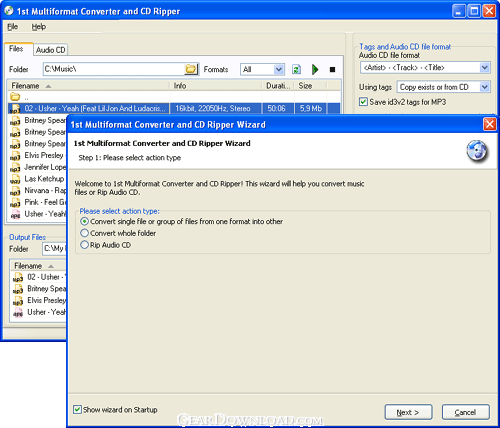 Click to enlarge screenshot
Software Description:
1st Multiformat Converter and CD Ripper - Audio CD ripper/converter supports all popular audio formats, keeps ID3Tags
1st Multiformat Converter and CD Ripper easily rips Audio CDs and converts between the most popular audio file formats: MP3, WMA, OGG, APE, FLAC, MPC, WAV. You can adjust the bit rate and frequency, get song titles from FreeDB, create a playlist after the file processing and much more.
This converter stands out among other conversion tools for the possibility of keeping all ID3Tags’ data. Usually after audio files conversion only certain fields of the ID3Tags remained. This program solves this problem; you won’t need to type in the data manually.
The program has a neat interface and is easy to use. As soon as you insert your CD into the disk drive and select this software as a program for the files processing, the program’s Wizard takes the lead. It will guide you through the conversion process: you can automatically get song titles from the internet, specify the catalogue to save the files to, select the music file format, set bit rate and frequency parameters. In this way you will get a copy of your Audio CD within several minutes with minimum effort. Then you can copy the files to your mp3 player and enjoy the music.
Some music lovers prefer collecting audio files in a certain format, for example, in MP3. The collection expands thanks to Internet downloads and the help of friends. It can be different kinds of files - OGG, FLAC, MPC, WAV, APE… You can apply 1st Multiformat Converter and CD Ripper to reduce this diversity to one common format just with a mouse click. All you need is to select the source files, set the output format and, if needed, adjust the conversion settings.
The software offers a pre-conversion mode. It enables you to get a 10-seconds converted sample to evaluate the final outcome. To make your life easier the developers have included the option of saving your favourite settings and then just using these presets for faster processing. For example, you can specify what conversion type to choose - CD quality or low quality.
What's New: Improved custom rename formats: added <Year> field. Fixed some bugs.
Limitations: 30 Days Trial
1st Multiformat Converter and CD Ripper easily rips Audio CDs and converts between the most popular audio file formats: MP3, WMA, OGG, APE, FLAC, MPC, WAV. You can adjust the bit rate and frequency, get song titles from FreeDB, create a playlist after the file processing and much more.
This converter stands out among other conversion tools for the possibility of keeping all ID3Tags’ data. Usually after audio files conversion only certain fields of the ID3Tags remained. This program solves this problem; you won’t need to type in the data manually.
The program has a neat interface and is easy to use. As soon as you insert your CD into the disk drive and select this software as a program for the files processing, the program’s Wizard takes the lead. It will guide you through the conversion process: you can automatically get song titles from the internet, specify the catalogue to save the files to, select the music file format, set bit rate and frequency parameters. In this way you will get a copy of your Audio CD within several minutes with minimum effort. Then you can copy the files to your mp3 player and enjoy the music.
Some music lovers prefer collecting audio files in a certain format, for example, in MP3. The collection expands thanks to Internet downloads and the help of friends. It can be different kinds of files - OGG, FLAC, MPC, WAV, APE… You can apply 1st Multiformat Converter and CD Ripper to reduce this diversity to one common format just with a mouse click. All you need is to select the source files, set the output format and, if needed, adjust the conversion settings.
The software offers a pre-conversion mode. It enables you to get a 10-seconds converted sample to evaluate the final outcome. To make your life easier the developers have included the option of saving your favourite settings and then just using these presets for faster processing. For example, you can specify what conversion type to choose - CD quality or low quality.
What's New: Improved custom rename formats: added <Year> field. Fixed some bugs.
Limitations: 30 Days Trial
100% Clean:
 1st Multiformat Converter and CD Ripper 5.9 is 100% clean
This download (multiformat-converter.exe) was tested thoroughly and was found 100% clean. Click "Report Spyware" link on the top if you found this software contains any form of malware, including but not limited to: spyware, viruses, trojans and backdoors.
Related Software:
- AudioAlchemy WMA Edition 2.3 - Fast, easy-to-use, configurable conversion from nearly all audio formats to WMA.
- 4Musics OGG Bitrate Changer 4.1 - Change bitrate of OGG files in one click at high speed and quality!
- Fast Audio Converter 2.5 - Fast Audio Converter - a supreme converter for the popular audio, video formats.
- WFilter Enterprise 4.1.168 - Monitor Internet activities and manage Internet behaviors.
- NoTrax 1.4 - Anonymous Browser-No Record of Internet Activity
- 4Musics WAV Bitrate Changer 4.1 - Change bitrate of WAV files in one click at high speed and quality!
- Cool CD Ripper 1.32 - easy-to-use CD ripper that rip CD into MP3, WMA, OGG, WAV
- Road Rush 1.6.0 - Road Rush - a thrilling racing arcade!
- GraFX Saver Pro 4.01 - Create and distribute screen savers using images, video, audio, and effects!
- Kazi Sound Recorder 3.50 - Record any sound that your sound card plays without losing quality.
top 10 most downloaded


recommended software
-
- Moyea PPT to DVD Burner Pro
- With Moyea PPT to DVD Burner Pro, you can easily convert your any PowerPoint presentations to Blu-ray/DVD movies and save them on recordable Blu-ray/D...
-
- Moyea PPT to DVD Burner Lite
- Moyea PPT to DVD Burner Lite is an easy-to-use tool in converting PowerPoint to Blu-ray/DVD and PowerPoint to Video. In converting PowerPoint to Blu-r...