Index >> Network & Internet >> Remote Computing >> SkyFex Remote Desktop
Report SpywareSkyFex Remote Desktop 3.4.0

 Click to enlarge screenshot
Software Description:
SkyFex Remote Desktop - SkyFex - free web based remote desktop service. Works through proxies and NAT.
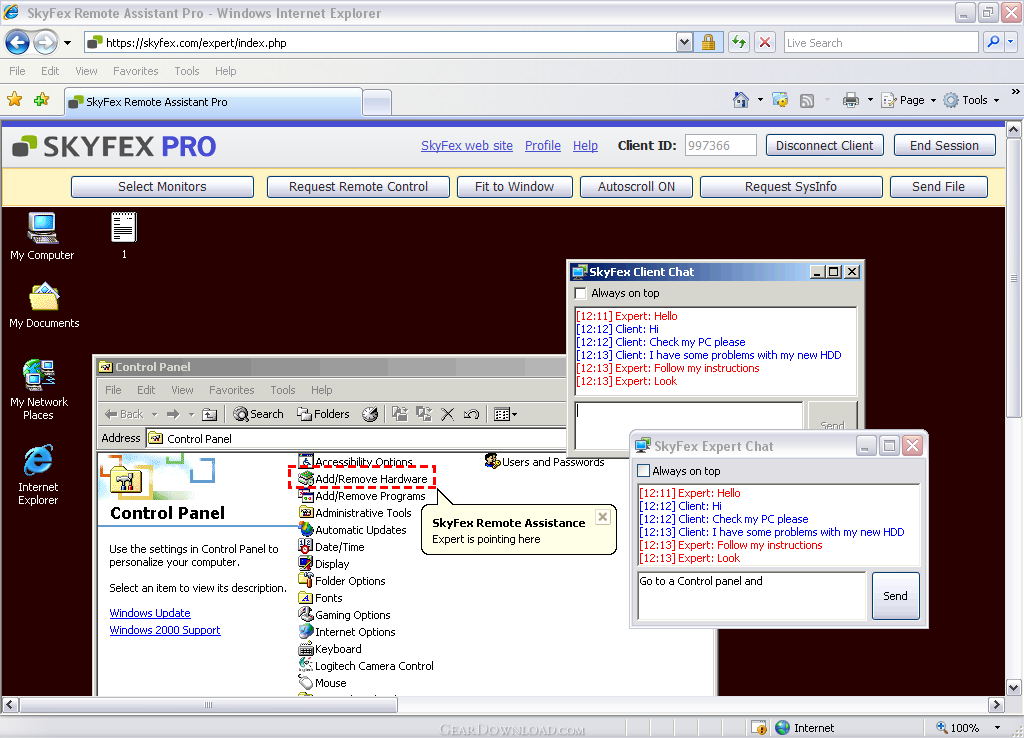
SkyFex Remote Desktop is a free online remote desktop service that allows watching and controlling remote computers in real time. It works transparently through firewalls, proxies and NAT. No special knowledge is required to use it.
SkyFex is a secure service for remote support solutions and help desks. It works directly in web browsers (Firefox, Chrome or Internet Explorer) and does not require additional software installation and configuration.
SkyFex is available as a free service, even for commercial purposes. Also, you can subscribe to SkyFex Pro to get advanced features including branding with your company logo and style, and unlimited session time.
Here is a brief list of Skyfex Remote Desktop features (full feature list is available at www.skyfex.com):
- Remote computer control via mouse and keyboard;
- Support of Firefox, Chrome and Internet Explorer (including IE version 6),
- Branding SkyFex GUI with your company's trade dress,
- SkyFex integration into your web site,
- Multiple monitors support,
- Remote reboot,
- Resuming broken connections,
- Remote computer system information retrieval,
- File transfer,
- Laser Pointer and Region Selection tools for screen annotation,
- Clipboard data exchange,
- Integrated text chat,
- Concurrent remote user logins,
- Remote key combinations support,
- Updates upon browser start,
- Deployment via Active Directory,
- Reverse screen sharing (great for online training)
- etc.
Required SkyFex components are downloaded automatically. Also, you can download them manually at http://skyfex.com/tour/downloads.php
What's New: Unattended access, remote to local printing.
SkyFex Remote Desktop is a free online remote desktop service that allows watching and controlling remote computers in real time. It works transparently through firewalls, proxies and NAT. No special knowledge is required to use it.
SkyFex is a secure service for remote support solutions and help desks. It works directly in web browsers (Firefox, Chrome or Internet Explorer) and does not require additional software installation and configuration.
SkyFex is available as a free service, even for commercial purposes. Also, you can subscribe to SkyFex Pro to get advanced features including branding with your company logo and style, and unlimited session time.
Here is a brief list of Skyfex Remote Desktop features (full feature list is available at www.skyfex.com):
- Remote computer control via mouse and keyboard;
- Support of Firefox, Chrome and Internet Explorer (including IE version 6),
- Branding SkyFex GUI with your company's trade dress,
- SkyFex integration into your web site,
- Multiple monitors support,
- Remote reboot,
- Resuming broken connections,
- Remote computer system information retrieval,
- File transfer,
- Laser Pointer and Region Selection tools for screen annotation,
- Clipboard data exchange,
- Integrated text chat,
- Concurrent remote user logins,
- Remote key combinations support,
- Updates upon browser start,
- Deployment via Active Directory,
- Reverse screen sharing (great for online training)
- etc.
Required SkyFex components are downloaded automatically. Also, you can download them manually at http://skyfex.com/tour/downloads.php
What's New: Unattended access, remote to local printing.
100% Clean:
 SkyFex Remote Desktop 3.4.0 is 100% clean
This download (skyfexua.exe) was tested thoroughly and was found 100% clean. Click "Report Spyware" link on the top if you found this software contains any form of malware, including but not limited to: spyware, viruses, trojans and backdoors.
Related Software:
- LanHelper 1.99 - Monitor, analyze, and manage a network.
- Specops Gpupdate Professional 2.1 - Remote Administration and Network Management with Specops Gpupdate Pro
- Remote Administration Tool 1.2 - Remote Administration Tool is a small free remote control software package
- iRemotePC Free 1.6 - iRemotePC - Free Remote Desktop and File Transfer Service with Remote Support
- VMN Storage 3.72.0 - Store all your digital assets on a secure, private, remote space
- 2X ApplicationServer 5.0 - Tunnel Windows apps on remote desktops, eliminate management & security issues
- Techinline Remote Desktop 2.5.1.0 - The easiest remote desktop access service that runs on a web browser.
- WebAdmin 3.3.2 - Securely manage MDaemon, RelayFax, and WorldClient from anywhere in the world.
- RDM+ 3.3.7 - Easy-to-use, reliable and secure remote access software for mobile phones.
- Anyplace Control 6.0 - Powerful and easy to use Remote Computer Control software.
top 10 most downloaded


recommended software
-
- Gear Software Manager
- Gear Software Manager is a free software version online check software. First, Gear Software Manager scans versions of all software installed in your...
-
- Gear Flash Downloader
- Gear Flash Downloader is a free handy tool to download SWF Flash files from web pages. Gear Flash Downloader is very easy to use. Simply copy and past...