Index >> Network & Internet >> Network Monitoring >> ServerObserver Network Monitor
Report SpywareServerObserver Network Monitor 4.1

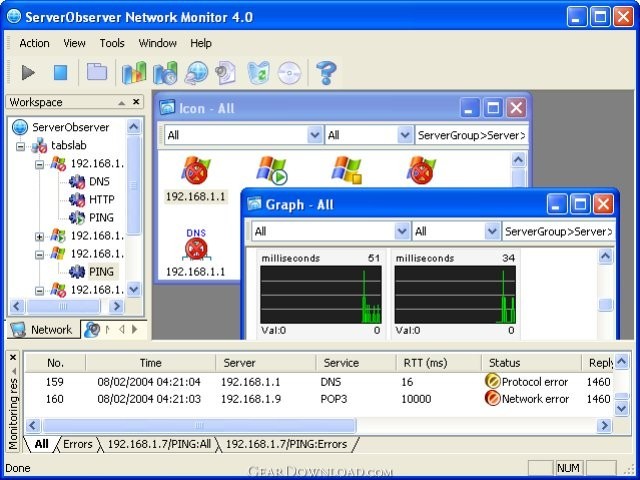 Click to enlarge screenshot
Software Description:
ServerObserver Network Monitor - Monitors various internet services, databases, Windows, and UNIX/LINUX system.
Monitoring: ServerObserver Network Monitor can monitor your servers working on any operating systems if you only inform it of your servers and your concerns. ServerObserver periodically monitors web servers(HTTP, HTTPS), mail servers(POP3, SMTP), databases(MS SQL Server, MySQL, ORACLE, Informix, Sybase), SNMP, directories(LDAP), domain name systems(DNS), file servers(FTP), and any TCP port of any server as well as inquire out a server alive (PING).
You can observe the system resources of Windows and UNIX/LINUX servers. ServerObserver investigates the CPU, Memory, Network, and Disk usage, file size and event logs. It can find whether a process is running as well.
Monitor something by running VB script file. For instance, Directory size. Whether a NT service is running? Whether a printer is up? You can write your own script file.
Notification: You can instruct the ServerObserver to inform you of notable situations (such as no response, the excess of RTT/CPU usage/disk usage, the detection of modified pages, the recovery from other notable situation) by sending an e-mail, by showing a popup window message, by performing a VB script, by executing an external application, and/or by play a sound. You can ask the ServerObserver for sending an SMS message on your cell phone.
Report: Reports come to your hand! The report wizard of ServerObserver generates daily, weekly, and monthly reports on monitoring results. You can choose the type of report among HTML text, MS Word document, and MS PowerPoint document.
View monitoring status on the web: It provides a web server that lets you view the status of your network from any web browser. You can enable/disable the web server and add/modify HTML view.
Logging: You can specify how many days old logs will be before being deleted or backup. If you want to backup, you can specify the backup directory.
Utilities : You can use the PING and SNMP utilities.
Monitoring: ServerObserver Network Monitor can monitor your servers working on any operating systems if you only inform it of your servers and your concerns. ServerObserver periodically monitors web servers(HTTP, HTTPS), mail servers(POP3, SMTP), databases(MS SQL Server, MySQL, ORACLE, Informix, Sybase), SNMP, directories(LDAP), domain name systems(DNS), file servers(FTP), and any TCP port of any server as well as inquire out a server alive (PING).
You can observe the system resources of Windows and UNIX/LINUX servers. ServerObserver investigates the CPU, Memory, Network, and Disk usage, file size and event logs. It can find whether a process is running as well.
Monitor something by running VB script file. For instance, Directory size. Whether a NT service is running? Whether a printer is up? You can write your own script file.
Notification: You can instruct the ServerObserver to inform you of notable situations (such as no response, the excess of RTT/CPU usage/disk usage, the detection of modified pages, the recovery from other notable situation) by sending an e-mail, by showing a popup window message, by performing a VB script, by executing an external application, and/or by play a sound. You can ask the ServerObserver for sending an SMS message on your cell phone.
Report: Reports come to your hand! The report wizard of ServerObserver generates daily, weekly, and monthly reports on monitoring results. You can choose the type of report among HTML text, MS Word document, and MS PowerPoint document.
View monitoring status on the web: It provides a web server that lets you view the status of your network from any web browser. You can enable/disable the web server and add/modify HTML view.
Logging: You can specify how many days old logs will be before being deleted or backup. If you want to backup, you can specify the backup directory.
Utilities : You can use the PING and SNMP utilities.
100% Clean:
 ServerObserver Network Monitor 4.1 is 100% clean
This download (observer41.exe) was tested thoroughly and was found 100% clean. Click "Report Spyware" link on the top if you found this software contains any form of malware, including but not limited to: spyware, viruses, trojans and backdoors.
Related Software:
- PromiScan 3.0 - Global standard network sniffing detection software
- Advanced Administrative Tools 5.92 - Network Diagnostic Software - detect open ports, audit your network security
- TimelyWeb 4.2a - Be notified about any web page update with TimelyWeb.
- Network Configuration Management 4.77 - Switch between network configurations, monitor network bandwidth and ports, etc.
- Alchemy Eye PRO 11.5.5 - Server (TCP/IP, ICMP, IPX/SPX, Oracle, MS SQL, NT EventLog) monitoring tool
- URL Helper 3.45 - URL Helper provide a one-step solution to finding the URLs for all streams.
- Advanced Host Monitor 9.58 - Award-winning network monitoring software
- Alchemy Eye 11.5.5 - Server (TCP/IP, ICMP, IPX/SPX, Oracle, MS SQL, NT EventLog) monitoring tool
- NetDog Internet Filter V3.0.1 - NetDog Internet Filter,Block Porn easily!Anti porn,Porn filter
- MING Chat Monitor 3.5 - Monitor and record AOL, MSN, Yahoo, FacebookIM and ICQ conversations on your LAN
top 10 most downloaded


recommended software
-
- Gear Software Manager
- Gear Software Manager is a free software version online check software. First, Gear Software Manager scans versions of all software installed in your...
-
- Gear Flash Downloader
- Gear Flash Downloader is a free handy tool to download SWF Flash files from web pages. Gear Flash Downloader is very easy to use. Simply copy and past...