Index >> Network & Internet >> Network Monitoring >> Proc Net Monitor
Report SpywareProc Net Monitor 4.1

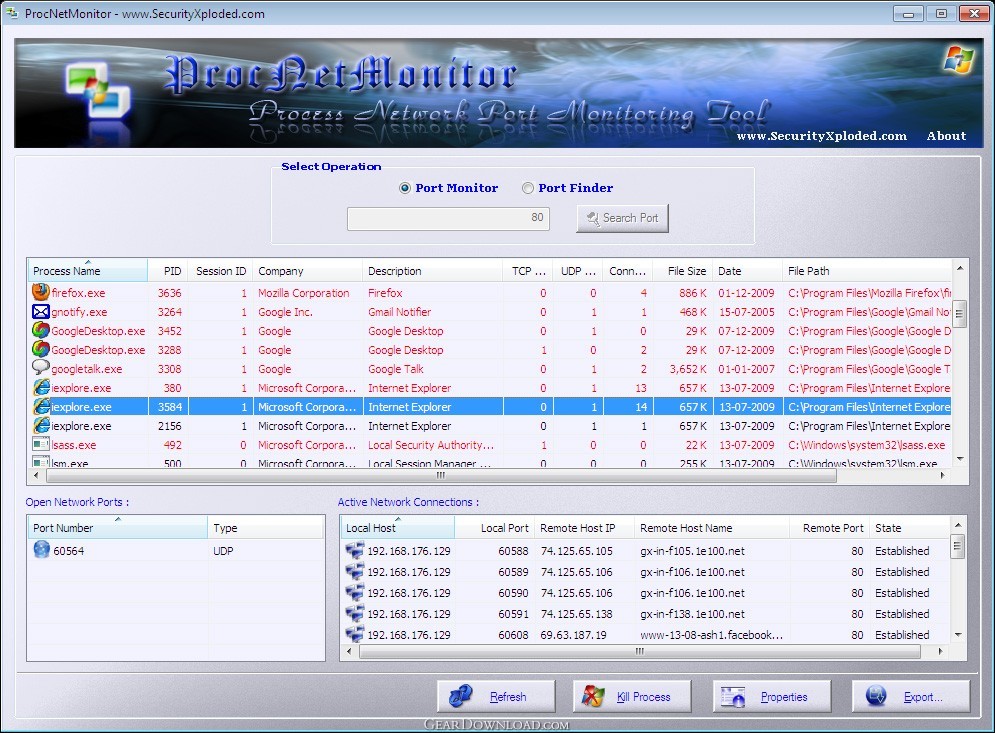 Click to enlarge screenshot
Software Description:
Proc Net Monitor - Process Network Port Monitoring Tool
Proc Net Monitor is the FREE software to monitor the Network activity of all running Process in the system.
Here are the Top Features,
* Detailed Network Activity of Process: Displays all network bound processes and all (TCP/UDP) ports/connections opened by selected Process.
* Unique 'Port Search' feature: Find processes which are using specified port like 80.
* Online Malicious Process Verification: Scan suspicious Processes using online services such as VirusTotal, ProcessLibrary and Google.
* Color based Representation: Displays network oriented processes in Red color for quick identification.
* Sort Feature: Arrange the listed Processes based on name, pid, path, company, tcp/udp count, net connections etc
* Right Click Menu: Makes it easy to quickly Kill Process, View Properties, Online Scan etc.
* Detailed Report: Generate complete report in HTML/XML format.
* Portable: You can easily run it directly without installation.
* Installer: It also comes with Installer to help you in local Installation & Un-installation.
All these features combined together makes it one of the effective tool in combating the Trojans and Spywares from your system.
Platform: Windows, XP, 2k3, 2k8, Vista, Windows7, Windows 8
What's New: Fixed the problem with screen refresh. Support for Windows 8.
Proc Net Monitor is the FREE software to monitor the Network activity of all running Process in the system.
Here are the Top Features,
* Detailed Network Activity of Process: Displays all network bound processes and all (TCP/UDP) ports/connections opened by selected Process.
* Unique 'Port Search' feature: Find processes which are using specified port like 80.
* Online Malicious Process Verification: Scan suspicious Processes using online services such as VirusTotal, ProcessLibrary and Google.
* Color based Representation: Displays network oriented processes in Red color for quick identification.
* Sort Feature: Arrange the listed Processes based on name, pid, path, company, tcp/udp count, net connections etc
* Right Click Menu: Makes it easy to quickly Kill Process, View Properties, Online Scan etc.
* Detailed Report: Generate complete report in HTML/XML format.
* Portable: You can easily run it directly without installation.
* Installer: It also comes with Installer to help you in local Installation & Un-installation.
All these features combined together makes it one of the effective tool in combating the Trojans and Spywares from your system.
Platform: Windows, XP, 2k3, 2k8, Vista, Windows7, Windows 8
What's New: Fixed the problem with screen refresh. Support for Windows 8.
Feature List:
- Informative running process list with TCP/UDP/connection count displayed per process
- Unique 'Port Finder' feature to search for network port in all running processes
- Advanced color based auto analysis system makes it easy to separate out network based process from others with just one glance
- AutoRefresh feature to automatically update the process network parameters on selection
- Faster remote host name resolution using multi thread based approach
- Display open network ports (TCP/UDP) and active network connections for selected process
- Sort the process list based on various parameters such as process name, process id, TCP count, UDP count, connection count etc
- Option to terminate the selected process
- Export feature to save the entire displayed list to standard HTML file for offline analysis
- Refresh option to manually refresh the process and network port/connections list
100% Clean:
 Proc Net Monitor 4.1 is 100% clean
This download was tested thoroughly and was found 100% clean. Click "Report Spyware" link on the top if you found this software contains any form of malware, including but not limited to: spyware, viruses, trojans and backdoors.
Related Software:
- PromiScan 3.0 - Global standard network sniffing detection software
- Advanced Administrative Tools 5.92 - Network Diagnostic Software - detect open ports, audit your network security
- TimelyWeb 4.2a - Be notified about any web page update with TimelyWeb.
- Network Configuration Management 4.77 - Switch between network configurations, monitor network bandwidth and ports, etc.
- Alchemy Eye PRO 11.5.5 - Server (TCP/IP, ICMP, IPX/SPX, Oracle, MS SQL, NT EventLog) monitoring tool
- URL Helper 3.45 - URL Helper provide a one-step solution to finding the URLs for all streams.
- Advanced Host Monitor 9.58 - Award-winning network monitoring software
- Alchemy Eye 11.5.5 - Server (TCP/IP, ICMP, IPX/SPX, Oracle, MS SQL, NT EventLog) monitoring tool
- NetDog Internet Filter V3.0.1 - NetDog Internet Filter,Block Porn easily!Anti porn,Porn filter
- MING Chat Monitor 3.5 - Monitor and record AOL, MSN, Yahoo, FacebookIM and ICQ conversations on your LAN
top 10 most downloaded


recommended software
-
- Gear Software Manager
- Gear Software Manager is a free software version online check software. First, Gear Software Manager scans versions of all software installed in your...
-
- Gear Flash Downloader
- Gear Flash Downloader is a free handy tool to download SWF Flash files from web pages. Gear Flash Downloader is very easy to use. Simply copy and past...