Index >> Network & Internet >> Remote Computing >> OnlineVNC Server
Report SpywareOnlineVNC Server 3.0

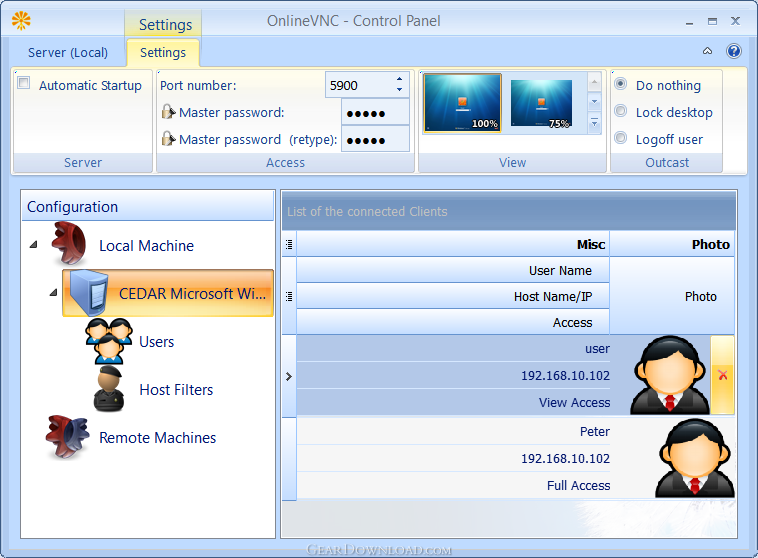 Click to enlarge screenshot
Software Description:
OnlineVNC Server is a VNC with Web access and FTP-based File Transfer
OnlineVNC Server is a quality and easy-to-use program that allows you to control your desktop from Web-Browser in Windows, Linux or MacOSX. It's supports embeded FTP Server inside for File Sharing.
Viewer for the server uses Web-Browser technology and requires no installation at all. With this solution you can use your desktop from anywhere - from home, from work, from internet cafes, hotels, everywhere where there is internet and a web browser.
OnlineVNC server is 100% compatible with RFB protocol. So you can get access to the server using third-party VNC viewer.
OnlineVNC server has a built-in account manager and filtering mechanism for incoming traffic. You can restrict access for the users and give access to view, keyboard or mouse separately.
With the server control panel, you can view list of connected users and if necessary block them.
A unique feature of OnlineVNC server is the ability to scale the remote desktop picture on the server side.
This allows you to optimize traffic and work on slow network channels.
OnlineVNC Server is a product of very high quality. It can support an unlimited number of incoming customers without losing a quality of transmitted desktop's images.
This makes the product an indispensable tool for creation of remote conferencing or for presentation of the capabilities of your software directly from your corporate website (this is true, for this purpose we offer a special program to integrate our OnlineVNC Flash Viewer directly into your site).
OnlineVNC Server is well-established for use in modern OSes - Windows 7 (Seven) and Windows Vista.
It does not have issue with the processing of SAS commands such as Ctrl+Alt+Del or Ctrl+Esc.
This allows you to perform LogOff, Lock and other commands without breaking the client's connection.
As you can see, OnlineVNC Server deserves at least to try to start using it.
And if you will like, you are welcome, OnlineVNC server absolutely free.
What's New: Added virtual desktop manager support. Ported to multi-threaded architecture. Known bugs were fixed.
TAGS: Connection, FTP Server, File Sharing
OnlineVNC Server is a quality and easy-to-use program that allows you to control your desktop from Web-Browser in Windows, Linux or MacOSX. It's supports embeded FTP Server inside for File Sharing.
Viewer for the server uses Web-Browser technology and requires no installation at all. With this solution you can use your desktop from anywhere - from home, from work, from internet cafes, hotels, everywhere where there is internet and a web browser.
OnlineVNC server is 100% compatible with RFB protocol. So you can get access to the server using third-party VNC viewer.
OnlineVNC server has a built-in account manager and filtering mechanism for incoming traffic. You can restrict access for the users and give access to view, keyboard or mouse separately.
With the server control panel, you can view list of connected users and if necessary block them.
A unique feature of OnlineVNC server is the ability to scale the remote desktop picture on the server side.
This allows you to optimize traffic and work on slow network channels.
OnlineVNC Server is a product of very high quality. It can support an unlimited number of incoming customers without losing a quality of transmitted desktop's images.
This makes the product an indispensable tool for creation of remote conferencing or for presentation of the capabilities of your software directly from your corporate website (this is true, for this purpose we offer a special program to integrate our OnlineVNC Flash Viewer directly into your site).
OnlineVNC Server is well-established for use in modern OSes - Windows 7 (Seven) and Windows Vista.
It does not have issue with the processing of SAS commands such as Ctrl+Alt+Del or Ctrl+Esc.
This allows you to perform LogOff, Lock and other commands without breaking the client's connection.
As you can see, OnlineVNC Server deserves at least to try to start using it.
And if you will like, you are welcome, OnlineVNC server absolutely free.
What's New: Added virtual desktop manager support. Ported to multi-threaded architecture. Known bugs were fixed.
TAGS: Connection, FTP Server, File Sharing
100% Clean:
 OnlineVNC Server 3.0 is 100% clean
This download (OnlineVNCServer3.0_x86.exe) was tested thoroughly and was found 100% clean. Click "Report Spyware" link on the top if you found this software contains any form of malware, including but not limited to: spyware, viruses, trojans and backdoors.
Related Software:
- LanHelper 1.99 - Monitor, analyze, and manage a network.
- Specops Gpupdate Professional 2.1 - Remote Administration and Network Management with Specops Gpupdate Pro
- Remote Administration Tool 1.2 - Remote Administration Tool is a small free remote control software package
- iRemotePC Free 1.6 - iRemotePC - Free Remote Desktop and File Transfer Service with Remote Support
- VMN Storage 3.72.0 - Store all your digital assets on a secure, private, remote space
- 2X ApplicationServer 5.0 - Tunnel Windows apps on remote desktops, eliminate management & security issues
- Techinline Remote Desktop 2.5.1.0 - The easiest remote desktop access service that runs on a web browser.
- WebAdmin 3.3.2 - Securely manage MDaemon, RelayFax, and WorldClient from anywhere in the world.
- RDM+ 3.3.7 - Easy-to-use, reliable and secure remote access software for mobile phones.
- Anyplace Control 6.0 - Powerful and easy to use Remote Computer Control software.
top 10 most downloaded


recommended software
-
- Gear Software Manager
- Gear Software Manager is a free software version online check software. First, Gear Software Manager scans versions of all software installed in your...
-
- Gear Flash Downloader
- Gear Flash Downloader is a free handy tool to download SWF Flash files from web pages. Gear Flash Downloader is very easy to use. Simply copy and past...