Index >> Network & Internet >> Network Monitoring >> IP Traffic Monitor
Report SpywareIP Traffic Monitor 3.3

 Click to enlarge screenshot
Software Description:
IP Traffic Monitor - Monitor all your network connections in real-time or browse historical reports.
There are many reasons why you may want to monitor your Internet traffic flows. I'll point out only a few of the most popular reasons. No anti-virus can guarantee you 100% protection from Trojan Horses and malicious spyware or adware programs. Some of them are highly customized and checking against anti-virus databases does nothing. They also slow down your Internet connection. Needless to say that identity theft or using your computer as a peer-to-peer network hub for pirated software, music and video downloads without you even knowing about this may certainly have unwanted consequences. If you share your computer with family members or you administer computers in your office, knowing the Internet traffic details becomes essential. Network load balance, security reasons and more...
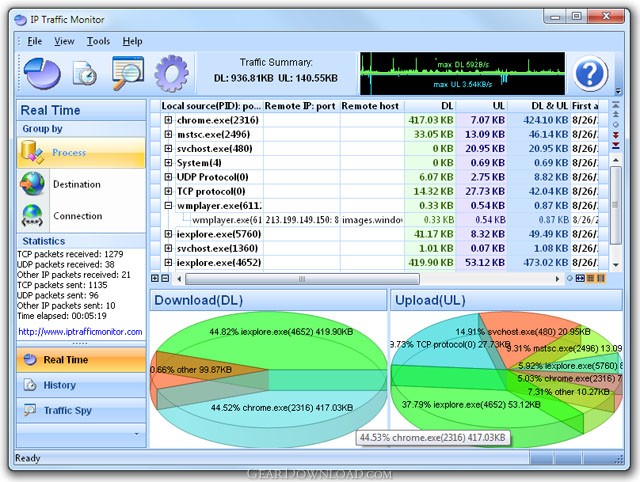
Recently I've come across a wonderful utility that serves just this purpose. IP Traffic Monitor sits in your system tray and monitors all your network connections. You can either monitor the active connections in real-time or browse historical logs. The program shows extensive information about each connection: remote host IP, remote host name (if available), amounts of incoming and outgoing traffic through this connection, timestamps of the first and last activity of this connection, name of the process that initiated or accepted this connection, full path to the application the process belongs to, etc. The traffic summary indicator shows an upload and download speed graph and traffic totals. In addition it draws pie chart diagrams that illustrate the percentage of certain hosts in the total incoming and outgoing traffic.
It would be naive to expect packet sniffer functionality from a $19.95 utility. Yet, IP Traffic Monitor includes a full-featured sniffer. You can easily capture and analyze TCP packets. Captured packets can be saved to a log file or analyzed in place. For example, you can analyze HTTP requests including passwords and other data that is sent to servers from your PC.
What's New: Traffic Spy added Traffic Bar added
Limitations: Demo version
There are many reasons why you may want to monitor your Internet traffic flows. I'll point out only a few of the most popular reasons. No anti-virus can guarantee you 100% protection from Trojan Horses and malicious spyware or adware programs. Some of them are highly customized and checking against anti-virus databases does nothing. They also slow down your Internet connection. Needless to say that identity theft or using your computer as a peer-to-peer network hub for pirated software, music and video downloads without you even knowing about this may certainly have unwanted consequences. If you share your computer with family members or you administer computers in your office, knowing the Internet traffic details becomes essential. Network load balance, security reasons and more...
Recently I've come across a wonderful utility that serves just this purpose. IP Traffic Monitor sits in your system tray and monitors all your network connections. You can either monitor the active connections in real-time or browse historical logs. The program shows extensive information about each connection: remote host IP, remote host name (if available), amounts of incoming and outgoing traffic through this connection, timestamps of the first and last activity of this connection, name of the process that initiated or accepted this connection, full path to the application the process belongs to, etc. The traffic summary indicator shows an upload and download speed graph and traffic totals. In addition it draws pie chart diagrams that illustrate the percentage of certain hosts in the total incoming and outgoing traffic.
It would be naive to expect packet sniffer functionality from a $19.95 utility. Yet, IP Traffic Monitor includes a full-featured sniffer. You can easily capture and analyze TCP packets. Captured packets can be saved to a log file or analyzed in place. For example, you can analyze HTTP requests including passwords and other data that is sent to servers from your PC.
What's New: Traffic Spy added Traffic Bar added
Limitations: Demo version
Feature List:
- Monitors IP traffic in real-time
- Save traffic logs
- Displays network activity also as graphic
100% Clean:
 IP Traffic Monitor 3.3 is 100% clean
This download (TraffMonSetup.exe) was tested thoroughly and was found 100% clean. Click "Report Spyware" link on the top if you found this software contains any form of malware, including but not limited to: spyware, viruses, trojans and backdoors.
Related Software:
- AuCalc 1.5 - Money Personal Analytics.
- SessionsMonitor 2.1 - Monitors current active sessions on your computer
- PromiScan 3.0 - Global standard network sniffing detection software
- Advanced Administrative Tools 5.92 - Network Diagnostic Software - detect open ports, audit your network security
- TimelyWeb 4.2a - Be notified about any web page update with TimelyWeb.
- Network Configuration Management 4.77 - Switch between network configurations, monitor network bandwidth and ports, etc.
- Alchemy Eye PRO 11.5.5 - Server (TCP/IP, ICMP, IPX/SPX, Oracle, MS SQL, NT EventLog) monitoring tool
- URL Helper 3.45 - URL Helper provide a one-step solution to finding the URLs for all streams.
- Advanced Host Monitor 9.58 - Award-winning network monitoring software
- Alchemy Eye 11.5.5 - Server (TCP/IP, ICMP, IPX/SPX, Oracle, MS SQL, NT EventLog) monitoring tool
top 10 most downloaded


recommended software
-
- Gear Software Manager
- Gear Software Manager is a free software version online check software. First, Gear Software Manager scans versions of all software installed in your...
-
- Gear Flash Downloader
- Gear Flash Downloader is a free handy tool to download SWF Flash files from web pages. Gear Flash Downloader is very easy to use. Simply copy and past...