Index >> Network & Internet >> Browser Tools >> Flash and Media Capture
Report SpywareFlash and Media Capture 2.0 SR2

 Click to enlarge screenshot
Software Description:
Flash and Media Capture - Saves all images, video and Flash applets from a page to the folder you want.
Flash and Media Capture is a Windows plugin application for MS Internet Explorer. It adds a nice toolbar that allows you to save all images and Flash applets from a page to the folder you want.
This tool is great for making collections of images on your disk from online photo albums, image forums and desktop wallpaper sites.
It also allows you to automatically save images (all or above certain dimensions) and Flash to the folder you want. For example, you may browse a picture gallery and have all photos you see to be kept in a folder on your hard disk. If you want to save YouTube, Google, MySpace or another online video (FLV
format,) please visit the page with the video, wait until it loads in the
page and then click the Flash and Media Capture button on its toolbar.
AutoSave will also work with such pages.
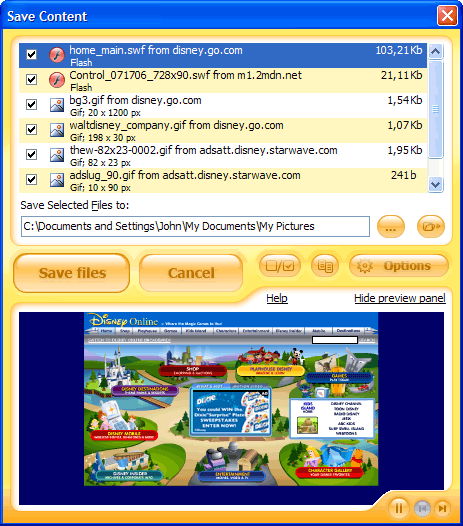
There is a dialog window included that shows all images and Flash files on the page. Preview and selective save is possible.
What's New: Improved support for Youtube video
Limitations: 30 Days Trial
Flash and Media Capture is a Windows plugin application for MS Internet Explorer. It adds a nice toolbar that allows you to save all images and Flash applets from a page to the folder you want.
This tool is great for making collections of images on your disk from online photo albums, image forums and desktop wallpaper sites.
It also allows you to automatically save images (all or above certain dimensions) and Flash to the folder you want. For example, you may browse a picture gallery and have all photos you see to be kept in a folder on your hard disk. If you want to save YouTube, Google, MySpace or another online video (FLV
format,) please visit the page with the video, wait until it loads in the
page and then click the Flash and Media Capture button on its toolbar.
AutoSave will also work with such pages.
There is a dialog window included that shows all images and Flash files on the page. Preview and selective save is possible.
What's New: Improved support for Youtube video
Limitations: 30 Days Trial
100% Clean:
 Flash and Media Capture 2.0 SR2 is 100% clean
This download (fmsetup.exe) was tested thoroughly and was found 100% clean. Click "Report Spyware" link on the top if you found this software contains any form of malware, including but not limited to: spyware, viruses, trojans and backdoors.
Related Software:
- MetaProducts Offline Browser 1.1 - Extremely simple offline browser - just one click to download a site!
- ! - Webm8 4 Release - All in one - bookmark, password and form-filling program.
- Web Resources PS 3.0 - Organize your internet surfing and websites with Web Resources PS.
- #1 Smart PopUp Stopper Pro 3.13 - Stops all annoying popups. Blocks banner ads. Easy to use - Self configurable.
- IE Guardian 7.0.0 - Customize and protect your IE settings against malicious changes.
- #1 Smart PopUp Blocker 3.2 - Stops all annoying popups. Blocks banner ads. Easy to use - Self configurable.
- Webm8 7.53.18 - Webm8 fills Internet forms and log on screens in a flash
- AEVITA Save Flash 1.5 - AEVITA Save Flash lets you easily save flash movies right from Internet Explorer
- Link Commander Lite 4.6.4.1158 - Keep all your bookmarks in the same browser-independent collection!
- IE Catcher 1.3 - Allow you saving web page as image with one click.
top 10 most downloaded


recommended software
-
- Gear Software Manager
- Gear Software Manager is a free software version online check software. First, Gear Software Manager scans versions of all software installed in your...
-
- Gear Flash Downloader
- Gear Flash Downloader is a free handy tool to download SWF Flash files from web pages. Gear Flash Downloader is very easy to use. Simply copy and past...