Index >> Network & Internet >> Browser Tools >> Firemin
Report SpywareFiremin 2.0.8.2083

 Click to enlarge screenshot
Software Description:
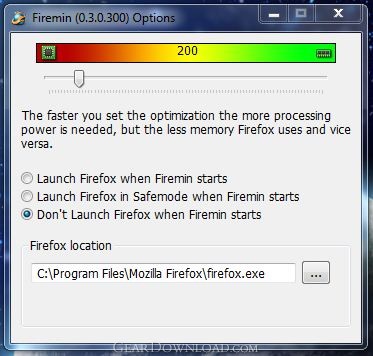
Firemin tames the fox and eliminate all memory leaks in Firefox.
One of the biggest 'improvements' that Mozilla claims is the Firefox memory usage, in particular, the vanquishing of memory leaks. If you thought it was too good to be true you were right. Firefox still uses a lot of memory - way too much memory for a web browser.
We like keeping our browser windows open for a few days and because of this, Firefox was using over 800MB of memory after about 3 days. It's quite normal for Firefox to be sucking up 100MB of memory right off the bat. In a memory leak you'll see the memory usage keep increasing the longer the browser is open/in-use and this is exactly what happens with Firefox.
Rather than complain about it, we decided to fix it. Enter Firemin; simply put, it will eliminate all memory leaks in Firefox. All we did was tweaked our memory booster core a little and applied it to Firefox (including most extensions) and all the memory leaks was gone. To use Firemin; you will need to unzip Firemin.zip, double click on Firemin.exe and let it babysit Firefox. If you expected it to be more complicated, we are truly sorry to disappoint you.
What's New: Bug fixes and cosmetic changes.
One of the biggest 'improvements' that Mozilla claims is the Firefox memory usage, in particular, the vanquishing of memory leaks. If you thought it was too good to be true you were right. Firefox still uses a lot of memory - way too much memory for a web browser.
We like keeping our browser windows open for a few days and because of this, Firefox was using over 800MB of memory after about 3 days. It's quite normal for Firefox to be sucking up 100MB of memory right off the bat. In a memory leak you'll see the memory usage keep increasing the longer the browser is open/in-use and this is exactly what happens with Firefox.
Rather than complain about it, we decided to fix it. Enter Firemin; simply put, it will eliminate all memory leaks in Firefox. All we did was tweaked our memory booster core a little and applied it to Firefox (including most extensions) and all the memory leaks was gone. To use Firemin; you will need to unzip Firemin.zip, double click on Firemin.exe and let it babysit Firefox. If you expected it to be more complicated, we are truly sorry to disappoint you.
What's New: Bug fixes and cosmetic changes.
100% Clean:
 Firemin 2.0.8.2083 is 100% clean
This download was tested thoroughly and was found 100% clean. Click "Report Spyware" link on the top if you found this software contains any form of malware, including but not limited to: spyware, viruses, trojans and backdoors.
Related Software:
- ! - Webm8 4 Release - All in one - bookmark, password and form-filling program.
- Web Resources PS 3.0 - Organize your internet surfing and websites with Web Resources PS.
- #1 Smart PopUp Stopper Pro 3.13 - Stops all annoying popups. Blocks banner ads. Easy to use - Self configurable.
- IE Guardian 7.0.0 - Customize and protect your IE settings against malicious changes.
- #1 Smart PopUp Blocker 3.2 - Stops all annoying popups. Blocks banner ads. Easy to use - Self configurable.
- Webm8 7.53.18 - Webm8 fills Internet forms and log on screens in a flash
- AEVITA Save Flash 1.5 - AEVITA Save Flash lets you easily save flash movies right from Internet Explorer
- Link Commander Lite 4.6.4.1158 - Keep all your bookmarks in the same browser-independent collection!
- IE Catcher 1.3 - Allow you saving web page as image with one click.
- IE Assistant 2.3 - Save web as img, IE sweeper, Save Flash to local disk with one click.
top 10 most downloaded


recommended software
-
- Gear Software Manager
- Gear Software Manager is a free software version online check software. First, Gear Software Manager scans versions of all software installed in your...
-
- Gear Flash Downloader
- Gear Flash Downloader is a free handy tool to download SWF Flash files from web pages. Gear Flash Downloader is very easy to use. Simply copy and past...