Index >> Network & Internet >> Network Monitoring >> Chroniker for Availability Monitoring
Report SpywareChroniker for Availability Monitoring 6.0

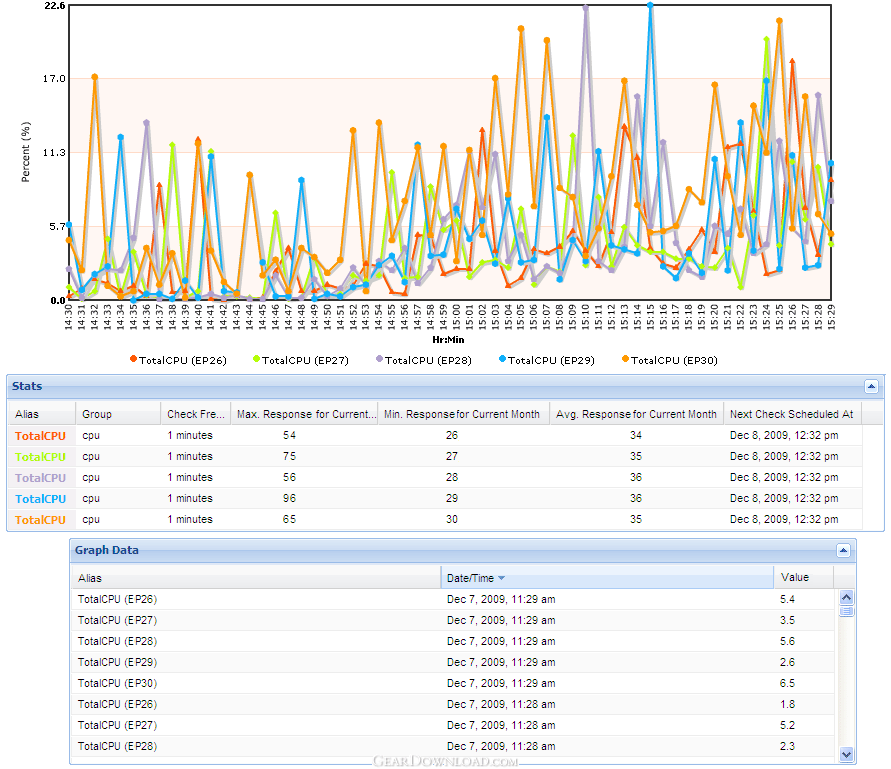 Click to enlarge screenshot
Software Description:
Chroniker for Availability Monitoring - Availability and Response Time monitoring of Network Components and User Defined
What Chroniker for Availability Monitors
NodeWatch gives you complete view on the availability of your environment, Ping Check Routers, Switches, and other vital network components.
Monitor Servers or any TCP Connect based application
DNS, FTP, Web servers, Mail servers, and Application servers monitoring
TaskWatch monitors response time of your applications by executing user defined tasks. That is, it monitors availability from the application layer perspective.
Database, FTP, Webserver, Advanced Webserver, DNS, Mail Server, LDAP Server, Network File Copy, Active Directory, and Custom Test
Features and Capabilities
Network Status Map: Quickly see a graphical display of your nodes and displays alert
message as the mouse moves over the node. (NodeWatch Only)
Dependencies- Apply dependencies to your nodes as needed and be alerted if a router goes down, without receiving multiple alerts from the other nodes affected by it.
Side Watch- Small Window that gives an overview
Ready-made Reports
Predefined essential reports in real time: Top N, Service Level, Agreement (SLA)
Daily / Monthly / Yearly Report, Node Alert Details, and Event List
Historical reports: pull up reports for any date
Email reports: share with managers or colleagues
Export report data to MS Excel
Grouping -Easily classify nodes into groups with common attributes for easier management
Profiles - Create monitoring window profiles e.g.: "business hours","weekends"
Exclude maintenance / blackout periods
Quickly assign profiles to monitoring groups
User Management
Grant read write access to different users for security purposes
Graphing
Zoom from minute to monthly scale
Summary statistics
Choose line or bar graph style
Alerts / Reactions
Numerical paging, Email, SNMP trap, and custom scripts
Set alarm thresholds, persistence conditions and two reactions per alert
Four alert levels: Down, Error, Warning, Information
Email can include up to 8 alert variables
What's New: Log Monitoring, Custom Scripts, Program Name
Limitations: 14 Days Trial
What Chroniker for Availability Monitors
NodeWatch gives you complete view on the availability of your environment, Ping Check Routers, Switches, and other vital network components.
Monitor Servers or any TCP Connect based application
DNS, FTP, Web servers, Mail servers, and Application servers monitoring
TaskWatch monitors response time of your applications by executing user defined tasks. That is, it monitors availability from the application layer perspective.
Database, FTP, Webserver, Advanced Webserver, DNS, Mail Server, LDAP Server, Network File Copy, Active Directory, and Custom Test
Features and Capabilities
Network Status Map: Quickly see a graphical display of your nodes and displays alert
message as the mouse moves over the node. (NodeWatch Only)
Dependencies- Apply dependencies to your nodes as needed and be alerted if a router goes down, without receiving multiple alerts from the other nodes affected by it.
Side Watch- Small Window that gives an overview
Ready-made Reports
Predefined essential reports in real time: Top N, Service Level, Agreement (SLA)
Daily / Monthly / Yearly Report, Node Alert Details, and Event List
Historical reports: pull up reports for any date
Email reports: share with managers or colleagues
Export report data to MS Excel
Grouping -Easily classify nodes into groups with common attributes for easier management
Profiles - Create monitoring window profiles e.g.: "business hours","weekends"
Exclude maintenance / blackout periods
Quickly assign profiles to monitoring groups
User Management
Grant read write access to different users for security purposes
Graphing
Zoom from minute to monthly scale
Summary statistics
Choose line or bar graph style
Alerts / Reactions
Numerical paging, Email, SNMP trap, and custom scripts
Set alarm thresholds, persistence conditions and two reactions per alert
Four alert levels: Down, Error, Warning, Information
Email can include up to 8 alert variables
What's New: Log Monitoring, Custom Scripts, Program Name
Limitations: 14 Days Trial
Feature List:
- Consolidate all log files (Windows Event Logs, Custom Logs, Application Logs) from different servers
- Understand the behavior of your application by looking at frequency and trends of log messages
- Choose your view: by Type, by Application, by Location, etc
- Be alerted when key events you specify appear on your log files
- Pre-made templates for Analysis Reports which include
- Daily Messages by Filter Type
- Messages by Filter Name for Last 7 Days and for current year
- Daily/Monthly/Yearly Messages by Finter Name, by Facility, and by Agent
- LogWatch Alerts Details Report
- See at a glance which locations are experiencing slow response time
- Define events and reactions for each location
- Drill down to the root cause
- New Task: URL Sequence Test
- Monitor your critical business transactions that span over multiple web pages
- Pass variables between the pages and get a complete response time of the whole sequence
- Allows you to execute a test immedialty without having to wait until the next monitoring check scheduled
- Web Server and Advanced Web Server Tests
- Fetch All feature was added to these tests to allow you to get a complete response time of the web page including all the images, css and js files, etc
- This test now gives you the flexibility to specify your own SMTP port if you are not using the default one
- You can now define nodes, tasks, systems, and snmp objects from BizWatch and they will be also added in the apropriate module that will be monitoring them
- With one click, Chroniker will create one panel per IP/Hostname being monitored on other Chroniker modules and group the different port, services, metrics, etc. specific to that IP or hostname under that panel
- The auto-initialize feature can also get LogWatch Facilities groups with other objects monitored
100% Clean:
 Chroniker for Availability Monitoring 6.0 is 100% clean
This download (CE_AM_Setup.zip) was tested thoroughly and was found 100% clean. Click "Report Spyware" link on the top if you found this software contains any form of malware, including but not limited to: spyware, viruses, trojans and backdoors.
Related Software:
- PromiScan 3.0 - Global standard network sniffing detection software
- Advanced Administrative Tools 5.92 - Network Diagnostic Software - detect open ports, audit your network security
- TimelyWeb 4.2a - Be notified about any web page update with TimelyWeb.
- Network Configuration Management 4.77 - Switch between network configurations, monitor network bandwidth and ports, etc.
- Alchemy Eye PRO 11.5.5 - Server (TCP/IP, ICMP, IPX/SPX, Oracle, MS SQL, NT EventLog) monitoring tool
- URL Helper 3.45 - URL Helper provide a one-step solution to finding the URLs for all streams.
- Advanced Host Monitor 9.58 - Award-winning network monitoring software
- Alchemy Eye 11.5.5 - Server (TCP/IP, ICMP, IPX/SPX, Oracle, MS SQL, NT EventLog) monitoring tool
- NetDog Internet Filter V3.0.1 - NetDog Internet Filter,Block Porn easily!Anti porn,Porn filter
- MING Chat Monitor 3.5 - Monitor and record AOL, MSN, Yahoo, FacebookIM and ICQ conversations on your LAN
top 10 most downloaded


recommended software
-
- Gear Software Manager
- Gear Software Manager is a free software version online check software. First, Gear Software Manager scans versions of all software installed in your...
-
- Gear Flash Downloader
- Gear Flash Downloader is a free handy tool to download SWF Flash files from web pages. Gear Flash Downloader is very easy to use. Simply copy and past...