Index >> Network & Internet >> Browsers >> CoolNovo
Report SpywareCoolNovo 2.0.0.4

Software Description:
CoolNovo(Previous ChromePlus) browser is the enhanced Google Chrome browser
CoolNovo(Previous ChromePlus) browser is the enhanced Google Chrome browser. Surf the web much easier.
Long description:
CoolNovo is Google Chrome with some welcomed features, its previous name was ChromePlus, which was well-known.
CoolNovo has all the functionalities that Google Chrome has, such as Speed, Security, Chrome Web Store, Google Sync, and so on. Besides, CoolNovo added some enhanced useful features such as Privacy protection, Mouse gesture, IE tab, Adblock, Super drag, Download tools support, bottom toolbar, etc. Below is the list:
1. Privacy protection
When the browser closed, the selected browsing data would be cleared automatically(not selected by default). You can go to OptionsàPrivacy DataàPrivacy Plus to setup.
2. Mouse gestures
You can make efficient commands with easy mouse gestures. Practiced mouse gestures can save you quite a lot of time and are fun.
3. IE tab
Some web pages use IE controls and thus can only run in IE correctly. The IE tab is designed to visit these pages.
4. Adblock
With the bulid-in Adblock, CoolNovo can prevent the display of ads. Especially, the Adblock of CoolNovo supports the rules of the world famous Adblock Plus' rule and thus make use of the existing blocking-list of Adblock Plus.
5. Super drag
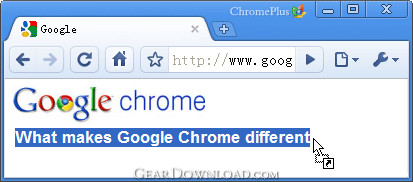
Dragging and dropping a block of text in the page will create a page and search the text with your default search engine. You can also drag the links and pictures to open them in the newtab page.
6. Download Tools Support
For your convenience, CoolNovo supported some popular download tools in the context menu of web pages. There’re more than 10 kinds of downloading tool supported including NetAnts, Orbit, QQ Xuanfeng, IS, FlashGet3, FlashGetMini, NetX, WebThunder, Xunlei, and so on.
7. Bottom toolbar
A new feature of CoolNovo, there're some common-used features(...) on the Bottom toolbar, very convenient and useful.
Additionally, CoolNovo has many other features as below:
Double click tab area to close page; Restore closed tabs button; Bookmarks bar auto-hide; Accelerator setting; Multi-tab thumbnail of Windows 7 taskbar; Customize the path of cache folder; Search box on toolbar and new tab; Hiding the close-button on tabs; Minimize to system tray area; Prompt on close button; Smooth scroll; Boss key; Process mode; Customize the proxy server; Additional menu items for download button; Portable package of CoolNovo; CoolNovo downloading manager and so on..
CoolNovo(Previous ChromePlus) browser is the enhanced Google Chrome browser. Surf the web much easier.
Long description:
CoolNovo is Google Chrome with some welcomed features, its previous name was ChromePlus, which was well-known.
CoolNovo has all the functionalities that Google Chrome has, such as Speed, Security, Chrome Web Store, Google Sync, and so on. Besides, CoolNovo added some enhanced useful features such as Privacy protection, Mouse gesture, IE tab, Adblock, Super drag, Download tools support, bottom toolbar, etc. Below is the list:
1. Privacy protection
When the browser closed, the selected browsing data would be cleared automatically(not selected by default). You can go to OptionsàPrivacy DataàPrivacy Plus to setup.
2. Mouse gestures
You can make efficient commands with easy mouse gestures. Practiced mouse gestures can save you quite a lot of time and are fun.
3. IE tab
Some web pages use IE controls and thus can only run in IE correctly. The IE tab is designed to visit these pages.
4. Adblock
With the bulid-in Adblock, CoolNovo can prevent the display of ads. Especially, the Adblock of CoolNovo supports the rules of the world famous Adblock Plus' rule and thus make use of the existing blocking-list of Adblock Plus.
5. Super drag
Dragging and dropping a block of text in the page will create a page and search the text with your default search engine. You can also drag the links and pictures to open them in the newtab page.
6. Download Tools Support
For your convenience, CoolNovo supported some popular download tools in the context menu of web pages. There’re more than 10 kinds of downloading tool supported including NetAnts, Orbit, QQ Xuanfeng, IS, FlashGet3, FlashGetMini, NetX, WebThunder, Xunlei, and so on.
7. Bottom toolbar
A new feature of CoolNovo, there're some common-used features(...) on the Bottom toolbar, very convenient and useful.
Additionally, CoolNovo has many other features as below:
Double click tab area to close page; Restore closed tabs button; Bookmarks bar auto-hide; Accelerator setting; Multi-tab thumbnail of Windows 7 taskbar; Customize the path of cache folder; Search box on toolbar and new tab; Hiding the close-button on tabs; Minimize to system tray area; Prompt on close button; Smooth scroll; Boss key; Process mode; Customize the proxy server; Additional menu items for download button; Portable package of CoolNovo; CoolNovo downloading manager and so on..
100% Clean:
CoolNovo 2.0.0.4 is 100% cleanThis download (CoolNovo2.0.0.4.exe) was tested thoroughly and was found 100% clean. Click "Report Spyware" link on the top if you found this software contains any form of malware, including but not limited to: spyware, viruses, trojans and backdoors.
Related Software:
- TV 2.2 C - Watch live world TV stations for free, Music, News, Educational Sport + more.
- WebCloner Offline Browser 2.7 - WebCloner is a site ripper, images downloader, offline browser, ebook compiler.
- Offline Explorer Pro 6.0 SR1 - Off-line downloader (Web and FTP) and browser
- Website Extractor 10.52 - Download whole websites to CD-ROM or USB drive
- Navigator Elegance 1.0 - Navigator Elegance Is A Full Fledged Internet Navigator With Elegant Design!
- Website Ripper Copier 3.6.2 - Best website downloader, offline browser - copy save download website, web pages
- History Search 1.10 - A local search engine, it searches in the content of recently visited sites.
- IENavigator 2.0.18 - Managing IE windows, open multiple sites at once, web page translation, voicing
- DeltaSpy 1.6 - DeltaSpy automatically checks your favorite web sites for changes.
- KidSplorer Web Browser 4.0.3 - Protect your children on the internet with this safe web browser.
top 10 most downloaded
recommended software
-
- Gear Software Manager
- Gear Software Manager is a free software version online check software. First, Gear Software Manager scans versions of all software installed in your...
-
- Weeny Free YouTube Downloader
- Weeny Free YouTube Downloader is a free software to download FLV video files from YouTube.com. Weeny Free YouTube Downloader is very easy to use. Si...