Index >> Network & Internet >> Servers >> AceFTP 3 Pro
Report SpywareAceFTP 3 Pro 3.72.0

 Click to enlarge screenshot
Software Description:
AceFTP 3 Pro is about total control, security, efficiency, and simplicity.
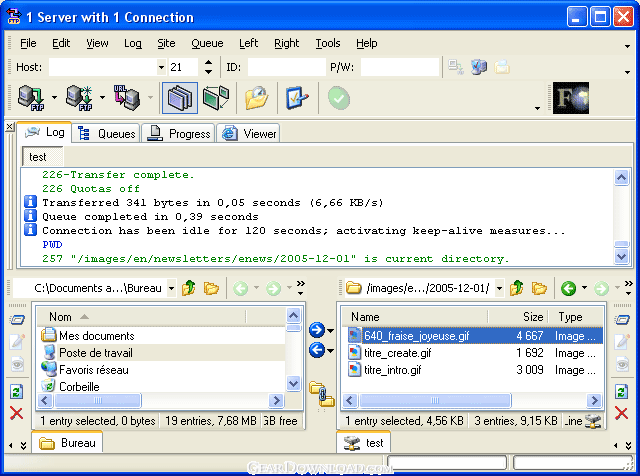
Visicom Media's AceFTP 3 Pro is an advanced FTP client software solution designed for ease of use by both novices and professionals.
A powerful and secure file transfer solution, the AceFTP 3 Pro FTP program emphasizes total control, security, efficiency, and simplicity.
New features of AceFTP 3 Pro include:
Windows XP-style interface
SSL security protocol integration
Password protection
Increased firewall support
File transfer scheduler
Improved management of queued files
Visicom Media's AceFTP 3 Pro is an advanced FTP client software solution designed for ease of use by both novices and professionals.
A powerful and secure file transfer solution, the AceFTP 3 Pro FTP program emphasizes total control, security, efficiency, and simplicity.
New features of AceFTP 3 Pro include:
Windows XP-style interface
SSL security protocol integration
Password protection
Increased firewall support
File transfer scheduler
Improved management of queued files
Feature List:
- Ensure secure and confidential file transfer through integrated SSL protocol
- Enhance firewall support through SOCKS 4 and SOCKS 5 integration
- Increased protection of software via encrypted passwords
- Keep users'network connections safe with separate profiles, automatically assigned for each user
- Conduct server-to-server file transfers
- Perform local-to-local file transfers
- Open several FTP sites simultaneously
- Execute multiple file transfers concurrently
- Resume interrupted transfers
- Automatically verify URLs in the clipboard
- Configure FTP sites using the Connection Assistant
- Conduct file-like operations (create, modify, delete, rename) on FTP sites
- Configure site views like File Manager (small or big icons, list view, detailed view, view order)
- Create desktop shortcuts
- Import FTP site connections from other FTP clients
- Add folders to the tree structure
- Manage favourites
- Customize toolbars according to your work habits and preferences
- Choose from a wide variety of advanced options for configuring FTP site properties
- View statistics on transfer history
- Search files on the server side
- Drag and drop files to start transfers
- Determine the proper action when file collisions occur
- Filter file selection
- Invert selection
- Set transfer priorities
- Put file transfers on hold
- View which files await transfer and which files have been transferred successfully
- Display properties of each file queued (status, dates, transfer rate, etc.)
- View logs
- Navigate through files and folders on the server side in offline mode
- Save queued files for later transfer
- Easy-to-Navigate Ergonomic Interface
- Enjoy ease of use equivalent to any file manager
- Use familiar Windows XP style
- Simplify management of local and remote files through a dual-plane interface
- Add or remove icons from any toolbar
- Add or remove toolbars
- Create new toolbars
- Maximize server view
- Monitor transfers graphically with the Transfer Rate Viewer
- View transfer speeds in real time
- Set maximum download and upload speeds
- Use the File Transfer Scheduler to automate your transfers
- Schedule transfers to occur on a daily, weekly, or monthly basis
- View scheduled transfer tasks through a transfer calendar
- Use scripts to program the execution of transfers
- Establish connections instantly
- Accomplish more by multitasking
- Speed up operations with cached files and folders
- Preview local and remote HTML and image files using the built-in viewer
- Get thumbnails of images on the server side as well as the local side
- View file-access rights
- Modify file-access rights through file properties
- Define parent-child relationships
- Use site properties inheritance
100% Clean:
 AceFTP 3 Pro 3.72.0 is 100% clean
This download (aceftp3pro.exe) was tested thoroughly and was found 100% clean. Click "Report Spyware" link on the top if you found this software contains any form of malware, including but not limited to: spyware, viruses, trojans and backdoors.
Related Software:
- Service - O - Matic 3.00 - Run any windows application as a windows service
- Axigen Business Messaging for Linux 8.0 - Axigen - Business Mail Server, Calendaring & Collaboration with 24x7 support
- Cyclope Internet Filtering Proxy 4.0 build 300 - Cyclope Internet Filtering Proxy is an Internet Filtering Software
- Simple DNS Plus 5.2 - The simple yet powerful DNS server for Windows
- Courier Mail Server 3.01 - Courier Mail Server is a e-mail server. Contains Web and SOCKS servers.
- AXIGEN Gateway Mail Server 1.2.5 - AXIGEN Gateway- secure mail relay server with FREE support
- Free SMTP Server 2.5994 - Free SMTP Server is a local SMTP server program for Windows
- SMTP Server Pro 5.27 - Easy-to-use SMTP POP3 mail server program designed for high-volume messaging.
- DWebPro 8.4.4 - DWebPro is a stand-alone web-server with CGI, PHP/MySQL, SMTP Server on CD.
- NoticeWare Email Server 5.2.3 - The NoticeWare Email Server is a high performance, multi-threaded email server.
top 10 most downloaded


recommended software
-
- Gear Software Manager
- Gear Software Manager is a free software version online check software. First, Gear Software Manager scans versions of all software installed in your...
-
- Gear Flash Downloader
- Gear Flash Downloader is a free handy tool to download SWF Flash files from web pages. Gear Flash Downloader is very easy to use. Simply copy and past...