Index >> Network & Internet >> Trace & Ping Tools >> 123LogAnalyzer
Report Spyware123LogAnalyzer 3.30

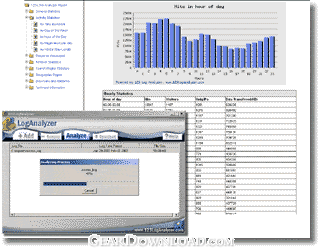 Click to enlarge screenshot
Software Description:
123LogAnalyzer - Fast, powerful and detailed web log analysis software.
123LogAnalyzer is the fastest, most powerful and detailed solution for seeing who your site visitors are, where they come from, where they go, and more! Features include high-speed processing, low disk space requirements, built-in IP mapping and 123LogAnalyzer's unique filtering capabilities. Very simple to use, with detailed tables and charts produced in an easy to understand, professional-quality report. Fast, powerful and professional.
What's New: Support new browsers
Limitations: 25 Days Trial
123LogAnalyzer is the fastest, most powerful and detailed solution for seeing who your site visitors are, where they come from, where they go, and more! Features include high-speed processing, low disk space requirements, built-in IP mapping and 123LogAnalyzer's unique filtering capabilities. Very simple to use, with detailed tables and charts produced in an easy to understand, professional-quality report. Fast, powerful and professional.
What's New: Support new browsers
Limitations: 25 Days Trial
Feature List:
- Fast speed analysis: 123LogAnalyzer can analyze a website log file at 1GB per minute (94,000 lines per second). On an 800Mhz PIII computer running Windows 2000, it can analyze a 625MB log file in only 37 seconds
- Easy-to-use interfaces: Intuitive user interface that requires no technical knowledge whatsoever(Windows version)
- Multi-platform support: Runs under Windows, Mac OSX, Linux, FreeBSD and Sun Solaris platforms. It can either run on client PCs or on servers
- Professional HTML web traffic analysis report
- General overview of your Website's performance and visitor behavior
- Statistics about web server activity. This report displays the number of visitors, the number of unique IPs, the amount of bandwidth used, and the number of hits the site received, broken down by Time Increment, Day of the Week, and Hour of the Day
- Statistics about the type of data visitors access on your site. This report shows web pages viewed, files downloaded, directories that were accessed, and images that were accessed during the time period entered. This is broken down by Page Views, Browsing Sequences, Downloaded Files, Accessed Directories, and Accessed Images
- Statistics about referrer information. This report shows which Domains and URLs your visitors come from, broken down by Referring Domains and Referring URLs. Referrers are the sites which have links to your site. For example, if we had a link to your site on our web pages, then the referring domain would be 123loganalyzer.com. If the link was on our index.htm page, then the referring URL would be http://www. log analyzer .com/index.htm
- Statistics about search engine performance. This report displays the search engines which referred visitors to the site, the phrases visitors searched for, and the keywords visitors searched for broken down by Top Search Engines, Keywords, and Each Search Engine
- Statistics about visitors' geographic region. This report displays a Most Active Countries graph and, a table showing which Countries your visitors come from
- Statistics about visitors' browsers and platforms. This report shows what browsers and platforms visitors use
- Statistics about server errors. This report shows errors visitors encountered at the site, broken down by Missing Files (404) and Miscellaneous Errors
- Advanced visitor filter: The powerful filter options available in 123LogAnalyzer set it apart from any other log analyzing applications. They provide you with far deeper and more specific analyzing
- Visitors who accessed specific pages or files. (Example: you can use this filter to see how many people visited your download page, or how many people downloaded a specific file.) You can also choose whether you want to match visitors who accessed ANY of the files listed or ALL of the files listed
- Visitors who came from specific referring URLs. (Example: you can use this filter to see how many visitors came from a page you have an advertisement on.)
- Day of Week. (Example: you can use this filter to see what happened on a specific day.)
- Hour of Day. (Example: you can use this filter to see what happened at a specific time.)
- Visitors whose first visit is a specific page. (Example: use this filter to see which page on your website is the first page most visitors view first.)
- Visitors' countries or regions. (Example: use this filter to see how many visitors are from France or Japan.)
- Visitors who make purchases on your web site. (Example: use this filter to see information on visitors who actually buy something from your web site.)
- Can run on both client side and server side
- Supports major web server log file formats on both Windows and Unix platforms.· Auto detects log file format
- Reports on multiple log files as if they are one continuous log file to view historical trends
- The time zone of the log file can be adjusted. For example if the log file uses the Greenwich Mean time zone but you are in the Central time zone you would need to adjust the time by -6 hours
- Can analyze commonly-used ZIP and GZ compressed log files without first extracting them to your hard drive, so you save disk space and download time
- Can download log files from remote FTP or WWW server
- Can automatically run a report from the command line
- Unique internal IP mapping technology that produces extraordinarily accurate visitor geographical statistics at blinding speeds
- Fully customizable HTML report template: Add your company logo to all 123LogAnalyzer reports, and then give them to your clients
100% Clean:
 123LogAnalyzer 3.30 is 100% clean
This download (123logsetup.exe) was tested thoroughly and was found 100% clean. Click "Report Spyware" link on the top if you found this software contains any form of malware, including but not limited to: spyware, viruses, trojans and backdoors.
Related Software:
- TraceAlarm 1.0 - Continuous watching and monitoring of any changes of route to the remote host.
- Magic NetTrace 3.0 - Ping, WHOIS and traceroute functions combined into friendly easy-to-use tool
- Pinkie 2.15 - Network tools: Ping,Traceroute,DNS,Subnet Calc,PingSweep,PortScanner,TFTPServer
- Path Analyzer Pro 2.7 - Path discovery, whois, firewall detection, network testing
- NetInfo 8.3 - Scan your network, diagnose problem, and start troubleshooting.
- Network Ping 1.2.9.5 - Network Ping is the network diagnostic utility
- Bopup Scanner 2.1.9 - Freeware LAN scanner that resolves NetBIOS, MAC, IP addresses, HTTP servers.
- Speed Test Gold 1.0.736 - Speed Test your Internet and network while monitoring system performance.
- Active Whois Browser 5.1 - Browse all information for an IP address or domain name with a single click!
- EMCO Monitor Live Connectivity 1.1.1 - Monitor your network IP/Host for Live Connectivity 24/7
top 10 most downloaded


recommended software
-
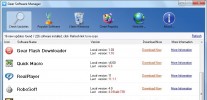
- Gear Software Manager
- Gear Software Manager is a free software version online check software. First, Gear Software Manager scans versions of all software installed in your...
-
- Gear Flash Downloader
- Gear Flash Downloader is a free handy tool to download SWF Flash files from web pages. Gear Flash Downloader is very easy to use. Simply copy and past...