Index >> Home & Hobby >> Personal Interest >> SymbolChooser
Report SpywareSymbolChooser 2.6

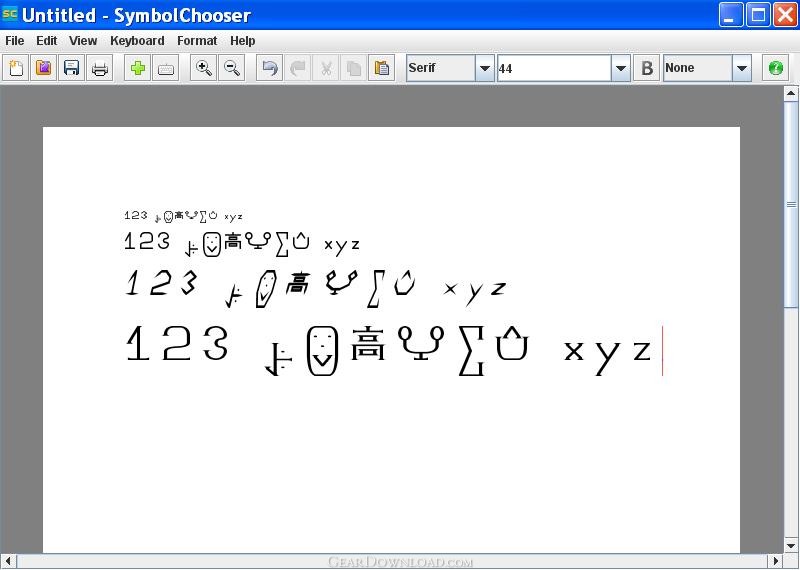 Click to enlarge screenshot
Software Description:
SymbolChooser - Allows for custom symbol creation and insertion for documents in any language
SymbolChooser is a word processor that allows you to insert your own shapes, markings, and symbols into a document just as you would any other letter or number on your keyboard. Creating and inserting custom symbols with SymbolChooser is easier and faster than using font editors, and your created symbols are immediately available in many different fonts and styles.
SymbolChooser is also a keyboard layout editor that allows you to specify which symbol is inserted into a document when a particular keyboard key is pressed. The keyboard can be edited to set the keys that are associated with your created symbols and also the keys that are associated with the existing English letters and numbers that can be inserted into SymbolChooser documents as soon as the program is installed.
SymbolChooser can be used to type documents in any of four different writing orientations:
-symbols from left to right with horizontal lines from top to bottom
-symbols from right to left with horizontal lines from top to bottom
-vertical lines from left to right with symbols from top to bottom
-vertical lines from right to left with symbols from top to bottom
SymbolChooser documents with your created symbols can be opened by anyone who has installed the free trial version of SymbolChooser. SymbolChooser documents can also be saved in Portable Document Format (PDF) to be shared with anyone who has a PDF viewer.
With a document containing your created symbols you can type messages in a secret code or in an entirely new language. No other word processor gives the user as much freedom to dictate what appears on their document's pages as they type.
What's New: - Improved startup time - Added "Find" functionality - Added "Find And Replace" functionality - Improved kerning for serif fonts
Limitations: Each page is marked with the words "TRIAL MODE". Saving documents is disabled.
SymbolChooser is a word processor that allows you to insert your own shapes, markings, and symbols into a document just as you would any other letter or number on your keyboard. Creating and inserting custom symbols with SymbolChooser is easier and faster than using font editors, and your created symbols are immediately available in many different fonts and styles.
SymbolChooser is also a keyboard layout editor that allows you to specify which symbol is inserted into a document when a particular keyboard key is pressed. The keyboard can be edited to set the keys that are associated with your created symbols and also the keys that are associated with the existing English letters and numbers that can be inserted into SymbolChooser documents as soon as the program is installed.
SymbolChooser can be used to type documents in any of four different writing orientations:
-symbols from left to right with horizontal lines from top to bottom
-symbols from right to left with horizontal lines from top to bottom
-vertical lines from left to right with symbols from top to bottom
-vertical lines from right to left with symbols from top to bottom
SymbolChooser documents with your created symbols can be opened by anyone who has installed the free trial version of SymbolChooser. SymbolChooser documents can also be saved in Portable Document Format (PDF) to be shared with anyone who has a PDF viewer.
With a document containing your created symbols you can type messages in a secret code or in an entirely new language. No other word processor gives the user as much freedom to dictate what appears on their document's pages as they type.
What's New: - Improved startup time - Added "Find" functionality - Added "Find And Replace" functionality - Improved kerning for serif fonts
Limitations: Each page is marked with the words "TRIAL MODE". Saving documents is disabled.
100% Clean:
 SymbolChooser 2.6 is 100% clean
This download (SymbolChooserWP.exe) was tested thoroughly and was found 100% clean. Click "Report Spyware" link on the top if you found this software contains any form of malware, including but not limited to: spyware, viruses, trojans and backdoors.
Related Software:
- Chrysanth NETime Author 1.1 - Professional book writing software. The fast way to a best seller!
- Family Gift Package 1.0 - Great gift for the entire family, note cards, posters, organizer, e-picture book
- Cards Right Now 1.0 - 210 all occasion greeting cards, written, formatted and ready to print as needed
- The Shakespeare Collection 1.0 - A classic collection of beautiful note cards, formatted and ready to print.
- Chrysanth NETime Diary 1.1 - Personal journal, diary and photo album in one secure software.
- Great Works of Art/The Impressionists 1.0 - Note and greeting cards featuring Impressionist paintings, ready to print & send
- Kaleido Flash 2.3 - Create dynamic Flash kaleidoscope with one photo
- WinLog Assist Task Tracking 2.1.5 - Win Log Assist is a PC time-keeping tool.
- Create A Plate 2008 2.0.0.1 - Create A Plate 2008, create amazing PERSONALIZED GIFTS.
- Personalised Clocks 2008 1.5.5.4 - Personalized Clocks 2008, create amazing PERSONALIZED GIFTS.
top 10 most downloaded


recommended software
-
- iCash
- iCash is a software intended to control your personal finance, keeping track of incomes, expenses, credits, debts and Banks transactions for you. As s...
-
- TypingMaster Typing Tutor
- Take your typing to the next level! TypingMaster 10 is a complete touch typing tutor that features over 10 hours of interactive training, professional...