Index >> Home & Hobby >> Education >> See-and-Type
Report SpywareSee-and-Type 1.0

 Click to enlarge screenshot
Software Description:
See-and-Type - On-screen virtual keyboard software bundle with mouse-assisted typing.
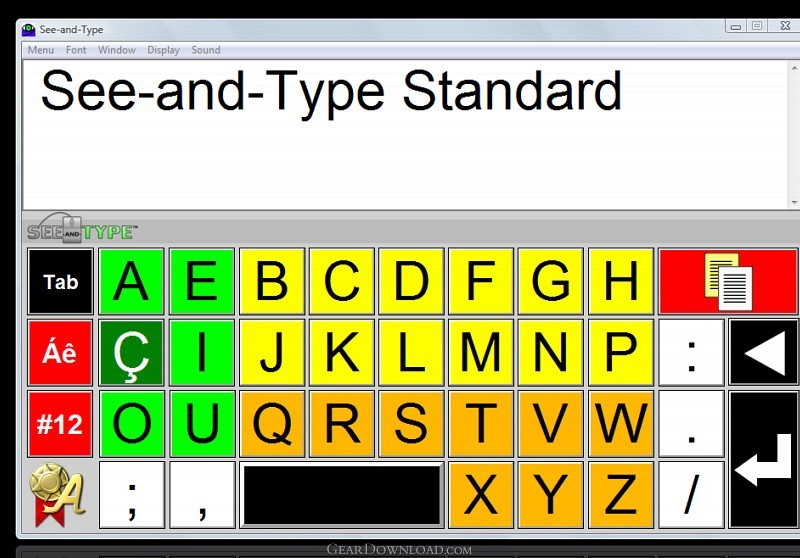
See-and-Type is a series of virtual keyboard models (Standard, Compact, and UltraCompact) that assist people to enter text with the mouse, without a conventional keyboard. See-and-Type uses a special color scheme for easy identification of the text keys. See-and-Type is designed to facilitate typing for everyone who either needs or wants to use the mouse for writing texts instead of a regular keyboard. See-and-Type has four basic color schemes for text/background displays. All models of See-and-Type have control of font size for better viewing and comfortable typing. Choose from five basic types of font size. When copying text, this will be exported without formatting and can be pasted into text editors, browsers, forums, emails etc.
Main features of "See-and-Type" models:
a) See-and-Type Standard: It is the model of choice for people with low vision acuity. Vowels are always displayed in the left corner of the screen and in a green background, while consonants are displayed in yellow and orange background colors. Useful for teaching words in an interactive and amusing way for children during initial vocabulary acquisition steps. "Tab", "Space", "Backspace" and "Enter" keys are displayed in a black background. Punctuation marks and typesetting symbols are displayed in a white background. After typing the text, just click the button (with red background) on the upper right-side of the keyboard panel in order to copy the entire text to the clipboard.
b) See-and-Type Compact: It is a model that occupies less screen space and is useful for people who already know and like See-and-Type Standard model, but prefer to use a more compact model.
c) See-and-Type UltraCompact: It is the model of choice for people with physical impairments and that cannot type using a regular keyboard. See-and-Type UltraCompact is very appropriate in such cases, especially due to the very short distance between its keys on the keyboard interface.
What's New: New Release
See-and-Type is a series of virtual keyboard models (Standard, Compact, and UltraCompact) that assist people to enter text with the mouse, without a conventional keyboard. See-and-Type uses a special color scheme for easy identification of the text keys. See-and-Type is designed to facilitate typing for everyone who either needs or wants to use the mouse for writing texts instead of a regular keyboard. See-and-Type has four basic color schemes for text/background displays. All models of See-and-Type have control of font size for better viewing and comfortable typing. Choose from five basic types of font size. When copying text, this will be exported without formatting and can be pasted into text editors, browsers, forums, emails etc.
Main features of "See-and-Type" models:
a) See-and-Type Standard: It is the model of choice for people with low vision acuity. Vowels are always displayed in the left corner of the screen and in a green background, while consonants are displayed in yellow and orange background colors. Useful for teaching words in an interactive and amusing way for children during initial vocabulary acquisition steps. "Tab", "Space", "Backspace" and "Enter" keys are displayed in a black background. Punctuation marks and typesetting symbols are displayed in a white background. After typing the text, just click the button (with red background) on the upper right-side of the keyboard panel in order to copy the entire text to the clipboard.
b) See-and-Type Compact: It is a model that occupies less screen space and is useful for people who already know and like See-and-Type Standard model, but prefer to use a more compact model.
c) See-and-Type UltraCompact: It is the model of choice for people with physical impairments and that cannot type using a regular keyboard. See-and-Type UltraCompact is very appropriate in such cases, especially due to the very short distance between its keys on the keyboard interface.
What's New: New Release
100% Clean:
 See-and-Type 1.0 is 100% clean
This download (setup_seeandtype.exe) was tested thoroughly and was found 100% clean. Click "Report Spyware" link on the top if you found this software contains any form of malware, including but not limited to: spyware, viruses, trojans and backdoors.
Related Software:
- IllustraBoard Personal Edition 2 - Professional and educational multimedia board for teaching and presentations.
- BlitzCalc 1.0.3 - BlitzCalc is a revolutionary Windows-integrated calculator.
- WordQuiz 5.4.0 - A flashcard program for learning vocabulary and terminology
- Cute Baby Name 1.0 - Contains about 30000 baby names, name meanings and origins,boy and girl names
- Geometry 1.1 - Calculate geometry figures as spheres, triangles, cones, trapezoids.
- GeoPro 2.3 - GeoPro is the next level of our application geometry for students and engineers
- Planets of the Solar System Screensaver 1.0 - Colorful pictures of 9 Planets and the Sun with basic scientific descriptions.
- Charlie and Arnaud 1.0 - 2 award winning e-picture books that delight both children and adults.
- Arnaud, the Boy Who... 1.0 - Arnaud follows his own path and does what he wants in this fun E-picture book.
- A Day With Charlie 1.0 - Spend a fun day with Charlie in this wonderful and moving picture book.
top 10 most downloaded


recommended software
-
- iCash
- iCash is a software intended to control your personal finance, keeping track of incomes, expenses, credits, debts and Banks transactions for you. As s...
-
- TypingMaster Typing Tutor
- Take your typing to the next level! TypingMaster 10 is a complete touch typing tutor that features over 10 hours of interactive training, professional...