Index >> Home & Hobby >> Education >> Baby Keyboard
Report SpywareBaby Keyboard 4.2

 Click to enlarge screenshot
Software Description:
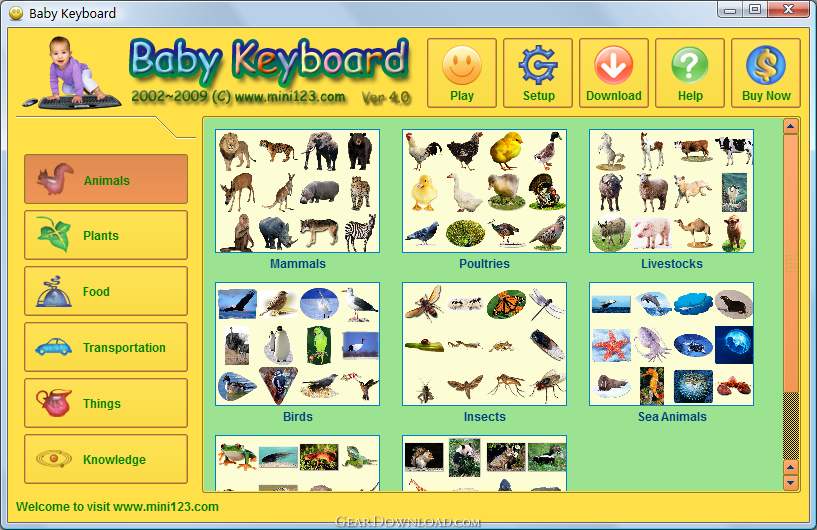
Baby Keyboard - baby presses keyboard or clicks mouse, a picture will be showed with a sound.
Babies love to pound on the computer keyboard in imitation of their mom and dad. Once your baby start to pound on the keyboard, strikes can activate unwanted programs or change the computer settings. "Baby Keyboard" is software for babies that would both prevent them from deleting all of our files while providing an entertaining experience. It will allow your baby pound and strike the keyboard freely without causing any damage.
1. When the baby presses the keys on your keyboard or clicks the mouse, the screen will display a picture, at the same time will play a sound, sometimes a word will be displayed.
For example, when a lion shows, the computer will play a lion's roar.
2. "Baby Keyboard" locks the computer system and protects your computer and files, allowing your baby to touch any key at all.
"Baby Keyboard" locks the "delete" key, Windows logo key, Alt key combinations (such as Alt + F4), Ctrl key combination, Shift key combination and so on. You can press "12345" on keyboard to exit the playing window.
3. Baby's ability to receive information is limited, so "Baby Keyboard" shows the images of individual objects.
In the software a total of more than 700 pictures can be used. A picture shows a complete object.
Pictures can be displayed in the order, and can also be randomly displayed.
4. Press "A" key to replay the sound. Press "S" Key to play Another sound. Press the Left key£¬or the Up key, or the PgUp key to re-display the previous picture.
5. You can set the time to play, and you can also set the keyboard delay time.
After a specified period of time, the picture will move around on the screen. Moreover, it can automatically display the next picture.
What's New: fix some bugs
Babies love to pound on the computer keyboard in imitation of their mom and dad. Once your baby start to pound on the keyboard, strikes can activate unwanted programs or change the computer settings. "Baby Keyboard" is software for babies that would both prevent them from deleting all of our files while providing an entertaining experience. It will allow your baby pound and strike the keyboard freely without causing any damage.
1. When the baby presses the keys on your keyboard or clicks the mouse, the screen will display a picture, at the same time will play a sound, sometimes a word will be displayed.
For example, when a lion shows, the computer will play a lion's roar.
2. "Baby Keyboard" locks the computer system and protects your computer and files, allowing your baby to touch any key at all.
"Baby Keyboard" locks the "delete" key, Windows logo key, Alt key combinations (such as Alt + F4), Ctrl key combination, Shift key combination and so on. You can press "12345" on keyboard to exit the playing window.
3. Baby's ability to receive information is limited, so "Baby Keyboard" shows the images of individual objects.
In the software a total of more than 700 pictures can be used. A picture shows a complete object.
Pictures can be displayed in the order, and can also be randomly displayed.
4. Press "A" key to replay the sound. Press "S" Key to play Another sound. Press the Left key£¬or the Up key, or the PgUp key to re-display the previous picture.
5. You can set the time to play, and you can also set the keyboard delay time.
After a specified period of time, the picture will move around on the screen. Moreover, it can automatically display the next picture.
What's New: fix some bugs
Feature List:
- Block Windows Logo key
- Block Logo key combinations (like Win+L)
- Block Windows additional keys
- Block Alt+ combinations
- Block Control+ combinations
- Block Shift+ combinations
- Power and Sleep keys: user can disable Power and Sleep keys from control panel
- Control+Alt+Delete stay reachable under any circumstances to enable rescue
- Let your baby pound and strike the keyboard freely - This will develop self-confidence and make for your baby to see the computer as a friendly device
- Safe keys are still working - This will lead your baby feeling self-conscious about his abilities, aware for screen responses and understanding the basic interaction with computers
- Let your baby play on the same computer with the same keyboard you work with. This will develop trust and confidence between you and your baby
100% Clean:
 Baby Keyboard 4.2 is 100% clean
This download (b2c3_eng.exe) was tested thoroughly and was found 100% clean. Click "Report Spyware" link on the top if you found this software contains any form of malware, including but not limited to: spyware, viruses, trojans and backdoors.
Related Software:
- BlitzCalc 1.0.3 - BlitzCalc is a revolutionary Windows-integrated calculator.
- WordQuiz 5.4.0 - A flashcard program for learning vocabulary and terminology
- Cute Baby Name 1.0 - Contains about 30000 baby names, name meanings and origins,boy and girl names
- Geometry 1.1 - Calculate geometry figures as spheres, triangles, cones, trapezoids.
- GeoPro 2.3 - GeoPro is the next level of our application geometry for students and engineers
- Planets of the Solar System Screensaver 1.0 - Colorful pictures of 9 Planets and the Sun with basic scientific descriptions.
- Charlie and Arnaud 1.0 - 2 award winning e-picture books that delight both children and adults.
- Arnaud, the Boy Who... 1.0 - Arnaud follows his own path and does what he wants in this fun E-picture book.
- A Day With Charlie 1.0 - Spend a fun day with Charlie in this wonderful and moving picture book.
- Play It - Notes 1.0.0 - Piano sight reading drills to improve recognition of notes, intervals and chords
top 10 most downloaded


recommended software
-
- iCash
- iCash is a software intended to control your personal finance, keeping track of incomes, expenses, credits, debts and Banks transactions for you. As s...
-
- TypingMaster Typing Tutor
- Take your typing to the next level! TypingMaster 10 is a complete touch typing tutor that features over 10 hours of interactive training, professional...