Index >> Graphic Apps >> Editors >> The Panorama Factory m32 Edition
Report SpywareThe Panorama Factory m32 Edition 5.1

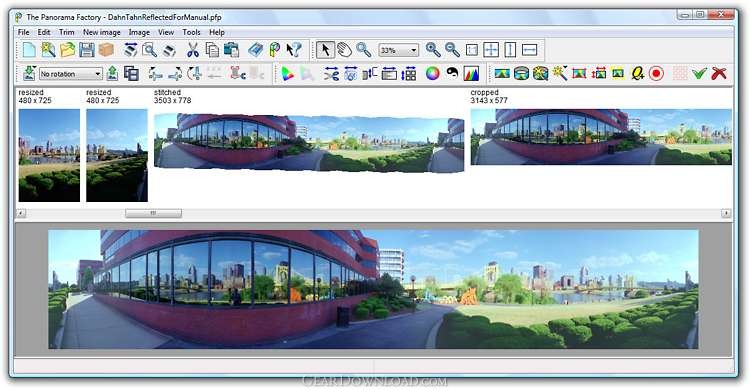 Click to enlarge screenshot
Software Description:
The Panorama Factory m32 Edition - Create high-quality panoramas from a set of overlapping digital images
The Panorama Factory creates high-quality panoramas from a set of overlapping digital images. You can add image hotspots, export to VR formats and create web pages that link your images into virtual tours. The software also corrects for lens-induced distortions and creates either cylindrical or spherical image projections. Additional features include onscreen zoom, support for digital SLRs, correction for barrel distortion, correction for brightness falloff and interactive controls.
The m32 Edition supports multi-core processors.
The Panorama Factory creates images that rival those made by expensive rotational and swing-lens panoramic cameras. Not only can The Panorama Factory facilitate creation of immersive VR worlds, it also provides features for the fine-art panoramic photographer who wishes to work from ordinary 35mm images or images captured with a digital camera.
The Panorama Factory supports JPG, BMP, PNG, TIFF image formats and QTVR, IVR and PTViewer virtual reality formats.
The virtual tour features make it possible to add hotspots to panoramic images and to create and update web pages and thumbnail indexes. Hotspots are used to link panoramas together. For example, a set of panoramas showing rooms in a house can be linked together so that clicking on a doorway moves from one room to another.
Users can automatically create web pages and thumbnail indexes when the panoramic images are saved. The web pages and thumbnail indexes are created from templates. Some predefined templates are supplied with The Panorama Factory, and users can create their own templates.
The software optionally corrects for barrel distortion and for brightness falloff, two problems that are common to many digital cameras. These problems can be corrected automatically and, if necessary, the user can adjust the corrections interactively. Automatic image alignment and focal length detection can also be adjusted interactively.
What's New: Now runs on Mac OS X; Color management; Cubic QTVR; 48-bit PSD export. See http://www.panoramafactory.com/whatsnew.html
Limitations: 30 Days Trial; Applies a watermark to saved and printed images until registered
The Panorama Factory creates high-quality panoramas from a set of overlapping digital images. You can add image hotspots, export to VR formats and create web pages that link your images into virtual tours. The software also corrects for lens-induced distortions and creates either cylindrical or spherical image projections. Additional features include onscreen zoom, support for digital SLRs, correction for barrel distortion, correction for brightness falloff and interactive controls.
The m32 Edition supports multi-core processors.
The Panorama Factory creates images that rival those made by expensive rotational and swing-lens panoramic cameras. Not only can The Panorama Factory facilitate creation of immersive VR worlds, it also provides features for the fine-art panoramic photographer who wishes to work from ordinary 35mm images or images captured with a digital camera.
The Panorama Factory supports JPG, BMP, PNG, TIFF image formats and QTVR, IVR and PTViewer virtual reality formats.
The virtual tour features make it possible to add hotspots to panoramic images and to create and update web pages and thumbnail indexes. Hotspots are used to link panoramas together. For example, a set of panoramas showing rooms in a house can be linked together so that clicking on a doorway moves from one room to another.
Users can automatically create web pages and thumbnail indexes when the panoramic images are saved. The web pages and thumbnail indexes are created from templates. Some predefined templates are supplied with The Panorama Factory, and users can create their own templates.
The software optionally corrects for barrel distortion and for brightness falloff, two problems that are common to many digital cameras. These problems can be corrected automatically and, if necessary, the user can adjust the corrections interactively. Automatic image alignment and focal length detection can also be adjusted interactively.
What's New: Now runs on Mac OS X; Color management; Cubic QTVR; 48-bit PSD export. See http://www.panoramafactory.com/whatsnew.html
Limitations: 30 Days Trial; Applies a watermark to saved and printed images until registered
100% Clean:
 The Panorama Factory m32 Edition 5.1 is 100% clean
This download (pfactory_setup_m32.exe) was tested thoroughly and was found 100% clean. Click "Report Spyware" link on the top if you found this software contains any form of malware, including but not limited to: spyware, viruses, trojans and backdoors.
Related Software:
- ASCII Art Generator 3.2.4.6 - Convert pictures into amazing colorful and readable text quickly and easily
- Colour Studio 2.0 - 5 plug-in filters for use with Adobe Photoshop or compatible host applications
- AKVIS Retoucher 6.0 - AKVIS Retoucher is an efficient software for photo restoration and retouching.
- FotoBatch 5.1.3.0818 - It will allow you to convert and processing image files using scripts.
- Project5 Photocut Processor 1.0.10.1005 - Bitmap tracer (raster to vector), realistic photo effect in vinyl decals
- FunPhotor 6.2003 - Fun Photo Creator - Put Your Face on Fantasy & Fun Photo!
- PixBuilder Studio 1.31 - PixBuilder Studio is graphic software for photo editing and images manipulation.
- AKVIS Stamp 3.0 - AKVIS Stamp - Image Healing Tool for seamless defects removal and object cloning
- RPE Photo 3.0 - Easy Digital Photo Resizing, Printing and Enhancement. Learn in Minutes!
- Able Fax Tif View 3.17.2.20 - Multi-page tif, pdf, eps, ai, dcx viewer, editor and converter.
top 10 most downloaded


recommended software
-
- 1AVCenter
- With 1AVCenter you can record your entire screen or part of it directly to AVI or WMV, capture screenshots in JPG, share your screen over the internet...

-
- IconEdit2
- Create and edit icon files for Windows, iPhone, iPad, Apple Watch, and Android with professional yet easy-to-use Icon Editor. IconEdit2 has full suppo...
