Index >> Graphic Apps >> Editors >> SVG Kit for Adobe Creative Suite
Report SpywareSVG Kit for Adobe Creative Suite 2.0.2

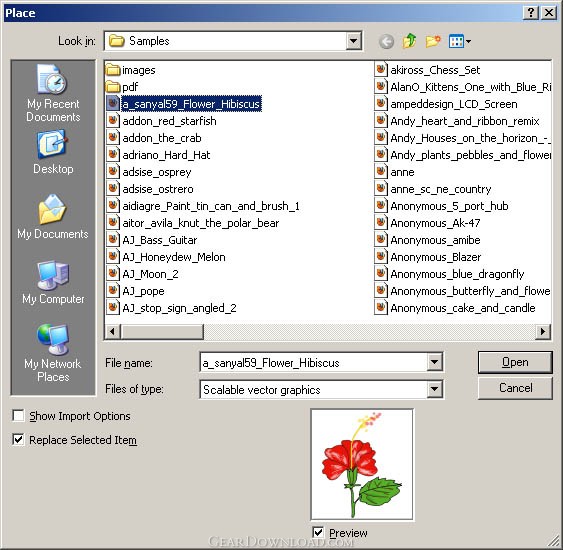 Click to enlarge screenshot
Software Description:
SVG Kit for Adobe Creative Suite: SVG in Photoshop/InDesign/InCopy
SVG Kit for Adobe Creative Suite.
Provides complete support of SVG format for Adobe CreativeSuite, including InDesign, InCopy, InDesign Server and Photoshop, both Windows and Mac, both 32 and 64bit. Moreover, with the help of our plug-in you can import SVG into your Indersign/InCopy documents, use it in automated processes, export to SVG your documents, and export SVG to Adobe Dreamweaver and ePub documents.
In practice, Adobe's support of SVG file format is limited. For example, you can use Adobe Illustrator to operate SVG files, but you can't use SVG files as images in InDesign. It means, that you need to convert images from SVG to EPS all the time. (sure, raster formats are not an option).
Fortunately, we are providing easy way to use SVG images: with the help of our plug-in, you can place SVG images directly in InDesign, without any annoying conversions. All changes of SVG images are reflected in InDesign as well. And of course, all commands and effects are applicable to SVG images as to any other embedded types.
Our solution offers advanced conversion from SVG to PSD, on the fly, directly in Photoshop. Just open SVG file in Photoshop, and we'll do the rest. Image will be shrinked into layers automatically, depending on SVG figures, opacity and effects. As a result, all intercepted polygons will be moved to different layers, to provide you more opportunities for image operating.
Limitations: 30 Days Trial
SVG Kit for Adobe Creative Suite.
Provides complete support of SVG format for Adobe CreativeSuite, including InDesign, InCopy, InDesign Server and Photoshop, both Windows and Mac, both 32 and 64bit. Moreover, with the help of our plug-in you can import SVG into your Indersign/InCopy documents, use it in automated processes, export to SVG your documents, and export SVG to Adobe Dreamweaver and ePub documents.
In practice, Adobe's support of SVG file format is limited. For example, you can use Adobe Illustrator to operate SVG files, but you can't use SVG files as images in InDesign. It means, that you need to convert images from SVG to EPS all the time. (sure, raster formats are not an option).
Fortunately, we are providing easy way to use SVG images: with the help of our plug-in, you can place SVG images directly in InDesign, without any annoying conversions. All changes of SVG images are reflected in InDesign as well. And of course, all commands and effects are applicable to SVG images as to any other embedded types.
Our solution offers advanced conversion from SVG to PSD, on the fly, directly in Photoshop. Just open SVG file in Photoshop, and we'll do the rest. Image will be shrinked into layers automatically, depending on SVG figures, opacity and effects. As a result, all intercepted polygons will be moved to different layers, to provide you more opportunities for image operating.
Limitations: 30 Days Trial
100% Clean:
 SVG Kit for Adobe Creative Suite 2.0.2 is 100% clean
This download (SVG-for-Adobe-2.0-x86-setup.exe) was tested thoroughly and was found 100% clean. Click "Report Spyware" link on the top if you found this software contains any form of malware, including but not limited to: spyware, viruses, trojans and backdoors.
Related Software:
- ASCII Art Generator 3.2.4.6 - Convert pictures into amazing colorful and readable text quickly and easily
- Colour Studio 2.0 - 5 plug-in filters for use with Adobe Photoshop or compatible host applications
- AKVIS Retoucher 6.0 - AKVIS Retoucher is an efficient software for photo restoration and retouching.
- FotoBatch 5.1.3.0818 - It will allow you to convert and processing image files using scripts.
- Project5 Photocut Processor 1.0.10.1005 - Bitmap tracer (raster to vector), realistic photo effect in vinyl decals
- FunPhotor 6.2003 - Fun Photo Creator - Put Your Face on Fantasy & Fun Photo!
- PixBuilder Studio 1.31 - PixBuilder Studio is graphic software for photo editing and images manipulation.
- AKVIS Stamp 3.0 - AKVIS Stamp - Image Healing Tool for seamless defects removal and object cloning
- RPE Photo 3.0 - Easy Digital Photo Resizing, Printing and Enhancement. Learn in Minutes!
- Able Fax Tif View 3.17.2.20 - Multi-page tif, pdf, eps, ai, dcx viewer, editor and converter.
top 10 most downloaded


recommended software
-
- 1AVCenter
- With 1AVCenter you can record your entire screen or part of it directly to AVI or WMV, capture screenshots in JPG, share your screen over the internet...

-
- IconEdit2
- Create and edit icon files for Windows, iPhone, iPad, Apple Watch, and Android with professional yet easy-to-use Icon Editor. IconEdit2 has full suppo...
