Index >> Graphic Apps >> Screen Capture >> StepShot
Report SpywareStepShot 2.0.13.252

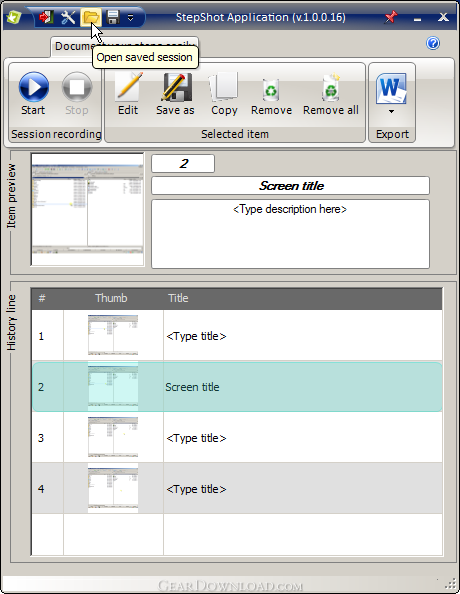 Click to enlarge screenshot
Software Description:
StepShot - Document your knowledge on business procedure and share it!
Use StepShot to create a quick guide of any procedure! Create an explanation for your colleague how to configure Outlook. Or create a simple guide for your grandma on how to reach your photos on Facebook or Picasa. And etc! Export to PDF/RTF/HTML in different styles & share!
Save your time and traffic! Stop recording videos! You now don't need expensive tools!
Free express version available!
Capturing
- Start or stop capturing at any time using global hot keys;
- Capture windows, objects, menus, drop-down lists, full screen and rectangular regions;
- Capture multiple windows and objects including multi-level menus;
- Use different capturing modes:
-- Capture screen/window/region on hot key;
-- Capture active window on mouse click;
-- Capture entire screen on mouse click;
- Save recorded session and open it for editing-recording-exporting later;
- Effects after screen shot is taken (sound).
Editing
-Draw annotation objects such as texts, highlights, etc. on your screen shots;
-Add title and description to images;
-Use Undo/Redo/Reload editor's functions;
-Save separate images in JPEG or PNG formats;
-Copy images directly to clipboard;
-Duplicate images, move them up/down in the history.
Exporting
-Export the session to PDF (RTF, HTML, JPG for full version);
-Use file pregenerated names to save the history;
-Directly share images and guides via Dropbox, FTP (or attach to new e-mail) with your customers!
What's New: Added Sequence tool item. Changed crop function. Minor fixes.
Limitations: No limitations!
Use StepShot to create a quick guide of any procedure! Create an explanation for your colleague how to configure Outlook. Or create a simple guide for your grandma on how to reach your photos on Facebook or Picasa. And etc! Export to PDF/RTF/HTML in different styles & share!
Save your time and traffic! Stop recording videos! You now don't need expensive tools!
Free express version available!
Capturing
- Start or stop capturing at any time using global hot keys;
- Capture windows, objects, menus, drop-down lists, full screen and rectangular regions;
- Capture multiple windows and objects including multi-level menus;
- Use different capturing modes:
-- Capture screen/window/region on hot key;
-- Capture active window on mouse click;
-- Capture entire screen on mouse click;
- Save recorded session and open it for editing-recording-exporting later;
- Effects after screen shot is taken (sound).
Editing
-Draw annotation objects such as texts, highlights, etc. on your screen shots;
-Add title and description to images;
-Use Undo/Redo/Reload editor's functions;
-Save separate images in JPEG or PNG formats;
-Copy images directly to clipboard;
-Duplicate images, move them up/down in the history.
Exporting
-Export the session to PDF (RTF, HTML, JPG for full version);
-Use file pregenerated names to save the history;
-Directly share images and guides via Dropbox, FTP (or attach to new e-mail) with your customers!
What's New: Added Sequence tool item. Changed crop function. Minor fixes.
Limitations: No limitations!
100% Clean:
 StepShot 2.0.13.252 is 100% clean
This download (StepShot.exe) was tested thoroughly and was found 100% clean. Click "Report Spyware" link on the top if you found this software contains any form of malware, including but not limited to: spyware, viruses, trojans and backdoors.
Related Software:
- HeavyMath Cam 3D Webmaster Edition 3.8 - 3D anaglyph stereo webcam software. Upload via FTP or record to video file.
- Huelix ScreenPlay Screen Recorder 2.0 - Record and broadcast PC screens as Windows Media video in real time!
- GrabXP7 7.0.4 - Image capture, view and print. Grab any user defined area from the screen
- GAX reloaded v2.01 - Contains a colorpicker, a screen ruler, and a screen capture.
- Ashampoo Snap 8 8.0.7 - Ashampoo Snap 8 - So much more than just screenshots
- HyperSnap 7.26.01 - Easy to use yet powerful Screen Capture, Text Capture, Image Editor for Windows
- CaptureXT Screen Capture 3.0.3 - Take screenshots and edit professionally with ease.
- River Past Cam Do 3.1 - Record webcam to AVI, WMV, or optional 3GP, MOV, MP4.
- River Past Cam Do Webmaster Edition 3.1 - Record webcam to AVI, WMV, or optional MOV, MP4, 3GP, or upload to website.
- River Past Screen Recorder 7.8 - Capture screen to AVI video file, with choices of video and audio codecs.
top 10 most downloaded


recommended software
-
- 1AVCenter
- With 1AVCenter you can record your entire screen or part of it directly to AVI or WMV, capture screenshots in JPG, share your screen over the internet...

-
- IconEdit2
- Create and edit icon files for Windows, iPhone, iPad, Apple Watch, and Android with professional yet easy-to-use Icon Editor. IconEdit2 has full suppo...
