Index >> Graphic Apps >> Other >> ScreenTools
Report SpywareScreenTools 1.2.0

 Click to enlarge screenshot
Software Description:
ScreenTools - Quick and small screen magnifier, screen capturer, ruler and color picker.
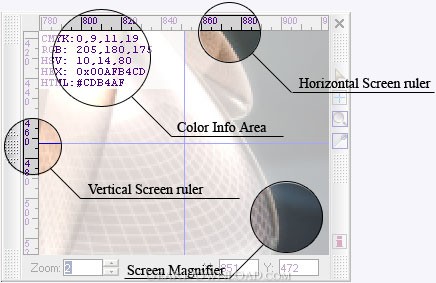
ScreenTools is a quick and small tool that combines capabilities of screen magnifier, screen ruler, screen capturer and color picker in the single application. It is the best choice for designers, web-masters and GUI developers.
Screen Magnifier is main function of the ScreenTools. All small details on the screen become noticeable and turn available for analysis. Magnification range can be changed from 1x up to 32x. Three modes are available:
- Mouse mode. View point is set to the mouse position.
- Fixed mode. View point is set once by mouse click and stays fixed until next mode.
- Loupe mode. View point is set to the position right under magnifier and it acts as a movable magnifying glass on the screen.
Screen Ruler allows the accurate measure of anything on the computers screen. This is especially useful when measuring graphics, web page browser sizes or whatever. Horizontal and vertical rulers are available. Ruler's scale is same as magnification range, so the bigger range - the more accurate measure!
Screen Capturer allows to make a shot of a part of the screen and copy it to the Windows clipboard being zoomed as well as keeping its original size.
Color Picker allows to determine the magnitude of the various color components which make up a color on the screen and display them in CMYK, RGB, HSV, HEX and HTML formats. It's primary target is those of who get frustrated trying to match a color on the screen. It is also particularly useful for determining the color hex codes needed in HTML documents.
Features:
- Easy to use interface;
- 1x-32x screen zoom;
- Mouse, Fixed and Loupe modes;
- Horizontal/vertical screen ruler;
- Magnified area can be copied to the clipboard;
- Works with layered/semitransparent windows (Mouse and Fixed modes only);
- Full color information in CMYK, RGB, HSV, HEX and HTML formats.
Requirements:
- Windows 98 or better;
- Pentium(R) CPU 450 Mhz or better;
- At least 32 Mb of RAM.
Limitations: 15 Days Trial
ScreenTools is a quick and small tool that combines capabilities of screen magnifier, screen ruler, screen capturer and color picker in the single application. It is the best choice for designers, web-masters and GUI developers.
Screen Magnifier is main function of the ScreenTools. All small details on the screen become noticeable and turn available for analysis. Magnification range can be changed from 1x up to 32x. Three modes are available:
- Mouse mode. View point is set to the mouse position.
- Fixed mode. View point is set once by mouse click and stays fixed until next mode.
- Loupe mode. View point is set to the position right under magnifier and it acts as a movable magnifying glass on the screen.
Screen Ruler allows the accurate measure of anything on the computers screen. This is especially useful when measuring graphics, web page browser sizes or whatever. Horizontal and vertical rulers are available. Ruler's scale is same as magnification range, so the bigger range - the more accurate measure!
Screen Capturer allows to make a shot of a part of the screen and copy it to the Windows clipboard being zoomed as well as keeping its original size.
Color Picker allows to determine the magnitude of the various color components which make up a color on the screen and display them in CMYK, RGB, HSV, HEX and HTML formats. It's primary target is those of who get frustrated trying to match a color on the screen. It is also particularly useful for determining the color hex codes needed in HTML documents.
Features:
- Easy to use interface;
- 1x-32x screen zoom;
- Mouse, Fixed and Loupe modes;
- Horizontal/vertical screen ruler;
- Magnified area can be copied to the clipboard;
- Works with layered/semitransparent windows (Mouse and Fixed modes only);
- Full color information in CMYK, RGB, HSV, HEX and HTML formats.
Requirements:
- Windows 98 or better;
- Pentium(R) CPU 450 Mhz or better;
- At least 32 Mb of RAM.
Limitations: 15 Days Trial
100% Clean:
 ScreenTools 1.2.0 is 100% clean
This download (screentools_inst.zip) was tested thoroughly and was found 100% clean. Click "Report Spyware" link on the top if you found this software contains any form of malware, including but not limited to: spyware, viruses, trojans and backdoors.
Related Software:
- TiffCombine 1.5 - Combine TIFF files easily
- CD & DVD Box Labeler Pro 2016 1.9.97r2 - Design your own custom CD, DVD & Blu-Ray Labels with this easy to use software.
- Ashampoo Photo Mailer 1.0.8 - Ashampoo Photo Mailer - the easiest way to share photos through email.
- Media Resizer FREE thumbnail creator 2.57 - Creating image thumbnails has never been easier!
- Pocket Wallpaper 1.01 - Create themes and wallpaper for PocketPC and other mobile devices.
- Kaleider 4.9.2 - Kaleider emulates kaleidoscope, mirroring, 3D mirroring and funneling effects.
- Photo to PSP 1.10 - Easy transfer and resize of photos to PlayStation Portable, PSP
- ColorMania 5.0 - Color Picker with Eyedropper and Screen Magnifier
- ConceptDraw for Mac 7.6 - Discover the world of visual communication
- ConceptDraw 7.5 - Discover the world of visual communication
top 10 most downloaded


recommended software
-
- 1AVCenter
- With 1AVCenter you can record your entire screen or part of it directly to AVI or WMV, capture screenshots in JPG, share your screen over the internet...

-
- IconEdit2
- Create and edit icon files for Windows, iPhone, iPad, Apple Watch, and Android with professional yet easy-to-use Icon Editor. IconEdit2 has full suppo...
