Index >> Graphic Apps >> Screen Capture >> River Past Screen Recorder Pro
Report SpywareRiver Past Screen Recorder Pro 7.1

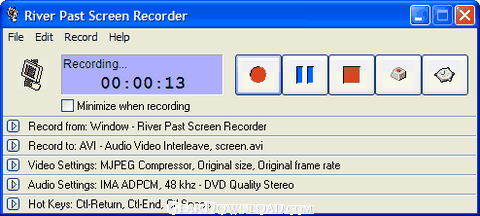 Click to enlarge screenshot
Software Description:
River Past Screen Recorder Pro - Capture screen to AVI/WMV/DivX/OGM/MKV or optional MOV/MP4/3GP
River Past Screen Recorder is a easy-to-use, fast, and powerful screen video recording software.
Record full screen, window (even if you drag it around the screen), fixed region, or cursor area. Output to AVI, DivX, XviD, MKV, OGM, WMV or MOV (optional) files, with choices of video codec with quality setting. It loads the video compressors dynamically on your system for the best power and flexibility. Common codecs include Cinepak, Indeo 3, 4, 5, Microsoft Video 1, Motion JPEG, DivX and XviD. Use the latter two for the best speed and quality.
Optionally audio can be recorded from any sources, including microphone, line-in, or speakers. Recording volume can be adjusted manually even during the recording. Full control over the audio codec, sample rate, channle, bits per sample, and bitrate.
It has a built-in scheduler for unattended recording. You can set the start time and/or the stop time. Record your e-learning sessions from the web or scheduled broadcasts when you cannot attend.
It has been tested to be up to four times faster than other programs. Ideal for making demo, tutorial, and training videos.
With the optional MOV Booster Pack, you can output to QuickTime movie.
With the optional MPEG-4 Booster Pack, you can output to MP4 video.
With the optional 3GP Booster Pack, you can output to 3GPP or 3GPP2 video.
No adware or spyware. DirectX 8 required.
30 day MONEY BACK GUARANTEE
River Past Screen Recorder is a easy-to-use, fast, and powerful screen video recording software.
Record full screen, window (even if you drag it around the screen), fixed region, or cursor area. Output to AVI, DivX, XviD, MKV, OGM, WMV or MOV (optional) files, with choices of video codec with quality setting. It loads the video compressors dynamically on your system for the best power and flexibility. Common codecs include Cinepak, Indeo 3, 4, 5, Microsoft Video 1, Motion JPEG, DivX and XviD. Use the latter two for the best speed and quality.
Optionally audio can be recorded from any sources, including microphone, line-in, or speakers. Recording volume can be adjusted manually even during the recording. Full control over the audio codec, sample rate, channle, bits per sample, and bitrate.
It has a built-in scheduler for unattended recording. You can set the start time and/or the stop time. Record your e-learning sessions from the web or scheduled broadcasts when you cannot attend.
It has been tested to be up to four times faster than other programs. Ideal for making demo, tutorial, and training videos.
With the optional MOV Booster Pack, you can output to QuickTime movie.
With the optional MPEG-4 Booster Pack, you can output to MP4 video.
With the optional 3GP Booster Pack, you can output to 3GPP or 3GPP2 video.
No adware or spyware. DirectX 8 required.
30 day MONEY BACK GUARANTEE
Feature List:
- River Past Screen Recorder can capture AVI from the full screen, a window, a rectangle region, and a defined area around the cursor
- Drag-and-drop operation is used to define the window or the rectangle to be captured. When capturing from a window, the capture area follows the window, even if the window has been moved around the screen
- You can define the maximum frame rate to be captured, and thus control the output file size
- River Past Screen Recorder supports the following output format: AVI
- DivX
- OGM (OGG Media)
- MKV (Matroka)
- MPG (MPEG-1)
- MOV (MOV Booster Pack required)
- XviD
- WMV (Windows Media Video)
- You have the full control over the codec of the AVI file. You can choose the video compressor, and its compression quality
- Use hot keys to control the recording. You can define the hot keys to the combinations you prefer. Minimize River Past Screen Recorder, and start and stop recording by the hot keys. You can even pause the recording
- River Past Screen Recorder Pro allows you to record to WMV files using Microsoft's Windows Media Screen codec, which is specialized in producing high quality and small screen videos
- Record the video and post it on the web without any editing and conversion
100% Clean:
 River Past Screen Recorder Pro 7.1 is 100% clean
This download (screenrecorderpro_setup.exe) was tested thoroughly and was found 100% clean. Click "Report Spyware" link on the top if you found this software contains any form of malware, including but not limited to: spyware, viruses, trojans and backdoors.
Related Software:
- HeavyMath Cam 3D Webmaster Edition 3.8 - 3D anaglyph stereo webcam software. Upload via FTP or record to video file.
- River Past Cam Do 3.1 - Record webcam to AVI, WMV, or optional 3GP, MOV, MP4.
- River Past Cam Do Webmaster Edition 3.1 - Record webcam to AVI, WMV, or optional MOV, MP4, 3GP, or upload to website.
- River Past Screen Recorder 7.8 - Capture screen to AVI video file, with choices of video and audio codecs.
- River Past Windows Mobile Presenter 1.8 - Show Windows Mobile SmartPhone or Pocket PC screen on PC and capture frame image
- River Past Windows Mobile Recorder 1.8 - Capture Windows Mobile SmartPhone or Pocket PC screen to WMV video
- Huelix ScreenPlay Screen Recorder 2.0 - Record and broadcast PC screens as Windows Media video in real time!
- GrabXP7 7.0.4 - Image capture, view and print. Grab any user defined area from the screen
- GAX reloaded v2.01 - Contains a colorpicker, a screen ruler, and a screen capture.
- Ashampoo Snap 8 8.0.7 - Ashampoo Snap 8 - So much more than just screenshots
top 10 most downloaded


recommended software
-
- 1AVCenter
- With 1AVCenter you can record your entire screen or part of it directly to AVI or WMV, capture screenshots in JPG, share your screen over the internet...

-
- IconEdit2
- Create and edit icon files for Windows, iPhone, iPad, Apple Watch, and Android with professional yet easy-to-use Icon Editor. IconEdit2 has full suppo...
