Index >> Graphic Apps >> Screen Capture >> PicPick
Report SpywarePicPick 3.1.1

 Click to enlarge screenshot
Software Description:
PicPick is user friendly and full of features for creating your image
`PicPick describes itself as "all-in-one design tools," and indeed it is. This program makes us think of a Swiss Army Knife, or perhaps a well-stocked, well-organized desk drawer. There are all kinds of helpful tools here, and we think PicPick would be useful to Web designers, graphic designers, and even the average computer user who occasionally needs to work with graphics.
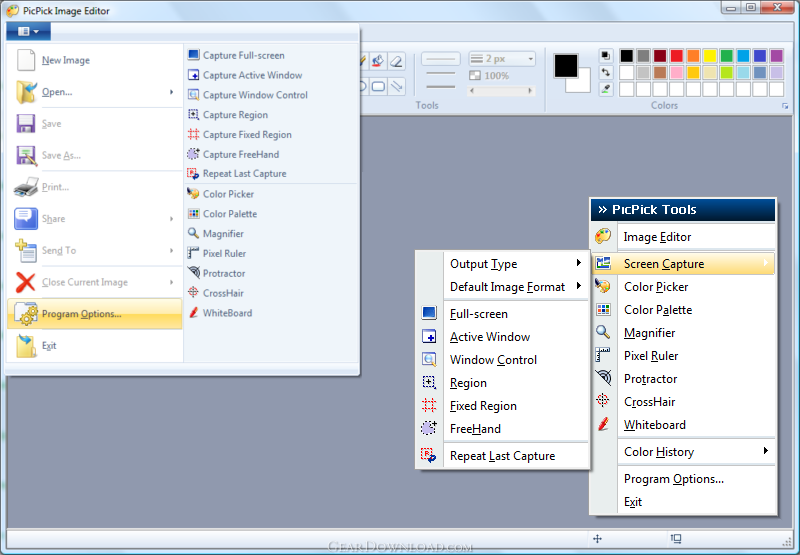
The program minimizes to the system tray, and accessing its features is as simple as clicking on its icon. A menu appears listing the program's many useful tools: an image editor, screen capture, color picker, color palette, magnifier, pixel ruler, protractor, crosshair, and whiteboard. We especially liked the image editor, which is basic as far as its features are concerned but which features a clean, intuitive design. The screen capture function was also impressive; we loved that it includes a scrolling capture option that lets users capture Web pages and other scrolling documents all in one image. A well-organized options menu lets users specify how images are saved, which hot keys to use for specific tools, whether to support dual monitors, and much more. PicPick even includes an FTP client that makes it incredibly easy to load its content directly to a Web site. We were a little disappointed that the program didn't seem to include a Help file, but most of the features should be fairly easy to figure out for anyone with basic design or image editing experience. Overall, we found PicPick to be an extremely useful set of tools, and we were impressed with both its features and its attractive design.
PicPick installs and uninstalls without issues. We recommend this program to all users.
What's New: Unicode Support, Improved Image Editor, Shape objects, Improved Text Tool, Improved Effect window
`PicPick describes itself as "all-in-one design tools," and indeed it is. This program makes us think of a Swiss Army Knife, or perhaps a well-stocked, well-organized desk drawer. There are all kinds of helpful tools here, and we think PicPick would be useful to Web designers, graphic designers, and even the average computer user who occasionally needs to work with graphics.
The program minimizes to the system tray, and accessing its features is as simple as clicking on its icon. A menu appears listing the program's many useful tools: an image editor, screen capture, color picker, color palette, magnifier, pixel ruler, protractor, crosshair, and whiteboard. We especially liked the image editor, which is basic as far as its features are concerned but which features a clean, intuitive design. The screen capture function was also impressive; we loved that it includes a scrolling capture option that lets users capture Web pages and other scrolling documents all in one image. A well-organized options menu lets users specify how images are saved, which hot keys to use for specific tools, whether to support dual monitors, and much more. PicPick even includes an FTP client that makes it incredibly easy to load its content directly to a Web site. We were a little disappointed that the program didn't seem to include a Help file, but most of the features should be fairly easy to figure out for anyone with basic design or image editing experience. Overall, we found PicPick to be an extremely useful set of tools, and we were impressed with both its features and its attractive design.
PicPick installs and uninstalls without issues. We recommend this program to all users.
What's New: Unicode Support, Improved Image Editor, Shape objects, Improved Text Tool, Improved Effect window
100% Clean:
 PicPick 3.1.1 is 100% clean
This download (picpick_inst.exe) was tested thoroughly and was found 100% clean. Click "Report Spyware" link on the top if you found this software contains any form of malware, including but not limited to: spyware, viruses, trojans and backdoors.
Related Software:
- HeavyMath Cam 3D Webmaster Edition 3.8 - 3D anaglyph stereo webcam software. Upload via FTP or record to video file.
- Huelix ScreenPlay Screen Recorder 2.0 - Record and broadcast PC screens as Windows Media video in real time!
- GrabXP7 7.0.4 - Image capture, view and print. Grab any user defined area from the screen
- GAX reloaded v2.01 - Contains a colorpicker, a screen ruler, and a screen capture.
- Ashampoo Snap 8 8.0.7 - Ashampoo Snap 8 - So much more than just screenshots
- HyperSnap 7.26.01 - Easy to use yet powerful Screen Capture, Text Capture, Image Editor for Windows
- CaptureXT Screen Capture 3.0.3 - Take screenshots and edit professionally with ease.
- River Past Cam Do 3.1 - Record webcam to AVI, WMV, or optional 3GP, MOV, MP4.
- River Past Cam Do Webmaster Edition 3.1 - Record webcam to AVI, WMV, or optional MOV, MP4, 3GP, or upload to website.
- River Past Screen Recorder 7.8 - Capture screen to AVI video file, with choices of video and audio codecs.
top 10 most downloaded


recommended software
-
- 1AVCenter
- With 1AVCenter you can record your entire screen or part of it directly to AVI or WMV, capture screenshots in JPG, share your screen over the internet...

-
- IconEdit2
- Create and edit icon files for Windows, iPhone, iPad, Apple Watch, and Android with professional yet easy-to-use Icon Editor. IconEdit2 has full suppo...
