Index >> Graphic Apps >> Editors >> IconCool Studio
Report SpywareIconCool Studio 7.70.121108

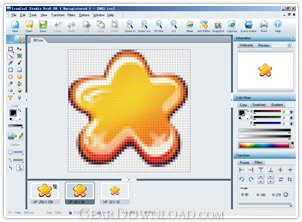 Click to enlarge screenshot
Software Description:
IconCool Studio - A professional Win7/Vista icon editor, icon maker and cursor creator.
IconCool Studio is a complete solution for 32 bit icon editing and creation. The program includes all standard icon editing tools, as well as a variety of filters and effects that can be used to enhance your icon designs. The included Mixer enables you to create custom icons from scratch, using multiple layers and a variety of ready-to-use design elements. In addition to icon and (animated) cursor formats, the program also supports editing of GIF, JPG and PNG image files. Other features included support for Win7/Vista icons, Photoshop plug-in and transfer, multi-format import/export and more.
1. Fantastic IconCool Mixer
IconCool Mixer is a tool which is built in IconCool Studio Pro. It provides users who are not design specialists with a quick mechanism for creating world-class, professional icons. IconCool Mixer also provides other useful functions including image layering and blending styles. You can also, without having extensive graphic design training, create unique icons based on 500+ image elements provided by us.
2.Creates iPhone, Andriod and Unix icons easily
IconCool Studio can create high-quality icons for all versions of iPhone, iPod Touch and iPad. It allows you to create bitmap images for iPhone, Android, Unix application. The bitmap images contain only one format (size and color) and can be saved in different file formats such as optimized BMP, PNG, JPEG and GIF.
3.Powerful marquee operation
On the basis of IconCool Studio 6, marquee tools have been improved and enhanced in IconCool Studio to more conveniently and flexibly select any element of the canvas. Theses tools are Rectangular Marquee Tool, Ellipse Marquee Tool and Polygon Marquee Tool. While using these tools the experience of convenience and swiftness bears the features as well as that of Adobe Photoshop.
Limitations: 30 Days Trial
IconCool Studio is a complete solution for 32 bit icon editing and creation. The program includes all standard icon editing tools, as well as a variety of filters and effects that can be used to enhance your icon designs. The included Mixer enables you to create custom icons from scratch, using multiple layers and a variety of ready-to-use design elements. In addition to icon and (animated) cursor formats, the program also supports editing of GIF, JPG and PNG image files. Other features included support for Win7/Vista icons, Photoshop plug-in and transfer, multi-format import/export and more.
1. Fantastic IconCool Mixer
IconCool Mixer is a tool which is built in IconCool Studio Pro. It provides users who are not design specialists with a quick mechanism for creating world-class, professional icons. IconCool Mixer also provides other useful functions including image layering and blending styles. You can also, without having extensive graphic design training, create unique icons based on 500+ image elements provided by us.
2.Creates iPhone, Andriod and Unix icons easily
IconCool Studio can create high-quality icons for all versions of iPhone, iPod Touch and iPad. It allows you to create bitmap images for iPhone, Android, Unix application. The bitmap images contain only one format (size and color) and can be saved in different file formats such as optimized BMP, PNG, JPEG and GIF.
3.Powerful marquee operation
On the basis of IconCool Studio 6, marquee tools have been improved and enhanced in IconCool Studio to more conveniently and flexibly select any element of the canvas. Theses tools are Rectangular Marquee Tool, Ellipse Marquee Tool and Polygon Marquee Tool. While using these tools the experience of convenience and swiftness bears the features as well as that of Adobe Photoshop.
Limitations: 30 Days Trial
Feature List:
- Supports for the PSD Plug-in, it allows user to transfer an image to IconCool Studio from Adobe Photoshop application
- User can easily edit animation GIF files
- IconCool Studio can custom the windows icons and change program skins
- IconCool Studio supports for various gradient effects
- IconCool Studio can load and export PSD file (supports the transparent) and completely load the PNG, GIF, ANI file and so on
- IconCool Studio supports for the PSD Plug-in, it allows user to transfer an image to IconCool Studio from Adobe Photoshop application
- IconCool Studio can easily edit animation GIF files
- IconCool Studio can custom the windows icons and change current skins
- IconCool Studio supports for various gradient effects
- IconCool Studio can load and export PSD file (supports the transparent) and completely load the PNG, GIF, ANI file and so on
- IconCool Studio can completely and exactly support for 32-bit icon,user can create and edit icons for Windows XP in 32-bit color depth with an alpha channel, and now you can easily create the wonderful semi-transparent XP icons
- IconCool Studio has powerful search function, it can search on computer and search network
- IconCool Studio has convenient snapshot function and icons test function
- IconCool Studio can edit more than 1 icons at one time
- IconCool Studio can set coordinates and radial angle
100% Clean:
 IconCool Studio 7.70.121108 is 100% clean
This download (iconst7p.exe) was tested thoroughly and was found 100% clean. Click "Report Spyware" link on the top if you found this software contains any form of malware, including but not limited to: spyware, viruses, trojans and backdoors.
Related Software:
- IconCool Editor 6.23.130120 - A powerful icon editor, cursor maker and ani creator.
- ASCII Art Generator 3.2.4.6 - Convert pictures into amazing colorful and readable text quickly and easily
- Colour Studio 2.0 - 5 plug-in filters for use with Adobe Photoshop or compatible host applications
- AKVIS Retoucher 6.0 - AKVIS Retoucher is an efficient software for photo restoration and retouching.
- FotoBatch 5.1.3.0818 - It will allow you to convert and processing image files using scripts.
- Project5 Photocut Processor 1.0.10.1005 - Bitmap tracer (raster to vector), realistic photo effect in vinyl decals
- FunPhotor 6.2003 - Fun Photo Creator - Put Your Face on Fantasy & Fun Photo!
- PixBuilder Studio 1.31 - PixBuilder Studio is graphic software for photo editing and images manipulation.
- AKVIS Stamp 3.0 - AKVIS Stamp - Image Healing Tool for seamless defects removal and object cloning
- RPE Photo 3.0 - Easy Digital Photo Resizing, Printing and Enhancement. Learn in Minutes!
top 10 most downloaded


recommended software
-
- 1AVCenter
- With 1AVCenter you can record your entire screen or part of it directly to AVI or WMV, capture screenshots in JPG, share your screen over the internet...

-
- IconEdit2
- Create and edit icon files for Windows, iPhone, iPad, Apple Watch, and Android with professional yet easy-to-use Icon Editor. IconEdit2 has full suppo...
