Index >> Graphic Apps >> Gallery & Cataloging Tools >> FirmTools RedEyeBot
Report SpywareFirmTools RedEyeBot 1.0

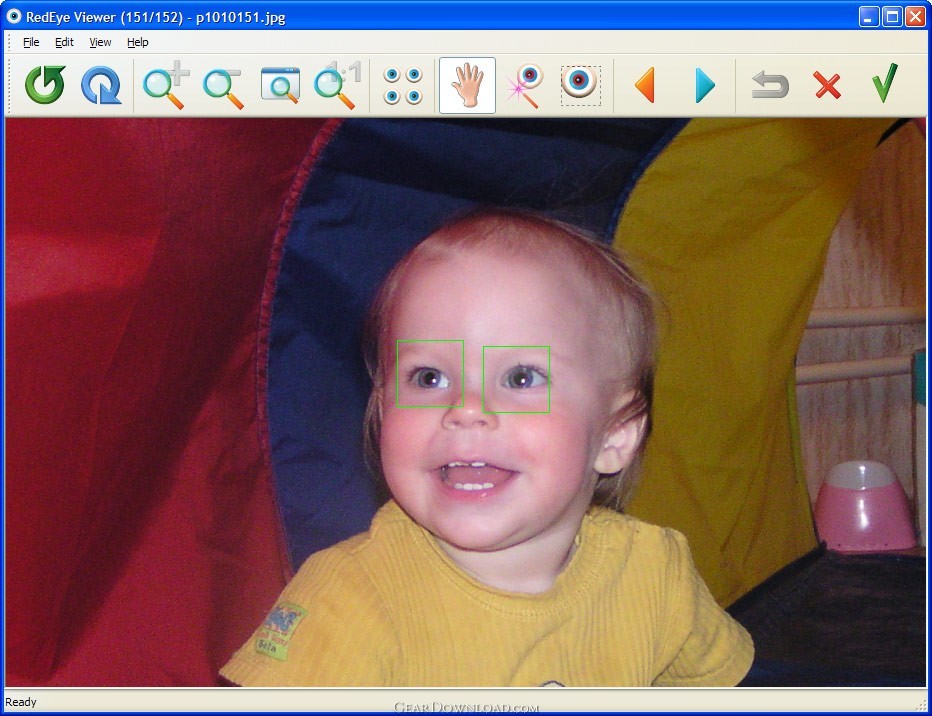 Click to enlarge screenshot
Software Description:
FirmTools RedEyeBot - Remove red-eye automatically from multiple pictures
Remove red-eye automatically from a bunch of digital pictures! FirmTools RedEyeBot scans your entire collection of digital photos or any part of it, detecting and removing red-eye completely automatically. Like the original better? You always have an option to roll-back any image to its original state.
The red-eye effect appears on film and digital photographs when you light a human face with a flash. The flash causes the bright red reflection deep inside of an eye. Removing the red-eye effect greatly enhances the appearance of faces in pictures.
It's no fun opening and editing each and every digital picture manually from the hundreds of images you've shot with a flash. There are various tools on the market that claim to reduce the red-eye effect, but the majority of these tools require that you open images one by one and select the areas that suffer from the red-eye effect.
FirmTools RedEyeBot removes the hassle of manual red-eye reduction once and forever! Processing hundreds of photographs is just a matter of minutes thanks to the ability of FirmTools RedEyeBot to detect human faces and red eyes.
Process all images at once, specify folders or select a set of images. FirmTools RedEyeBot will process your selection quickly and efficiently no matter how many images you select!
Every once in a while, the original photograph makes you happier than the corrected one. Even though this does not frequently happen, FirmTools RedEyeBot backs up each processed image for easy one-click restoration. If you're not completely happy with the result, just click a button and return the original image!
Every once in a while, you might want to work on a picture in an assisted-automatic or even a fully-manual mode. FirmTools RedEyeBot provides you an easy way to remove the red-eye effect by defining an area that contains the red eyes. After you do this, FirmTools RedEyeBot processes your selection and removes the red-eye within it automatically.
Limitations: Red-eye remove operation disabled
Remove red-eye automatically from a bunch of digital pictures! FirmTools RedEyeBot scans your entire collection of digital photos or any part of it, detecting and removing red-eye completely automatically. Like the original better? You always have an option to roll-back any image to its original state.
The red-eye effect appears on film and digital photographs when you light a human face with a flash. The flash causes the bright red reflection deep inside of an eye. Removing the red-eye effect greatly enhances the appearance of faces in pictures.
It's no fun opening and editing each and every digital picture manually from the hundreds of images you've shot with a flash. There are various tools on the market that claim to reduce the red-eye effect, but the majority of these tools require that you open images one by one and select the areas that suffer from the red-eye effect.
FirmTools RedEyeBot removes the hassle of manual red-eye reduction once and forever! Processing hundreds of photographs is just a matter of minutes thanks to the ability of FirmTools RedEyeBot to detect human faces and red eyes.
Process all images at once, specify folders or select a set of images. FirmTools RedEyeBot will process your selection quickly and efficiently no matter how many images you select!
Every once in a while, the original photograph makes you happier than the corrected one. Even though this does not frequently happen, FirmTools RedEyeBot backs up each processed image for easy one-click restoration. If you're not completely happy with the result, just click a button and return the original image!
Every once in a while, you might want to work on a picture in an assisted-automatic or even a fully-manual mode. FirmTools RedEyeBot provides you an easy way to remove the red-eye effect by defining an area that contains the red eyes. After you do this, FirmTools RedEyeBot processes your selection and removes the red-eye within it automatically.
Limitations: Red-eye remove operation disabled
100% Clean:
 FirmTools RedEyeBot 1.0 is 100% clean
This download (redeyebot.exe) was tested thoroughly and was found 100% clean. Click "Report Spyware" link on the top if you found this software contains any form of malware, including but not limited to: spyware, viruses, trojans and backdoors.
Related Software:
- ! - ImageM8 6.00 Relea - ImageM8 is a complete, self contained, image management system for Windows.
- PicaJet FX 2.6.5 - Popular & easy-to-use digital photo and image management software. Free to try!
- DzSoft Slide Show 2.0.0.2 - View your photos in an aesthetical way in a slide show with added captions.
- Thumb Buddy 2.1a - Create stylish photo albums of all your precious digital pictures in a snap.
- AlbumWeb Pro 2.9 - Create stunning multimedia-rich photo albums that can be published on the web!
- My Photo Album Edit 2.15 - A fast, stable, user-friendly image browser,converter and album editor.
- Photo Packager 1.6 - PhotoPackager creates richness and colorful web photo album with clicks.
- My Pictures 3D Album 0.96 - Create 3D photo albums and share them with your friends for free.
- PicaJet Photo Organizer 2.6.5 - Popular & easy-to-use digital photo album software. Free!
- Photo Sorter 1.2.0.68 - Organize your photo folders chronologically based on EXIF information
top 10 most downloaded


recommended software
-
- 1AVCenter
- With 1AVCenter you can record your entire screen or part of it directly to AVI or WMV, capture screenshots in JPG, share your screen over the internet...

-
- IconEdit2
- Create and edit icon files for Windows, iPhone, iPad, Apple Watch, and Android with professional yet easy-to-use Icon Editor. IconEdit2 has full suppo...
