Index >> Graphic Apps >> Other >> eDocuments Scan
Report SpywareeDocuments Scan 5.6.13

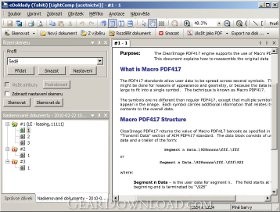 Click to enlarge screenshot
Software Description:
eDocuments Scan - Sophisticated program for document scanning and export to PDF.
Basic Features
* Efficient document scanning
* Sophisticated user interface
* Parallel processing with high throughput
* Save documents to PDF
Compatible Scanners
* Almost all scanners or MFD (Multi Function Device) in use today
* Flatbad scanners
* Middle-rande and High-End scanners with feeder, duplex scanners
* Twain 1.9
* WIA drivers - V1 (Windows XP) and V2 (Windows Vista/7)
Batch scanning
* Scan more documents at one time
* Separation sheets - automatic detection of the new document
* Blank page detection - blank pages are detected and removed from further processnig
Image Enhancement
eDocuments Scan is using several optimalization techniques to achieve the best document quality and minimize the size of the document, such as the following:
* Smast Quality Control - the application automatically selects the most suitable compression and other settings for the scanned document, however the image is still available in other compression levels and user can select another one.
* Adaptive threshold - a technique to preserve the readability of the text when converting the image to the black-and-white format.
* Deskew - detection of the inclination of the scanned image and its automatic correction.
* Post-scanning operations - e.g. the rotation function can be applied to every scanned image.
* User modules - custom modules can be add, e.g. to remove specific background.
Supported Formats
* Support of many common file formats (JPEG, PNG, TIFF, GIF, BMP, etc.)
* Industry standard TIFF compressions: CCITT T.6 (Group 4), CCITT T.3, LZW, JPEG
* Save documents to PDF
What's New: PDF/A Support
Limitations: 10 Days Trial
Basic Features
* Efficient document scanning
* Sophisticated user interface
* Parallel processing with high throughput
* Save documents to PDF
Compatible Scanners
* Almost all scanners or MFD (Multi Function Device) in use today
* Flatbad scanners
* Middle-rande and High-End scanners with feeder, duplex scanners
* Twain 1.9
* WIA drivers - V1 (Windows XP) and V2 (Windows Vista/7)
Batch scanning
* Scan more documents at one time
* Separation sheets - automatic detection of the new document
* Blank page detection - blank pages are detected and removed from further processnig
Image Enhancement
eDocuments Scan is using several optimalization techniques to achieve the best document quality and minimize the size of the document, such as the following:
* Smast Quality Control - the application automatically selects the most suitable compression and other settings for the scanned document, however the image is still available in other compression levels and user can select another one.
* Adaptive threshold - a technique to preserve the readability of the text when converting the image to the black-and-white format.
* Deskew - detection of the inclination of the scanned image and its automatic correction.
* Post-scanning operations - e.g. the rotation function can be applied to every scanned image.
* User modules - custom modules can be add, e.g. to remove specific background.
Supported Formats
* Support of many common file formats (JPEG, PNG, TIFF, GIF, BMP, etc.)
* Industry standard TIFF compressions: CCITT T.6 (Group 4), CCITT T.3, LZW, JPEG
* Save documents to PDF
What's New: PDF/A Support
Limitations: 10 Days Trial
Feature List:
- Efficient document scanning
- Sophisticated user interface
- Parallel processing with high throughput
- Almost all scanners or MFD (Multi Function Device) in use today
- Flatbad scanners
- Middle-rande and High-End scanners with feeder, duplex scanners
- Twain 1.9
- WIA drivers - V1 (Windows XP) and V2 (Windows Vista/7)
- Scan more documents at one time
- Separation sheets - automatic detection of the new document
- Blank page detection – blank pages are detected and removed from further processnig
- Smast Quality Control - the application automatically selects the most suitable compression and other settings for the scanned document, however the image is still available in other compression levels and user can select another one
- Adaptive threshold – a technique to preserve the readability of the text when converting the image to the black-and-white format
- Deskew - detection of the inclination of the scanned image and its automatic correction
- Post-scanning operations - e.g. the rotation function can be applied to every scanned image
- User modules – custom modules can be add, e.g. to remove specific background
- Support of many common file formats (JPEG, PNG, TIFF, GIF, BMP, etc.)
- Industry standard TIFF compressions: CCITT T.6 (Group 4), CCITT T.3, LZW, JPEG
- Save documents to PDF
- Barcode recognition - 1d (EAN 13, Code 128, Code 39, etc.), 2d (PDF417, Data Matrix, QR Code, etc.). The extracted data can be sent to further processing or used for file naming or for document separation
- Definition of file and directory naming scheme
- Automatic file indexing
- Possibility to call an external application to process the scanned data
- Save documents to directory
- Send by email
- Send documents to Web Sevice
- Integration with other applications
- COM API with examples is part of the SDK
- Prepared interfaces for Web Services (Java, .Net)
- User modules for data export - C++, JavaScript
100% Clean:
 eDocuments Scan 5.6.13 is 100% clean
This download (eDocumentsScan-5.6.13.0-en.msi) was tested thoroughly and was found 100% clean. Click "Report Spyware" link on the top if you found this software contains any form of malware, including but not limited to: spyware, viruses, trojans and backdoors.
Related Software:
- TiffCombine 1.5 - Combine TIFF files easily
- CD & DVD Box Labeler Pro 2016 1.9.97r2 - Design your own custom CD, DVD & Blu-Ray Labels with this easy to use software.
- Ashampoo Photo Mailer 1.0.8 - Ashampoo Photo Mailer - the easiest way to share photos through email.
- Media Resizer FREE thumbnail creator 2.57 - Creating image thumbnails has never been easier!
- Pocket Wallpaper 1.01 - Create themes and wallpaper for PocketPC and other mobile devices.
- Kaleider 4.9.2 - Kaleider emulates kaleidoscope, mirroring, 3D mirroring and funneling effects.
- Photo to PSP 1.10 - Easy transfer and resize of photos to PlayStation Portable, PSP
- ColorMania 5.0 - Color Picker with Eyedropper and Screen Magnifier
- ConceptDraw for Mac 7.6 - Discover the world of visual communication
- ConceptDraw 7.5 - Discover the world of visual communication
top 10 most downloaded


recommended software
-
- 1AVCenter
- With 1AVCenter you can record your entire screen or part of it directly to AVI or WMV, capture screenshots in JPG, share your screen over the internet...

-
- IconEdit2
- Create and edit icon files for Windows, iPhone, iPad, Apple Watch, and Android with professional yet easy-to-use Icon Editor. IconEdit2 has full suppo...
