Index >> Graphic Apps >> Screen Capture >> Easy Screen Capture
Report SpywareEasy Screen Capture 2.0.4

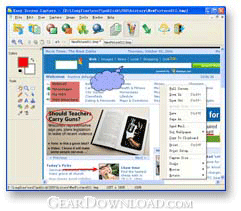 Click to enlarge screenshot
Software Description:
Easy Screen Capture - Capture screen and scrolling Web pages, edit professional screenshot images.
Easy Screen Capture is a full featured screen capture tool that can capture images from full screen, active window, controls, rectangles, rounds, and ellipses from your desktop. It can automatically scroll your browser to capture entire web pages and can capture images from DirectX games and movies. Captured images can be edited or modified in appearance to suit user requirements and exported to the most popular file types such as JPG, GIF, PNG and BMP. You can add text annotation, arrows, shapes and other objects on images using drawing tools. It also has other normal editing tools, including resize, blur, sharpen, and color balance. If you make a mistake, the unique undo feature can undo anything. Captured images can also be printed on pages, copied and e-mailed. All screen capture operations can alternatively be performed via user defined hotkeys. Easy Screen Capture can save captured images automatically. It maintains a capture history to quickly open, rename, edit and organize previous images. With this useful program, you can make professional screenshots for inclusion in Word documents, online tutorials, manuals, presentations handouts, promotion material, websites, emails and so on. Easy Screen Capture has easy-to-use interface, it boasts a short learning curve and incorporates many advanced image capture and manipulation features, will be suitable for computer users of all levels, from beginner to professional.
Limitations: 30 Days Trial
Easy Screen Capture is a full featured screen capture tool that can capture images from full screen, active window, controls, rectangles, rounds, and ellipses from your desktop. It can automatically scroll your browser to capture entire web pages and can capture images from DirectX games and movies. Captured images can be edited or modified in appearance to suit user requirements and exported to the most popular file types such as JPG, GIF, PNG and BMP. You can add text annotation, arrows, shapes and other objects on images using drawing tools. It also has other normal editing tools, including resize, blur, sharpen, and color balance. If you make a mistake, the unique undo feature can undo anything. Captured images can also be printed on pages, copied and e-mailed. All screen capture operations can alternatively be performed via user defined hotkeys. Easy Screen Capture can save captured images automatically. It maintains a capture history to quickly open, rename, edit and organize previous images. With this useful program, you can make professional screenshots for inclusion in Word documents, online tutorials, manuals, presentations handouts, promotion material, websites, emails and so on. Easy Screen Capture has easy-to-use interface, it boasts a short learning curve and incorporates many advanced image capture and manipulation features, will be suitable for computer users of all levels, from beginner to professional.
Limitations: 30 Days Trial
100% Clean:
 Easy Screen Capture 2.0.4 is 100% clean
This download (esc2_setup.exe) was tested thoroughly and was found 100% clean. Click "Report Spyware" link on the top if you found this software contains any form of malware, including but not limited to: spyware, viruses, trojans and backdoors.
Related Software:
- HeavyMath Cam 3D Webmaster Edition 3.8 - 3D anaglyph stereo webcam software. Upload via FTP or record to video file.
- Huelix ScreenPlay Screen Recorder 2.0 - Record and broadcast PC screens as Windows Media video in real time!
- GrabXP7 7.0.4 - Image capture, view and print. Grab any user defined area from the screen
- GAX reloaded v2.01 - Contains a colorpicker, a screen ruler, and a screen capture.
- Ashampoo Snap 8 8.0.7 - Ashampoo Snap 8 - So much more than just screenshots
- HyperSnap 7.26.01 - Easy to use yet powerful Screen Capture, Text Capture, Image Editor for Windows
- CaptureXT Screen Capture 3.0.3 - Take screenshots and edit professionally with ease.
- River Past Cam Do 3.1 - Record webcam to AVI, WMV, or optional 3GP, MOV, MP4.
- River Past Cam Do Webmaster Edition 3.1 - Record webcam to AVI, WMV, or optional MOV, MP4, 3GP, or upload to website.
- River Past Screen Recorder 7.8 - Capture screen to AVI video file, with choices of video and audio codecs.
top 10 most downloaded


recommended software
-
- 1AVCenter
- With 1AVCenter you can record your entire screen or part of it directly to AVI or WMV, capture screenshots in JPG, share your screen over the internet...

-
- IconEdit2
- Create and edit icon files for Windows, iPhone, iPad, Apple Watch, and Android with professional yet easy-to-use Icon Editor. IconEdit2 has full suppo...
