Index >> Graphic Apps >> CAD >> DWG Recovery Toolbox
Report SpywareDWG Recovery Toolbox 2.0.1

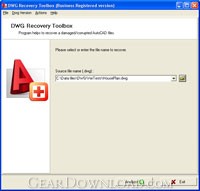 Click to enlarge screenshot
Software Description:
DWG Recovery Toolbox - Analyzes DWG files, allows saving this data into clean illustrations
Choose DWG Recovery Toolbox if you encounter difficulties with AutoCAD illustrations, this program may easily get your data back without any losses, difficulties and other problems of you. The recovery of corrupted illustrations is fully automated, some kind of additional instructions, explanations and guidelines are not needed due to the ease of DWG Recovery Toolbox. However, you may get the detailed description of data recovery steps, it is published on the website of application developer. In the same time, there is no need to waste it for useless activities, you may simply get the installer of DWG Recovery Toolbox and follow its guidelines, it is free, you may evaluate the ease of AutoCAD recovery tool and its efficiency as well by applying this tool for your DWG recovery needs. Please follow the instructions of data recovery application and install this program on any PC in the local area network, DWG Recovery Toolbox works under all available hw configurations, you may apply this solution anywhere. The interface of selected data recovery tool is easy to use therefore the processing of DWG illustrations can be started immediately and without any efforts of you, open DWG Recovery Toolbox as soon as you encounter DWG corruption problems and follow its instructions. Since it looks like the process of file decompression, there is no need for additional explanations, just proceed to the file selection dialog and make sure everything looks to be correct. After the final checks of selected path you may use the Next softkey to start the process of DWG illustration analysis, it is fully automated so you should wait for the end of data recovery it is all you need. Please be patient if the file to be processed is too large and the analysis is started on slower computer, in this case the processing of selected document may take some time. Please do not interrupt the recovery of selected document and wait for the end of DWG repair.
What's New: Added fixes of errors.
Limitations: Don not save a recovered data.
Choose DWG Recovery Toolbox if you encounter difficulties with AutoCAD illustrations, this program may easily get your data back without any losses, difficulties and other problems of you. The recovery of corrupted illustrations is fully automated, some kind of additional instructions, explanations and guidelines are not needed due to the ease of DWG Recovery Toolbox. However, you may get the detailed description of data recovery steps, it is published on the website of application developer. In the same time, there is no need to waste it for useless activities, you may simply get the installer of DWG Recovery Toolbox and follow its guidelines, it is free, you may evaluate the ease of AutoCAD recovery tool and its efficiency as well by applying this tool for your DWG recovery needs. Please follow the instructions of data recovery application and install this program on any PC in the local area network, DWG Recovery Toolbox works under all available hw configurations, you may apply this solution anywhere. The interface of selected data recovery tool is easy to use therefore the processing of DWG illustrations can be started immediately and without any efforts of you, open DWG Recovery Toolbox as soon as you encounter DWG corruption problems and follow its instructions. Since it looks like the process of file decompression, there is no need for additional explanations, just proceed to the file selection dialog and make sure everything looks to be correct. After the final checks of selected path you may use the Next softkey to start the process of DWG illustration analysis, it is fully automated so you should wait for the end of data recovery it is all you need. Please be patient if the file to be processed is too large and the analysis is started on slower computer, in this case the processing of selected document may take some time. Please do not interrupt the recovery of selected document and wait for the end of DWG repair.
What's New: Added fixes of errors.
Limitations: Don not save a recovered data.
100% Clean:
 DWG Recovery Toolbox 2.0.1 is 100% clean
This download (DWGRecoveryToolboxSetup.exe) was tested thoroughly and was found 100% clean. Click "Report Spyware" link on the top if you found this software contains any form of malware, including but not limited to: spyware, viruses, trojans and backdoors.
Related Software:
- ABViewer 9.1 - CAD DWG DXF HPGL TIFF CGM SVG WMF STEP IGES STL SAT viewer, editor and converter
- Visual Drawing Maker 1.13 - Convert CAD files into self viewing executable (*.exe) files.
- MITCalc3D for SolidWorks 1.61 - Mechanical, Industrial and Technical Calculations for SolidWorks
- AutoQ3D CAD 5.10 - Full CAD application that let you make a lot of things in 2D & 3D
- progeCAD Professional AutoCAD Clone 2011.2.0.9 - progeCAD AutoCAD DWG Clone, 1/10th the cost, no learning curve for AutoCAD users
- DWF to DWG Converter 2007 2010 - Instantly convert DWF files to AutoCAD DWG and DXF files.
- AutoDWG Attribute Extractor 2.8 - AutoDWG Attribute Extractor, extract attribute information
- Maze Creator PRO 1.70 - Create random customized mazes with solution; add pictures, text, change shape
- ACAD DWG Viewer Pro 3 - DWGSee, a lite and fast DWG/DXF/DWF Viewer, batch print DWG/DXF/DWF files.
- VaryTable 2.1.0005 - Converts any selected text array in a CAD drawing into spread sheet cell table
top 10 most downloaded


recommended software
-
- 1AVCenter
- With 1AVCenter you can record your entire screen or part of it directly to AVI or WMV, capture screenshots in JPG, share your screen over the internet...

-
- IconEdit2
- Create and edit icon files for Windows, iPhone, iPad, Apple Watch, and Android with professional yet easy-to-use Icon Editor. IconEdit2 has full suppo...
