Index >> Graphic Apps >> Editors >> Color Correction Wizard
Report SpywareColor Correction Wizard 1.1

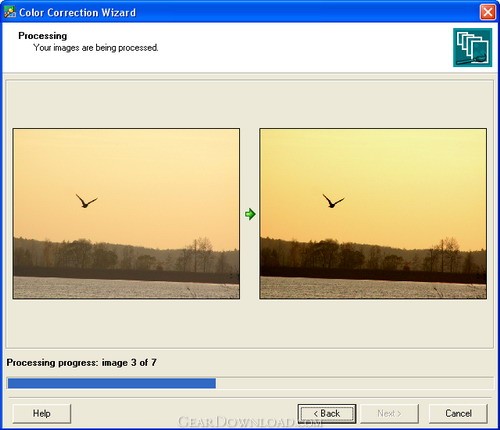 Click to enlarge screenshot
Software Description:
Color Correction Wizard - Batch imaging software for quick and effective color correction.
Now completely free! Color Correction Wizard is an indispensable tool in photography, capable of turning even dull images into splashes of color. This program easily fixes a host of common digital imaging problems performing color correction of large collections of images within a couple of minutes. The program effectively solves poor contrast and color balance problems providing a more natural look to your images or helping achieve richer colors on batches of images in automatic or manual mode.
Color Correction Wizard has still another useful feature. It can recolor multiple images giving them the same look and feel (color, contrast and brightness). All you need is to select the template image and parameters you want to impose upon other images. This feature can be extremely useful in preparing photos for web galleries.
Images can be corrected or enhanced in Color Correction Wizard in one of the following ways:
- You can let the program automatically correct image levels, contrast and color balance.
- Brightness, contrast and gamma can be adjusted manually.
- You can select the template image (an image that is successful or appropriate in terms of color, brightness or contrast), and the program will apply one or several of its parameters to other images, giving them the same look and feel.
The program can also resize multiple images according to a template image size. This is a useful feature if you need to quickly prepare a large collection of images with similar characteristics: gamma, brightness, contrast and size. The best thing about it is that you don't have to make a tremendous number of adjustments manually or resize images one by one. You don't even have to be familiar with the terms "levels", "contrast", "color balance" and the like.
The program is a useful color correction tool for all digital camera owners, as well as for professional photographers. The program also contains a plugin for creating thumbnails of your photos for web galleries.
Now completely free! Color Correction Wizard is an indispensable tool in photography, capable of turning even dull images into splashes of color. This program easily fixes a host of common digital imaging problems performing color correction of large collections of images within a couple of minutes. The program effectively solves poor contrast and color balance problems providing a more natural look to your images or helping achieve richer colors on batches of images in automatic or manual mode.
Color Correction Wizard has still another useful feature. It can recolor multiple images giving them the same look and feel (color, contrast and brightness). All you need is to select the template image and parameters you want to impose upon other images. This feature can be extremely useful in preparing photos for web galleries.
Images can be corrected or enhanced in Color Correction Wizard in one of the following ways:
- You can let the program automatically correct image levels, contrast and color balance.
- Brightness, contrast and gamma can be adjusted manually.
- You can select the template image (an image that is successful or appropriate in terms of color, brightness or contrast), and the program will apply one or several of its parameters to other images, giving them the same look and feel.
The program can also resize multiple images according to a template image size. This is a useful feature if you need to quickly prepare a large collection of images with similar characteristics: gamma, brightness, contrast and size. The best thing about it is that you don't have to make a tremendous number of adjustments manually or resize images one by one. You don't even have to be familiar with the terms "levels", "contrast", "color balance" and the like.
The program is a useful color correction tool for all digital camera owners, as well as for professional photographers. The program also contains a plugin for creating thumbnails of your photos for web galleries.
Feature List:
- Work with large collections of images with just a few clicks
- Open and save images in common image file formats (jpeg, bmp and png)
- Give a similar style to a large collection of images according to the specified template image (the same color, brightness, contrast and size)
- Adjust brightness, contrast, saturation and color balance of multiple images
- Perform levels, contrast and color balance autocorrection to a collection of images
- Set individual correction parameters for each image
- Set image quality when saving JPEG files
100% Clean:
 Color Correction Wizard 1.1 is 100% clean
This download (ccwinst.exe) was tested thoroughly and was found 100% clean. Click "Report Spyware" link on the top if you found this software contains any form of malware, including but not limited to: spyware, viruses, trojans and backdoors.
Related Software:
- Photo Toolkit 1.7 - Edit digital photos automatically with this handy and complete toolkit for free
- Light Artist 1.5 - Add realistic lighting effects to your images and give them a touch of 3D.
- Red Eye Remover 2.0 - Simple and powerful red eye removal software
- Cartoonist 1.3 - Add a touch of humor to your photos with Cartoonist. Create caricatures easily.
- Red Eye Remover Pro 1.2 - Unique batch imaging software able to automatically detect and fix red eye.
- Photo! Editor 1.1 - Powerful and easy-to-use image editing tools for free
- VCW VicMan's Photo Editor 8.1 - An award-winning image editor with an appealing interface and powerful features.
- ASCII Art Generator 3.2.4.6 - Convert pictures into amazing colorful and readable text quickly and easily
- Colour Studio 2.0 - 5 plug-in filters for use with Adobe Photoshop or compatible host applications
- AKVIS Retoucher 6.0 - AKVIS Retoucher is an efficient software for photo restoration and retouching.
top 10 most downloaded


recommended software
-
- 1AVCenter
- With 1AVCenter you can record your entire screen or part of it directly to AVI or WMV, capture screenshots in JPG, share your screen over the internet...

-
- IconEdit2
- Create and edit icon files for Windows, iPhone, iPad, Apple Watch, and Android with professional yet easy-to-use Icon Editor. IconEdit2 has full suppo...
