Index >> Graphic Apps >> Editors >> Classic Menu for Publisher 2010
Report SpywareClassic Menu for Publisher 2010 5.00

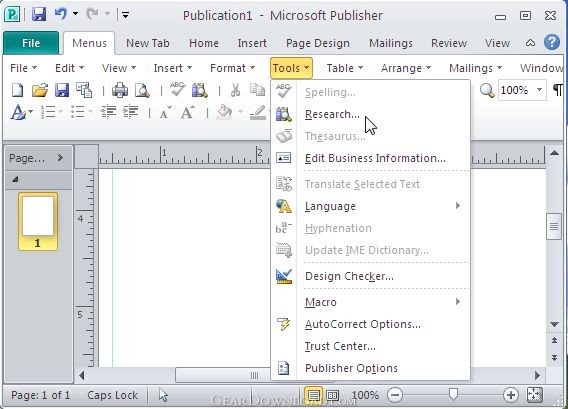 Click to enlarge screenshot
Software Description:
Classic Menu for Publisher 2010 - Bring Classic Menus and Toolbars to Ribbon of Microsoft Publisher 2010
Are you missing the old interface of Publisher 2003 replaced by Ribbon in Publisher 2010? Have you spent a lot of time adjusting yourself to the Ribbon interface of Microsoft Publisher 2010? Or frustrated by searches for new features on the Ribbon? Here is a solution to save your time for the transition, Classic Menu for Microsoft Publisher 2010, bringing Publisher 2003's old looks with old menus into Publisher 2010 Ribbon.
Classic Menu for Publisher 2010, an Office add-in designed for Microsoft Publisher 2010, brings the classic view with menus and toolbars of Publisher 2003 and 2007 into the Ribbon of Microsoft Publisher 2010, adds a "Menus" tab at the far left of the menu bar and makes Publisher 2010 look like Publisher 2003.
All old classic menu items of Publisher 2003 and 2007 are well displayed as a group in the tool bar of the Ribbon, while all new features and commands of Microsoft Publisher 2010 are added to the classic style interface.
The software makes Publisher 2010 look like Publisher 2003/2007. It shows the old menus and toolbars on the ribbon in Microsoft Publisher 2010. If you were using Publisher2007/2003/XP/2000 before, you don't need any trainings or tutorials after upgrading to Microsoft Publisher 2010 with this add-in now.
Supports all languages that are supported by Microsoft Publisher 2010: English, French, German, Italian, Spanish, Portuguese, Japanese, Dutch, Chinese, and more. It automatically shows the menus and toolbars in the language of your Microsoft Office 2010.
Fully compatible with Windows 7, Windows 7 x64, Vista, Vista x64, XP, XP x64, Windows 2003 Server and 2008 Server. Combine 32-bit and 64-bit Classic Menu into one single Exe installation package, so that users don't need to know whether they are using 32-bit or 64-bit of Microsoft Office 2010.
What's New: Combine 32-bit and 64-bit Classic Menu into one single Exe installation package, so that users don't need to know whether they are using 32-bit or 64-bit of Microsoft Office 2010.
Limitations: 15 Days Trial
Are you missing the old interface of Publisher 2003 replaced by Ribbon in Publisher 2010? Have you spent a lot of time adjusting yourself to the Ribbon interface of Microsoft Publisher 2010? Or frustrated by searches for new features on the Ribbon? Here is a solution to save your time for the transition, Classic Menu for Microsoft Publisher 2010, bringing Publisher 2003's old looks with old menus into Publisher 2010 Ribbon.
Classic Menu for Publisher 2010, an Office add-in designed for Microsoft Publisher 2010, brings the classic view with menus and toolbars of Publisher 2003 and 2007 into the Ribbon of Microsoft Publisher 2010, adds a "Menus" tab at the far left of the menu bar and makes Publisher 2010 look like Publisher 2003.
All old classic menu items of Publisher 2003 and 2007 are well displayed as a group in the tool bar of the Ribbon, while all new features and commands of Microsoft Publisher 2010 are added to the classic style interface.
The software makes Publisher 2010 look like Publisher 2003/2007. It shows the old menus and toolbars on the ribbon in Microsoft Publisher 2010. If you were using Publisher2007/2003/XP/2000 before, you don't need any trainings or tutorials after upgrading to Microsoft Publisher 2010 with this add-in now.
Supports all languages that are supported by Microsoft Publisher 2010: English, French, German, Italian, Spanish, Portuguese, Japanese, Dutch, Chinese, and more. It automatically shows the menus and toolbars in the language of your Microsoft Office 2010.
Fully compatible with Windows 7, Windows 7 x64, Vista, Vista x64, XP, XP x64, Windows 2003 Server and 2008 Server. Combine 32-bit and 64-bit Classic Menu into one single Exe installation package, so that users don't need to know whether they are using 32-bit or 64-bit of Microsoft Office 2010.
What's New: Combine 32-bit and 64-bit Classic Menu into one single Exe installation package, so that users don't need to know whether they are using 32-bit or 64-bit of Microsoft Office 2010.
Limitations: 15 Days Trial
Feature List:
- Easily deploy classic menu and toolbars in Classic Menu Manager
- Easily show or hide Classic Menu and toolbars in Microsoft Publisher 2010
- The classic menu can stay at far right of Ribbon, or between 'File' and 'New Tab' tabs in Ribbon
- The Microsoft Publisher 2007 interface can be positioned along with Ribbon of Microsoft Publisher 2010 or you can completely overlay the latter
- Easily show or hide 'Menus' tab in the Ribbon
- Quickly find and execute the command that you want
100% Clean:
 Classic Menu for Publisher 2010 5.00 is 100% clean
This download (PublisherMenu2010.exe) was tested thoroughly and was found 100% clean. Click "Report Spyware" link on the top if you found this software contains any form of malware, including but not limited to: spyware, viruses, trojans and backdoors.
Related Software:
- Classic Menu for Visio 2010 5.00 - Bring Classic Menus and Toolbars to Ribbon of Microsoft Visio 2010
- Classic Menu for PowerPoint 2010 5.00 - Bring Classic Menus and Toolbars to Ribbon of Microsoft PowerPoint 2010
- ASCII Art Generator 3.2.4.6 - Convert pictures into amazing colorful and readable text quickly and easily
- Colour Studio 2.0 - 5 plug-in filters for use with Adobe Photoshop or compatible host applications
- AKVIS Retoucher 6.0 - AKVIS Retoucher is an efficient software for photo restoration and retouching.
- FotoBatch 5.1.3.0818 - It will allow you to convert and processing image files using scripts.
- Project5 Photocut Processor 1.0.10.1005 - Bitmap tracer (raster to vector), realistic photo effect in vinyl decals
- FunPhotor 6.2003 - Fun Photo Creator - Put Your Face on Fantasy & Fun Photo!
- PixBuilder Studio 1.31 - PixBuilder Studio is graphic software for photo editing and images manipulation.
- AKVIS Stamp 3.0 - AKVIS Stamp - Image Healing Tool for seamless defects removal and object cloning
top 10 most downloaded


recommended software
-
- 1AVCenter
- With 1AVCenter you can record your entire screen or part of it directly to AVI or WMV, capture screenshots in JPG, share your screen over the internet...

-
- IconEdit2
- Create and edit icon files for Windows, iPhone, iPad, Apple Watch, and Android with professional yet easy-to-use Icon Editor. IconEdit2 has full suppo...
