Index >> Graphic Apps >> CAD >> Canvas
Report SpywareCanvas 14

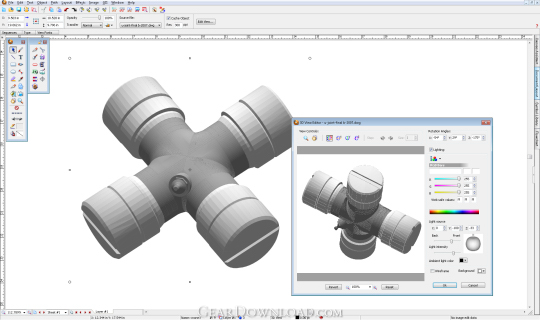 Click to enlarge screenshot
Software Description:
Canvas 14 is how engineers and illustrators communicate with confidence
Canvas 14 is all you need!
Canvas 14 is how engineers and technical graphics professionals illustrate and communicate with confidence. Canvas' minimum precision levels and powerful object illustration and image editing tools ensure that the accuracy of your data is maintained from import right through to publication and beyond. Accelerate and streamline your technical illustration workflow from initial import and design to final presentation, facilitate collaboration, and improve your overall productivity with this complete technical illustration software solution.
Technical Illustration
As the preferred choice of technical illustrators in precision industries, Canvas 14 comes with all the powerful vector object illustration and advanced raster image editing tools you need, in one integrated, flexible design environment.
ANNOTATE, ENHANCE and DIMENSION
Enhance your technical vision with Canvas 14. Add clarity to your illustration with labels or text, add format dimensions, create dynamic charts, or use Canvas' unique lens for a more detailed view.
Create dynamic charts - NEW
Create and customize visually appealing dynamic charts and tables in a variety of formats using data inputted directly into Canvas: no need to import a static, pre-created chart from an external spreadsheet program.
SHARE
Canvas 14 makes it quick and easy to share your vision with professional publications and presentations, and to work collaboratively with colleagues.
Preserve Canvas data in a PDF files - NEW
Convert your Canvas 14 document to a PDF file for sharing or storage and the native Canvas data will remain imbedded in the file. Re-open your file in Canvas for further editing, with no loss of your data or formatting.
What's New: Create dynamic charts and Preserve Canvas data in PDF files
Limitations: 30 Days Trial
TAGS: CAD, AutoCAD, GIS, flowchart
Canvas 14 is all you need!
Canvas 14 is how engineers and technical graphics professionals illustrate and communicate with confidence. Canvas' minimum precision levels and powerful object illustration and image editing tools ensure that the accuracy of your data is maintained from import right through to publication and beyond. Accelerate and streamline your technical illustration workflow from initial import and design to final presentation, facilitate collaboration, and improve your overall productivity with this complete technical illustration software solution.
Technical Illustration
As the preferred choice of technical illustrators in precision industries, Canvas 14 comes with all the powerful vector object illustration and advanced raster image editing tools you need, in one integrated, flexible design environment.
ANNOTATE, ENHANCE and DIMENSION
Enhance your technical vision with Canvas 14. Add clarity to your illustration with labels or text, add format dimensions, create dynamic charts, or use Canvas' unique lens for a more detailed view.
Create dynamic charts - NEW
Create and customize visually appealing dynamic charts and tables in a variety of formats using data inputted directly into Canvas: no need to import a static, pre-created chart from an external spreadsheet program.
SHARE
Canvas 14 makes it quick and easy to share your vision with professional publications and presentations, and to work collaboratively with colleagues.
Preserve Canvas data in a PDF files - NEW
Convert your Canvas 14 document to a PDF file for sharing or storage and the native Canvas data will remain imbedded in the file. Re-open your file in Canvas for further editing, with no loss of your data or formatting.
What's New: Create dynamic charts and Preserve Canvas data in PDF files
Limitations: 30 Days Trial
TAGS: CAD, AutoCAD, GIS, flowchart
100% Clean:
 Canvas 14 is 100% clean
This download (canvas.exe) was tested thoroughly and was found 100% clean. Click "Report Spyware" link on the top if you found this software contains any form of malware, including but not limited to: spyware, viruses, trojans and backdoors.
Related Software:
- ABViewer 9.1 - CAD DWG DXF HPGL TIFF CGM SVG WMF STEP IGES STL SAT viewer, editor and converter
- Visual Drawing Maker 1.13 - Convert CAD files into self viewing executable (*.exe) files.
- MITCalc3D for SolidWorks 1.61 - Mechanical, Industrial and Technical Calculations for SolidWorks
- AutoQ3D CAD 5.10 - Full CAD application that let you make a lot of things in 2D & 3D
- progeCAD Professional AutoCAD Clone 2011.2.0.9 - progeCAD AutoCAD DWG Clone, 1/10th the cost, no learning curve for AutoCAD users
- DWF to DWG Converter 2007 2010 - Instantly convert DWF files to AutoCAD DWG and DXF files.
- AutoDWG Attribute Extractor 2.8 - AutoDWG Attribute Extractor, extract attribute information
- Maze Creator PRO 1.70 - Create random customized mazes with solution; add pictures, text, change shape
- ACAD DWG Viewer Pro 3 - DWGSee, a lite and fast DWG/DXF/DWF Viewer, batch print DWG/DXF/DWF files.
- VaryTable 2.1.0005 - Converts any selected text array in a CAD drawing into spread sheet cell table
top 10 most downloaded


recommended software
-
- 1AVCenter
- With 1AVCenter you can record your entire screen or part of it directly to AVI or WMV, capture screenshots in JPG, share your screen over the internet...

-
- IconEdit2
- Create and edit icon files for Windows, iPhone, iPad, Apple Watch, and Android with professional yet easy-to-use Icon Editor. IconEdit2 has full suppo...
