Index >> Graphic Apps >> Editors >> Bits&Coffee BatchPhoto
Report SpywareBits&Coffee BatchPhoto 4.0

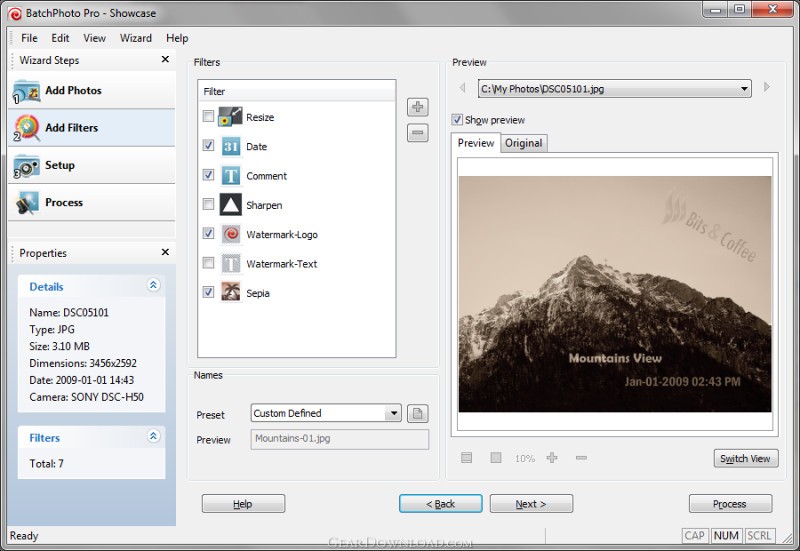 Click to enlarge screenshot
Software Description:
Bits&Coffee BatchPhoto - Easily edit not one, but dozens of photos at once. Try it free!
BatchPhoto is a powerful all-in-one photo manipulation program for Windows that lets photographers, web designers, business people, and families enhance photos quickly and efficiently. Simply select a group of photographs, and with a single operation annotate, touch-up, apply special effects, convert to different image types, resize, and rename every image in the group.
With BatchPhoto you can: Convert images (to JPEG, PDF, TIFF, GIF, PNG and 100 more); Read and convert RAW image formats; Resize pictures automatically and even adjust the DPI; Annotate photos with date/time information, comments and watermarks; Rename hundreds of images in one session; Apply special effects like: sepia, black & white, oil paint, charcoal sketch and more; Touch-up photos by adjust the brightness, sharpness, contrast, and more.
But don't take our word for it, try it for free!
What's New: Completely rewritten user interface with a new Dark-theme; Drag & drop functionality for filters (Date, Watermark, Crop, Resize, Comment); Universal version for Win & Mac and much more
Limitations: 30 Days Trial
BatchPhoto is a powerful all-in-one photo manipulation program for Windows that lets photographers, web designers, business people, and families enhance photos quickly and efficiently. Simply select a group of photographs, and with a single operation annotate, touch-up, apply special effects, convert to different image types, resize, and rename every image in the group.
With BatchPhoto you can: Convert images (to JPEG, PDF, TIFF, GIF, PNG and 100 more); Read and convert RAW image formats; Resize pictures automatically and even adjust the DPI; Annotate photos with date/time information, comments and watermarks; Rename hundreds of images in one session; Apply special effects like: sepia, black & white, oil paint, charcoal sketch and more; Touch-up photos by adjust the brightness, sharpness, contrast, and more.
But don't take our word for it, try it for free!
What's New: Completely rewritten user interface with a new Dark-theme; Drag & drop functionality for filters (Date, Watermark, Crop, Resize, Comment); Universal version for Win & Mac and much more
Limitations: 30 Days Trial
100% Clean:
 Bits&Coffee BatchPhoto 4.0 is 100% clean
This download (batchphoto-ds.exe) was tested thoroughly and was found 100% clean. Click "Report Spyware" link on the top if you found this software contains any form of malware, including but not limited to: spyware, viruses, trojans and backdoors.
Related Software:
- ASCII Art Generator 3.2.4.6 - Convert pictures into amazing colorful and readable text quickly and easily
- Colour Studio 2.0 - 5 plug-in filters for use with Adobe Photoshop or compatible host applications
- AKVIS Retoucher 6.0 - AKVIS Retoucher is an efficient software for photo restoration and retouching.
- FotoBatch 5.1.3.0818 - It will allow you to convert and processing image files using scripts.
- Project5 Photocut Processor 1.0.10.1005 - Bitmap tracer (raster to vector), realistic photo effect in vinyl decals
- FunPhotor 6.2003 - Fun Photo Creator - Put Your Face on Fantasy & Fun Photo!
- PixBuilder Studio 1.31 - PixBuilder Studio is graphic software for photo editing and images manipulation.
- AKVIS Stamp 3.0 - AKVIS Stamp - Image Healing Tool for seamless defects removal and object cloning
- RPE Photo 3.0 - Easy Digital Photo Resizing, Printing and Enhancement. Learn in Minutes!
- Able Fax Tif View 3.17.2.20 - Multi-page tif, pdf, eps, ai, dcx viewer, editor and converter.
top 10 most downloaded


recommended software
-
- 1AVCenter
- With 1AVCenter you can record your entire screen or part of it directly to AVI or WMV, capture screenshots in JPG, share your screen over the internet...

-
- IconEdit2
- Create and edit icon files for Windows, iPhone, iPad, Apple Watch, and Android with professional yet easy-to-use Icon Editor. IconEdit2 has full suppo...
