Index >> Graphic Apps >> Icon Tools >> ArtIcons
Report SpywareArtIcons 5.45

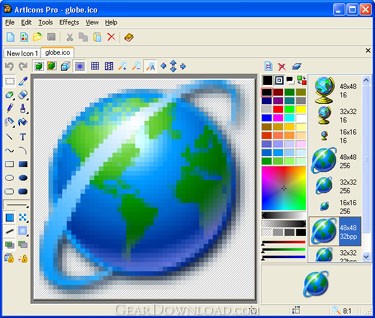 Click to enlarge screenshot
Software Description:
ArtIcons - You can create, edit, import, export and find icons and manage icon libraries
ArtIcons provides great opportunities for working with Windows 10/8/7/Vista/XP icons. You will be able to handle Windows icons with ease. In order to make Windows 10/8/7/Vista icons compatible with Windows XP you can save them without any compression.
Windows 10 introduces a new style of iconography that brings a higher level of detail and sophistication to Windows imagery. First, the style of Windows Aero-style icons is more realistic than illustrative, but not quite photorealistic. The icons are symbolic images - they should look better than photorealistic. Second, icons have a maximum size of 256 x 256, making them suitable for high-DPI displays. These high-resolution icons allow for high visual quality in list views with large icons. Finally, wherever practical, fixed document icons are replaced by thumbnails of the content, making documents easier to identify and find. Thus, ArtIcons is a beeline to refining the visuals of your program and making it more communicative for users.
A picture of a maximum size of 256 x 256 to be used as an icon, in principle, is supported by XP, yet such an icon occupies 400Kb of disk space, which is far more than standard 25Kb of an XP icon. Aha-Soft has again found a way to cast off these shackles: ArtIcons uses advanced PNG compression to save images without losses and supports semitransparent images with 8bit alpha channel. That technology reduces the size of an icon only, leaving the quality invariable.
ArtIcons will help you to obtain the modern Windows 10 look. All you need is just to redesign your program's most prominent icons to use the Aerostyle or Metro style. From this time onwards Vista Icons crafted by ArtIcons will strongly impact users' overall impression of your programs' visual design. ArtIcons will improve the usability of your software by making programs, objects, and actions easier to identify and find.
What's New: ArtIcons Pro changes: Added: Support for SVG, AI, PDF images. Support for large 1024x1024 Mac OS icons. Fixed: Problems with Windows UAC
Limitations: 30 Days Trial
ArtIcons provides great opportunities for working with Windows 10/8/7/Vista/XP icons. You will be able to handle Windows icons with ease. In order to make Windows 10/8/7/Vista icons compatible with Windows XP you can save them without any compression.
Windows 10 introduces a new style of iconography that brings a higher level of detail and sophistication to Windows imagery. First, the style of Windows Aero-style icons is more realistic than illustrative, but not quite photorealistic. The icons are symbolic images - they should look better than photorealistic. Second, icons have a maximum size of 256 x 256, making them suitable for high-DPI displays. These high-resolution icons allow for high visual quality in list views with large icons. Finally, wherever practical, fixed document icons are replaced by thumbnails of the content, making documents easier to identify and find. Thus, ArtIcons is a beeline to refining the visuals of your program and making it more communicative for users.
A picture of a maximum size of 256 x 256 to be used as an icon, in principle, is supported by XP, yet such an icon occupies 400Kb of disk space, which is far more than standard 25Kb of an XP icon. Aha-Soft has again found a way to cast off these shackles: ArtIcons uses advanced PNG compression to save images without losses and supports semitransparent images with 8bit alpha channel. That technology reduces the size of an icon only, leaving the quality invariable.
ArtIcons will help you to obtain the modern Windows 10 look. All you need is just to redesign your program's most prominent icons to use the Aerostyle or Metro style. From this time onwards Vista Icons crafted by ArtIcons will strongly impact users' overall impression of your programs' visual design. ArtIcons will improve the usability of your software by making programs, objects, and actions easier to identify and find.
What's New: ArtIcons Pro changes: Added: Support for SVG, AI, PDF images. Support for large 1024x1024 Mac OS icons. Fixed: Problems with Windows UAC
Limitations: 30 Days Trial
100% Clean:
 ArtIcons 5.45 is 100% clean
This download (aicon.zip) was tested thoroughly and was found 100% clean. Click "Report Spyware" link on the top if you found this software contains any form of malware, including but not limited to: spyware, viruses, trojans and backdoors.
Related Software:
- IconUtils 5.40 - Let your imagination embody in an icon format. IconUtils have all you need.
- Any to Icon 3.53 - A wizard converter to produce your own icons from any image or a Mac OS icon
- IconXP 3.34 - You can edit icons and other small images and customize desktop and folder icons
- Icon to Any 3.23 - A slim wizard converts Windows icons to images and cursors for use on webpages
- ArtIcons Pro 5.45 - You can create, edit, import, export and find icons and manage icon libraries
- Security Toolbar Icons 2013.1 - Security Toolbar Icons - a comprehensive set of security-related handmade icons
- Navigation Toolbar Icons 2011.1 - A set of eye-catching navigation-related icons created by professional artists!
- Image Icon Converter 1.3.5 - Converts BMP, JPEG, GIF, PNG, TGA, TIF and PCX formats into Windows icons.
- Icon Processor 3.14 - Personalize your desktop with nifty icons converted from your photos or images
- Image2Ico 2.3 - Powerful and easy-to-use utility for convert bitmap and gif images to icon
top 10 most downloaded


recommended software
-
- 1AVCenter
- With 1AVCenter you can record your entire screen or part of it directly to AVI or WMV, capture screenshots in JPG, share your screen over the internet...

-
- IconEdit2
- Create and edit icon files for Windows, iPhone, iPad, Apple Watch, and Android with professional yet easy-to-use Icon Editor. IconEdit2 has full suppo...
