Index >> Graphic Apps >> Editors >> ACDSee Pro Mac
Report SpywareACDSee Pro Mac 1.9

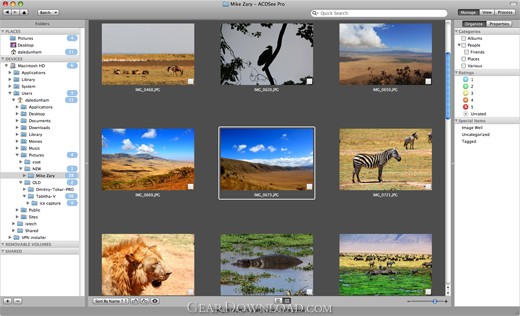 Click to enlarge screenshot
Software Description:
ACDSee Pro Mac - ACDSee Pro (Mac) Fast and Flexible Photo Workflow
Intuitive Workflow-Oriented Interface: To help you accelerate your workflow, ACDSee Pro's interface is built around the key steps of managing, viewing and processing images on the Mac OS. Designed in consultation with pro photographers and Mac users, the streamlined interface is also optimized to keep the focus on your photos while you work. Stay oriented within ACDSee Pro as you move between the Manage, View and Process modes with a simple click. Digital Asset Management Manage mode: Your foundation for an effective workflow is digital asset management. With the flexibility and control offered by ACDSee Pro, you can now manage your digital assets on the Mac platform to your specifications, rather than trying to adapt your workflow to fit the cookie-cutter cataloging imposed by other photo applications. Easily customize ACDSee Pro to suit your unique needs as a photographer, and get ready to experience an accelerated workflow. Browse instantly: Browse your existing collection instantly with ACDSee Pro. Unlike catalog-based photo applications, you don't need to spend valuable time importing files that are already on your system and connected devices. ACDSee Pro automatically detects your devices, including cameras, photo frames and external memory. Browse these devices directly, and simply drag and drop to copy the images onto your hard drive. Access folders and files live, in real time. When you browse a folder, ACDSee Pro instantly populates thumbnails of your photos. Manage your metadata: Get all the information about your images in the Properties pane, which includes ACDSee database information like categories and ratings, file properties like size and resolution, and EXIF data such ISO speed and focal length. Zoom in on data details via the Custom Metadata pane, where you can see at a glance the data that is most important to your workflow. ACDSee Pro also supports IPTC Core, Extended and IIM, as well as XMP sidecar files.
What's New: ACDSee Pro 1.9 resolves minor compatibility issues with the new OS X Lion (10.7) operating system. ACDSee Pro keeps getting better with enhanced usability and new tools to speed up your process.
Limitations: 30 Days Trial
TAGS: digital camera, digital camera software, acdsee, digital photography, digit
Intuitive Workflow-Oriented Interface: To help you accelerate your workflow, ACDSee Pro's interface is built around the key steps of managing, viewing and processing images on the Mac OS. Designed in consultation with pro photographers and Mac users, the streamlined interface is also optimized to keep the focus on your photos while you work. Stay oriented within ACDSee Pro as you move between the Manage, View and Process modes with a simple click. Digital Asset Management Manage mode: Your foundation for an effective workflow is digital asset management. With the flexibility and control offered by ACDSee Pro, you can now manage your digital assets on the Mac platform to your specifications, rather than trying to adapt your workflow to fit the cookie-cutter cataloging imposed by other photo applications. Easily customize ACDSee Pro to suit your unique needs as a photographer, and get ready to experience an accelerated workflow. Browse instantly: Browse your existing collection instantly with ACDSee Pro. Unlike catalog-based photo applications, you don't need to spend valuable time importing files that are already on your system and connected devices. ACDSee Pro automatically detects your devices, including cameras, photo frames and external memory. Browse these devices directly, and simply drag and drop to copy the images onto your hard drive. Access folders and files live, in real time. When you browse a folder, ACDSee Pro instantly populates thumbnails of your photos. Manage your metadata: Get all the information about your images in the Properties pane, which includes ACDSee database information like categories and ratings, file properties like size and resolution, and EXIF data such ISO speed and focal length. Zoom in on data details via the Custom Metadata pane, where you can see at a glance the data that is most important to your workflow. ACDSee Pro also supports IPTC Core, Extended and IIM, as well as XMP sidecar files.
What's New: ACDSee Pro 1.9 resolves minor compatibility issues with the new OS X Lion (10.7) operating system. ACDSee Pro keeps getting better with enhanced usability and new tools to speed up your process.
Limitations: 30 Days Trial
TAGS: digital camera, digital camera software, acdsee, digital photography, digit
100% Clean:
 ACDSee Pro Mac 1.9 is 100% clean
This download (acdseepromac.exe) was tested thoroughly and was found 100% clean. Click "Report Spyware" link on the top if you found this software contains any form of malware, including but not limited to: spyware, viruses, trojans and backdoors.
Related Software:
- ACD FotoCanvas 3.0.3 - Fix and enhance photos with this easy and affordable product. An award-winner.
- Stitcher EZ 1.0 - Make panoramas, posters, virtual tours of your photos easily. Plug-in to ACDSee.
- Stitcher 3.5 - Create panoramas for print, web, film and 3D. This plug-in for ACDSee by REALVIZ
- ACDSee Plugin - RoboEnhancer 1.0 - RoboEnhancer - the script software for batch processing digital image files
- ACDSee Plugin - RealOptimizer 1.0 - Reduce the frustration of image compression work with this optimization software
- PicaView 2.0 - The simple, effective, right click image viewer "add-on" for Windows explorer.
- Morpheus Photo Animator 1.85 - Graphics software for transforming photos with morphing and warping effects.
- ImageFox 2.0 - View images, videos and sound files in most Windows Open/Save_as dialog boxes.
- FotoVac 1.0 - FotoVac is a mass image downloader that downloads pictures from usenet newsgroup
- ACD FotoAngelo 2.0 - Make and share multimedia slide shows and screen savers with ease.
top 10 most downloaded


recommended software
-
- 1AVCenter
- With 1AVCenter you can record your entire screen or part of it directly to AVI or WMV, capture screenshots in JPG, share your screen over the internet...

-
- IconEdit2
- Create and edit icon files for Windows, iPhone, iPad, Apple Watch, and Android with professional yet easy-to-use Icon Editor. IconEdit2 has full suppo...
