Index >> Graphic Apps >> Viewers >> Able Image Browser
Report SpywareAble Image Browser 2.0.14.14

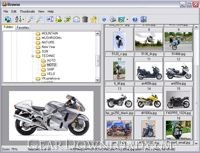 Click to enlarge screenshot
Software Description:
Able Image Browser - Full featured image viewing solution which is fast, simple-to-use, inexpensive.
Able Image Browser is a full featured image viewing solution which is fast, simple-to-use and inexpensive.
Able Image Browser features:
Supports all common image formats: JPEG (JPG and JPE), GIF, Bitmaps (BMP, RLE and DIB), TIFF (TIF and FAX), Metafiles (WMF and EMF), Icons (ICO), PNG, PCX, TGA (TARGA, VDA, ICB, VST, PIX), PBM, PGM and PPM
Converting to Adobe PDF, PostScript PS, EPS, Wireless bitmap.
Thumbnails display with support for memory and disk caching
Images can be added to favorites for later viewing or saving as an image collection
Advanced thumbnail display, printing and exporting functionality
Three printing modes:
1 - Print the currently Selected Image(s).
2 - Print All Images in the current folder.
3 - Print Thubmnails for all images in the current folder.
Automatic choice of best orientation for printing
Assigning of text descriptions to images
Image manipulation functions including rotate, flip, crop, resize and various filters and effects
Multiple Copy / Rename
Removing the Red Eye effect (caused by flash photography).
Color adjusting.
Color mode converting.
Effects (Negative, Bupmap, Lens, Wave, Morph, User filter).
Forwarding of images via e-mail
All standard file and folder management functionality and image conversion features
Auto Adjust Orientation
Fast editing (brightness, contrast, cropping)
Able Image Browser is simple to use.
What's New: + Auto Adjust Orientation + Size of Thumbnails + Size of Preview area + Default starting folder + Fast editing (brightness, contrast, cropping) + New command: Multiple Copy / Rename
Limitations: 30 Days Trial
Able Image Browser is a full featured image viewing solution which is fast, simple-to-use and inexpensive.
Able Image Browser features:
Supports all common image formats: JPEG (JPG and JPE), GIF, Bitmaps (BMP, RLE and DIB), TIFF (TIF and FAX), Metafiles (WMF and EMF), Icons (ICO), PNG, PCX, TGA (TARGA, VDA, ICB, VST, PIX), PBM, PGM and PPM
Converting to Adobe PDF, PostScript PS, EPS, Wireless bitmap.
Thumbnails display with support for memory and disk caching
Images can be added to favorites for later viewing or saving as an image collection
Advanced thumbnail display, printing and exporting functionality
Three printing modes:
1 - Print the currently Selected Image(s).
2 - Print All Images in the current folder.
3 - Print Thubmnails for all images in the current folder.
Automatic choice of best orientation for printing
Assigning of text descriptions to images
Image manipulation functions including rotate, flip, crop, resize and various filters and effects
Multiple Copy / Rename
Removing the Red Eye effect (caused by flash photography).
Color adjusting.
Color mode converting.
Effects (Negative, Bupmap, Lens, Wave, Morph, User filter).
Forwarding of images via e-mail
All standard file and folder management functionality and image conversion features
Auto Adjust Orientation
Fast editing (brightness, contrast, cropping)
Able Image Browser is simple to use.
What's New: + Auto Adjust Orientation + Size of Thumbnails + Size of Preview area + Default starting folder + Fast editing (brightness, contrast, cropping) + New command: Multiple Copy / Rename
Limitations: 30 Days Trial
Feature List:
- Supports all common image formats
- JPEG (JPG and JPE), GIF, Bitmaps (BMP, RLE and DIB), TIFF (TIF and FAX)
- Metafiles (WMF and EMF), Icons (ICO), PNG, PCX, TGA (TARGA, VDA, ICB, VST, PIX), PBM, PGM and PPM
- Converting to Adobe PDF, PostScript PS, EPS, Wireless bitmap
- Thumbnails display with support for memory and disk caching
- Images can be added to favorites for later viewing or saving as an image collection
- Advanced thumbnail display, printing and exporting functionality
- Three printing modes
- 1 - Print the currently Selected Image(s)
- 2 - Print All Images in the current folder
- 3 - Print Thubmnails for all images in the current folder
- Automatic choice of best orientation for printing
- Assigning of text descriptions to images
- Image manipulation functions including rotate, flip, crop, resize and various filters and effects
- Removing the Red Eye effect (caused by flash photography)
- Color adjusting
- Color mode converting
- Effects (Negative, Bupmap, Lens, Wave, Morph, User filter)
- Forwarding of images via e-mail
- All standard file and folder management functionality and image conversion features
- Able Image Browser is simple to use
100% Clean:
 Able Image Browser 2.0.14.14 is 100% clean
This download (imagebrowser_setup.exe) was tested thoroughly and was found 100% clean. Click "Report Spyware" link on the top if you found this software contains any form of malware, including but not limited to: spyware, viruses, trojans and backdoors.
Related Software:
- Easy Photo Slide Show 2.6.3.3 - Display all digital photos as a slide show.
- Able Photo Slide Show 2.8.11.12 - Display all images as a slide show. Executable slideshow,web gallery,screensaver
- Able Page View 1.8.7.17 - Able Page View is a fax and tiff viewer and converter.
- PicViewer 2.74 - PicViewer is an image viewer/converter and file manager.
- I-Cipher AP 2.2.2 - Extremely fast and reliable image file encryptor/decryptor with activity log.
- EXIFViewer 1.2 - EXIF Viewer is the most efficient tool for dealing with extended info in photos
- Picture To Go 1.5.6 - Resize and email your pictures conveniently in one step
- PixGrabber 1.1.23 - Search and download images from Internet. View images from Hard Drive and CDs
- My Photos Screen Saver 1.2 - My Photos Screen Saver is a slideshow screen saver that displays your photos.
- Ashampoo Photo Commander 14 14.0.2 - Multi-purpose program to view, organize and edit images
top 10 most downloaded


recommended software
-
- 1AVCenter
- With 1AVCenter you can record your entire screen or part of it directly to AVI or WMV, capture screenshots in JPG, share your screen over the internet...

-
- IconEdit2
- Create and edit icon files for Windows, iPhone, iPad, Apple Watch, and Android with professional yet easy-to-use Icon Editor. IconEdit2 has full suppo...
