Index >> Games & Entertainment >> Tools & Editors >> D3DGear
Report SpywareD3DGear 4.41.1834

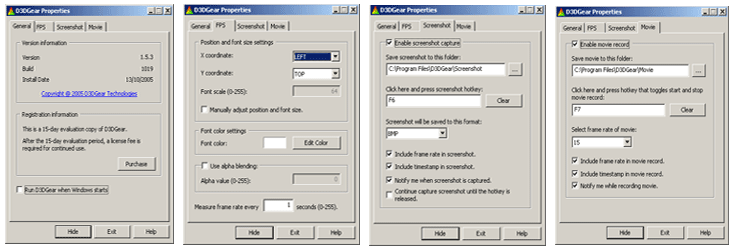 Click to enlarge screenshot
Software Description:
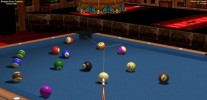
D3DGear - A Very Fast Video Game Recording and Broadcasting Software for PC
D3DGear is a very fast video game recording software, video game recorder and game screen capture software for PC. It allows user to record video game screen without slowing down the game. D3DGears video game recording performance and quality are superior among other game video game recorder software.
D3DGear also is very fast all in one video game broadcasting software, it lets user to live stream video game play to web without affecting game performance. D3DGear broadcasting function is extremely easy use, and it works with low upload speed and it is compatible with all live stream web sites.
In addition, D3DGear can measure video game frame rate (FPS), capture video game screen shot, and P2P stream video game play to remote PC. .
To use D3DGear, simply launch D3DGear prior to start video game, the frame rate of video game will be automatically measured and displayed on screen; recording video game or broadcasting video game is as simple as pressing a hotkey.
D3DGear supports PC video games that use DirectX8, DirectX9, DirectX9Ex, DirectX10, DirectX10.1, DirectX11, DirectX11.1 or OpenGL API. D3DGear runs on 32 and 64 bit of Windows XP, VISTA, Windows 7 and Windows 8.
D3DGear is shareware. After a 15 day trial period, user needs purchase a license to continue use it.
D3DGear has passed Microsoft designed tests for software compatibility and reliability on Windows® 8 and Windows® 7, and has received Windows 8 Compatible and Windows 7 Compatible Logo Certification.
What's New: D3DGear Version 4.41.1834 Fixed the issue where D3DGear didn't work with some WebCam.
Limitations: 15 Days Trial
D3DGear is a very fast video game recording software, video game recorder and game screen capture software for PC. It allows user to record video game screen without slowing down the game. D3DGears video game recording performance and quality are superior among other game video game recorder software.
D3DGear also is very fast all in one video game broadcasting software, it lets user to live stream video game play to web without affecting game performance. D3DGear broadcasting function is extremely easy use, and it works with low upload speed and it is compatible with all live stream web sites.
In addition, D3DGear can measure video game frame rate (FPS), capture video game screen shot, and P2P stream video game play to remote PC. .
To use D3DGear, simply launch D3DGear prior to start video game, the frame rate of video game will be automatically measured and displayed on screen; recording video game or broadcasting video game is as simple as pressing a hotkey.
D3DGear supports PC video games that use DirectX8, DirectX9, DirectX9Ex, DirectX10, DirectX10.1, DirectX11, DirectX11.1 or OpenGL API. D3DGear runs on 32 and 64 bit of Windows XP, VISTA, Windows 7 and Windows 8.
D3DGear is shareware. After a 15 day trial period, user needs purchase a license to continue use it.
D3DGear has passed Microsoft designed tests for software compatibility and reliability on Windows® 8 and Windows® 7, and has received Windows 8 Compatible and Windows 7 Compatible Logo Certification.
What's New: D3DGear Version 4.41.1834 Fixed the issue where D3DGear didn't work with some WebCam.
Limitations: 15 Days Trial
Feature List:
- Automatically measure game frame rate; display frame rate on screen
- Customize frame rate position, size and color
- Measure each game/application independently, simultaneously
- Capture screenshot by pressing hotkey; automatically save screenshot to file
- Save screenshot in file with BMP, JPG, TGA, PNG, PPM or HDR image format
- Continually capture multiple screenshots until hotkey being released
- Include frame rate in screenshot
- Include timestamp in screenshot
- Support both Windows DirectX9 API and OpenGL API
- Support obsolete Windows DirectX8 game
- Start run when Windows starts up
100% Clean:
 D3DGear 4.41.1834 is 100% clean
This download (D3DGearSetup.exe) was tested thoroughly and was found 100% clean. Click "Report Spyware" link on the top if you found this software contains any form of malware, including but not limited to: spyware, viruses, trojans and backdoors.
Related Software:
- Alive! Jigsaw Producer 1.6 - A tool for creating jigsaws from user pictures and video files.
- Game Copy 1.0.5.132 - Copies and/or emulates all major game copy protections.
- Quick Macro 6.6 - record, replay and edit keyboard & mouse macros
- BLZ Extractor 1.0.2.163 - BLZ Extractor is a tool for extracting Nokia N-Gage game containers (blz files).
- GameNow 2.20 - Play 1000+ addicting games with this handy game platform.
- Growler Guncam 3.1.9.0 - Growler Guncam is a game recorder and video capture tool.
- Speed Gear 7.2 - Best games speed hack Software, hack games speed with one click
- ASL Logbook 3.2 - ASL Logbook is a database program for the Advanced Squad Leader game system
- Quick Memory Editor 5.7 - powerful game cheating tool that can modify game data in memory easily
- VirtualDrive 11.5 - Play PC games without inserting the game disc.
top 10 most downloaded


recommended software
-
- SeaWar The Battleship
- Seawar: The Battleship 2 is a strategy game. All the events of the game take place in the sea. The main task is to defeat the enemies. Choose one of f...
-
- Live Billiards
- Version 2 features Straight Pool, 14+1, 3, 8, 9 ball, Snooker, Pyramid, American, Rotation and DeathMatch games. Ball graphics and movements are perfe...