Index >> Development >> Help Tools >> Process Heap Viewer
Report SpywareProcess Heap Viewer 4.5

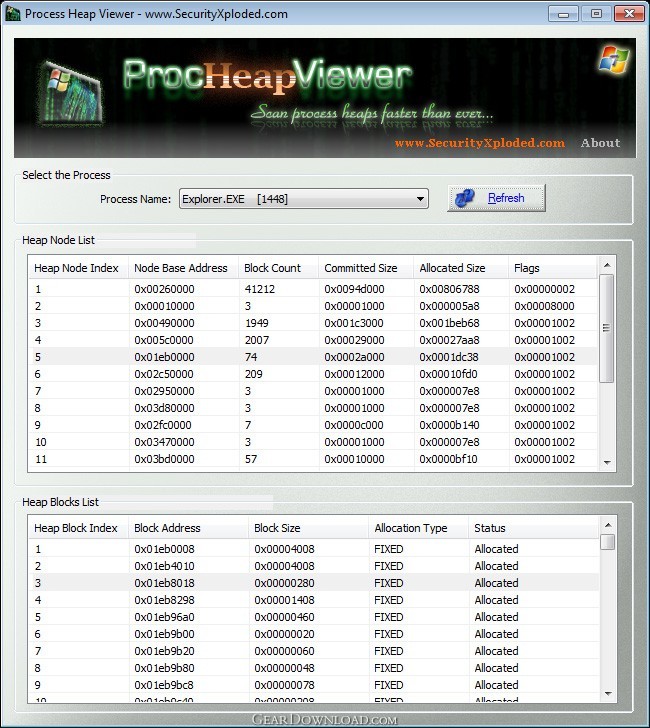 Click to enlarge screenshot
Software Description:
Fast Process Heap Viewer Tool
Process Heap Viewer is the FREE tool to quickly enumerate Process Heap memory on Windows.
It uses much smarter technique than slower Windows heap API functions. This makes it one of the fastest tool for quickly enumerating thousands of process heap blocks. You can enumerate the heaps from normal Windows processes as well as system services.
It is very useful tool for anyone involved in analyzing process heaps. Vulnerability researchers can use it as a companion tool while discovering heap related vulnerabilities.
Here's the quick usage instructions
* Launch ProcHeapViewer by clicking on the binary file. It automatically loads all running processes including services.
* Select any process from the list. Then all the heap nodes for that process will be displayed.
* Now you can click on any of the heap nodes to display all the heap blocks within it.
* Next click on one of the heap block to view its content. You can store this data by clicking on the 'save' button. To get back to the main screen, simply click on 'close' button.
* You can use 'Find' button to search for strings within the selected heap block. Select the 'Unicode' check box for searching Unicode strings.
Process Heap Viewer is fully portable and works on most of the Windows platforms starting from Windows XP to Windows 8.
What's New: Support for Windows 8. Fix for refresh screen problem.
Process Heap Viewer is the FREE tool to quickly enumerate Process Heap memory on Windows.
It uses much smarter technique than slower Windows heap API functions. This makes it one of the fastest tool for quickly enumerating thousands of process heap blocks. You can enumerate the heaps from normal Windows processes as well as system services.
It is very useful tool for anyone involved in analyzing process heaps. Vulnerability researchers can use it as a companion tool while discovering heap related vulnerabilities.
Here's the quick usage instructions
* Launch ProcHeapViewer by clicking on the binary file. It automatically loads all running processes including services.
* Select any process from the list. Then all the heap nodes for that process will be displayed.
* Now you can click on any of the heap nodes to display all the heap blocks within it.
* Next click on one of the heap block to view its content. You can store this data by clicking on the 'save' button. To get back to the main screen, simply click on 'close' button.
* You can use 'Find' button to search for strings within the selected heap block. Select the 'Unicode' check box for searching Unicode strings.
Process Heap Viewer is fully portable and works on most of the Windows platforms starting from Windows XP to Windows 8.
What's New: Support for Windows 8. Fix for refresh screen problem.
100% Clean:
 Process Heap Viewer 4.5 is 100% clean
This download was tested thoroughly and was found 100% clean. Click "Report Spyware" link on the top if you found this software contains any form of malware, including but not limited to: spyware, viruses, trojans and backdoors.
Related Software:
- HelpScribble 7.8.1 - Full-featured help authoring tool for creating help files from start to finish.
- Help Development Studio 1.92 - Create WinHelp and HTML Help files the fast and easy way.
- HTML Help Generator for Visual Basic 6.0 2.0 - HTML Help Generator for Visual Basic 6.0 creates HTML Help for your VB apps
- HTML Help Generator for VS.NET 2003 2.0 - HTML Help Generator for Visual Studio.NET creates Help integrated with your app.
- HelpBreeze HTML Help/JavaHelp Edition 3.0e - A complete visual environment for creating HTML Help (.chm) & JavaHelp files.
- Hitonic MIDlet Protector 2.1.1 - Hitonic MIDlet Protector sets various limitations on launching MIDlets.
- WinCHM - help authoring software 5.131 - CHM creator, CHM editor, Help file, Help you create help file easily.
- Windows HLP To RTF 8.0 - Windows HLP To RTF is designed to convert Microsoft Windows Help (*.HLP) to RTF
- Eltima Serial Port Terminal 5.0 - Eltima Serial Port Terminal - a handy application for testing serial ports.
- Macrobject Word-2-CHM Converter 2007 2007.13.912.651 - Convert Word Doc to CHM, Create HTML Help from Word, Create ebook from Word.
top 10 most downloaded


recommended software
-
- HelpSmith
- HelpSmith is an innovative help authoring tool which allows you to create CHM Help files, Web Help , Word RTF, and Manuals from a single source. The r...
-
- EditPlus
- EditPlus is a text editor, HTML editor, PHP editor and Java editor for Windows. While it can serve as a good Notepad replacement, it also offers many ...