Index >> Development >> Other >> History Explorer
Report SpywareHistory Explorer 2.2.5

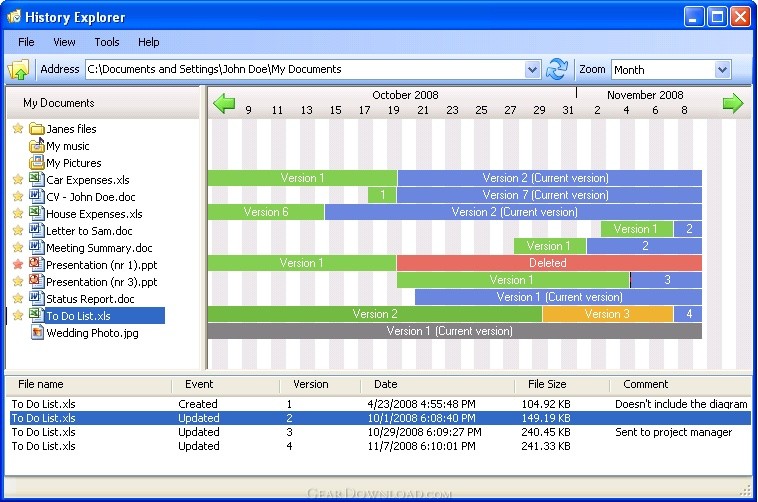 Click to enlarge screenshot
Software Description:
History Explorer - Simple Version Control and a Time Machine for Windows.
Wow, why isn't this included in Windows? Everyone should need it!
Have you ever done big changes to you files and then felt that some of it was better before? You might want to rewind all your work or maybe just look at the file as it was seconds hours or days ago. With History Explorer it is easy. With a clean and simple user interface you can regret any changes you have made to files, undelete files or view entire folders as they were as some point in time. This is a perfect Time Machine for Windows enabling you to go back to any version of any file with just a click.
Have you ever heard about source control or file version control? Well that's what this is about. This is easy file version control that runs on your computer and does all the work for you, and the day you need it (which may well turn out to be every day) you can easily and swiftly access and overview what has been going on to your files. Source control has never been easier! History Explorer is file version control for the common man!
History Explorer is for all of us that work on our computers and save our work in files - Word documents, Presentations, text files, any kind of project files and much more. History Explorer is often used by writers, bloggers, web developers, software developers and much more.
History Explorer is a local backup software that watches selected files and folders for any changes. With a unique user interface you will be able to graphically overview what files you have been working with and when they were changed or deleted. With just one click you can look at old files as they were at any moment in the past.
Have you ever regretted a change you made to a file yesterday? Or accidentally deleted important files? History Explorer is for you! Never again will you say "I wish I hadn't changed that", "I wish I hadn't deleted that file" or "What files have I actually been working on lately?". Give it a try today or you might well regret it tomorrow.
What's New: Maintenance release
Limitations: 30 Days Trial
Wow, why isn't this included in Windows? Everyone should need it!
Have you ever done big changes to you files and then felt that some of it was better before? You might want to rewind all your work or maybe just look at the file as it was seconds hours or days ago. With History Explorer it is easy. With a clean and simple user interface you can regret any changes you have made to files, undelete files or view entire folders as they were as some point in time. This is a perfect Time Machine for Windows enabling you to go back to any version of any file with just a click.
Have you ever heard about source control or file version control? Well that's what this is about. This is easy file version control that runs on your computer and does all the work for you, and the day you need it (which may well turn out to be every day) you can easily and swiftly access and overview what has been going on to your files. Source control has never been easier! History Explorer is file version control for the common man!
History Explorer is for all of us that work on our computers and save our work in files - Word documents, Presentations, text files, any kind of project files and much more. History Explorer is often used by writers, bloggers, web developers, software developers and much more.
History Explorer is a local backup software that watches selected files and folders for any changes. With a unique user interface you will be able to graphically overview what files you have been working with and when they were changed or deleted. With just one click you can look at old files as they were at any moment in the past.
Have you ever regretted a change you made to a file yesterday? Or accidentally deleted important files? History Explorer is for you! Never again will you say "I wish I hadn't changed that", "I wish I hadn't deleted that file" or "What files have I actually been working on lately?". Give it a try today or you might well regret it tomorrow.
What's New: Maintenance release
Limitations: 30 Days Trial
100% Clean:
 History Explorer 2.2.5 is 100% clean
This download (History%20Explorer%20Setup.exe) was tested thoroughly and was found 100% clean. Click "Report Spyware" link on the top if you found this software contains any form of malware, including but not limited to: spyware, viruses, trojans and backdoors.
Related Software:
- Database Architect 2.0 - Define database tables, fields, references, and generate the database
- Binary Browser 6.1 - Programmer file format, structure, search, history and comparison tools
- Transaction 1.6.9 - Online sales interactive data analysis and reporting tool
- CoffeeCup Sitemapper 6.0.341 - Create snazzy sitemaps in seconds!
- Quick Batch File Compiler 3.6.1.0 - Quick Batch File compiler convert batch files into actual program in one click
- FastScript 1.101 - Cross-platform multi-language (VB, JS, Pascal and C++) scripting engine
- Practiline Source Code Line Counter 1.0 - Source code line count software for developers and project managers
- pgISQL (Interactive SQL for PostgreSQL) 2.2.0 - Windows GUI database administrator tool for PostgreSQL
- FlexHEX 2.6 - Advanced hex editor. Can edit files, logical, and physical drives.
- EzALV - generates ALV program using the Standard SAP Function Modules.
top 10 most downloaded


recommended software
-
- HelpSmith
- HelpSmith is an innovative help authoring tool which allows you to create CHM Help files, Web Help , Word RTF, and Manuals from a single source. The r...
-
- EditPlus
- EditPlus is a text editor, HTML editor, PHP editor and Java editor for Windows. While it can serve as a good Notepad replacement, it also offers many ...