Index >> Development >> Help Tools >> Dr.Explain
Report SpywareDr.Explain 4.11.863

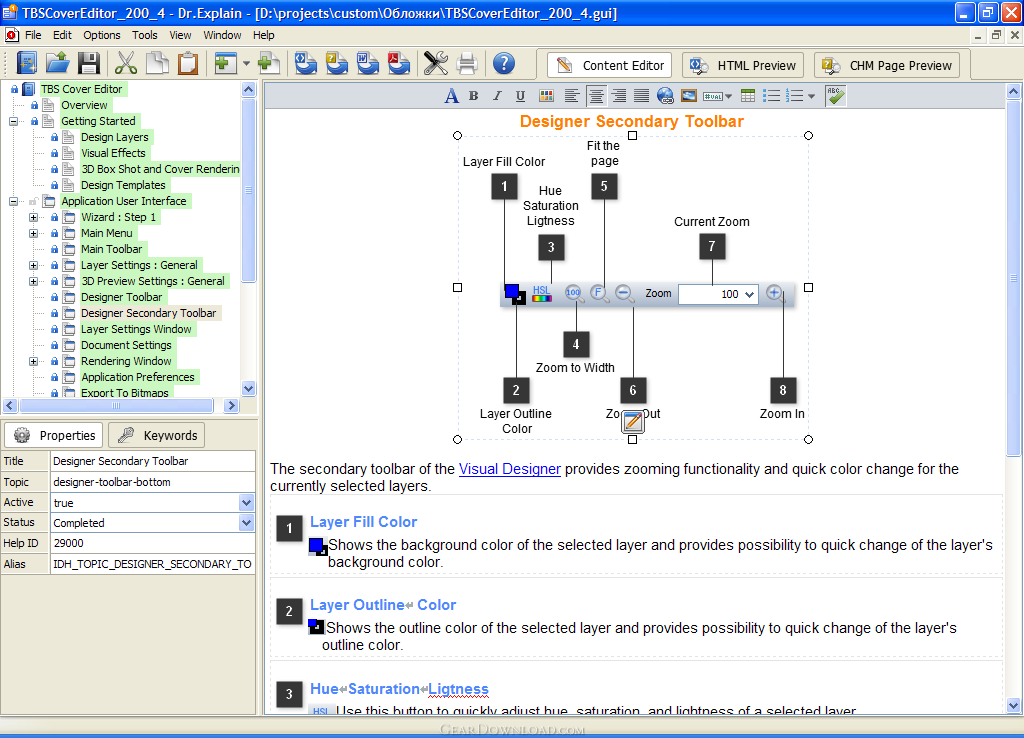 Click to enlarge screenshot
Software Description:
Software help authoring tool. Dr.Explain makes CHM, PDF, and HTML help files.
Dr.Explain is a help authoring tool for rapid creation of help files and user guides. Using its unique auto capture and annotation technology, developers can document their software interfaces almost hands down. When set to work, Dr.Explain parses a live application and automatically produces screenshots of its windows along with a sequence of callouts for each window control. Users only have to add some description to each callout as needed. Dr.Explain can output the results as a set of HTML pages, CHM help file, RTF, or PDF document complete with screenshots, cross-references, menus and an index page. The output is accurate and professional.
Dr.Explain is ideal for software developers, ISV, micro ISV and technical writers. It handles all the complexities of help formatting and generation, allowing them to concentrate on pure writing. This saves them days that would otherwise be wasted. Dr.Explain is also great to keep help documentation in sync with software updates. Since all data is stored in a single source file, developers can easily edit or update any portion of an existing file. In doing this, they are not required to rearrange the entire help or generate a new file. Developers will also benefit from the opportunity to customize the appearance of their help file to make it match their corporate style. They can customize its visual elements, menus and page layout. On top of all this is an affordable price, which is lower than with the majority of other software documentation tools.
What's New: Title page editor;TOC editor;
Dr.Explain is a help authoring tool for rapid creation of help files and user guides. Using its unique auto capture and annotation technology, developers can document their software interfaces almost hands down. When set to work, Dr.Explain parses a live application and automatically produces screenshots of its windows along with a sequence of callouts for each window control. Users only have to add some description to each callout as needed. Dr.Explain can output the results as a set of HTML pages, CHM help file, RTF, or PDF document complete with screenshots, cross-references, menus and an index page. The output is accurate and professional.
Dr.Explain is ideal for software developers, ISV, micro ISV and technical writers. It handles all the complexities of help formatting and generation, allowing them to concentrate on pure writing. This saves them days that would otherwise be wasted. Dr.Explain is also great to keep help documentation in sync with software updates. Since all data is stored in a single source file, developers can easily edit or update any portion of an existing file. In doing this, they are not required to rearrange the entire help or generate a new file. Developers will also benefit from the opportunity to customize the appearance of their help file to make it match their corporate style. They can customize its visual elements, menus and page layout. On top of all this is an affordable price, which is lower than with the majority of other software documentation tools.
What's New: Title page editor;TOC editor;
100% Clean:
 Dr.Explain 4.11.863 is 100% clean
This download was tested thoroughly and was found 100% clean. Click "Report Spyware" link on the top if you found this software contains any form of malware, including but not limited to: spyware, viruses, trojans and backdoors.
Related Software:
- HelpScribble 7.8.1 - Full-featured help authoring tool for creating help files from start to finish.
- Help Development Studio 1.92 - Create WinHelp and HTML Help files the fast and easy way.
- HTML Help Generator for Visual Basic 6.0 2.0 - HTML Help Generator for Visual Basic 6.0 creates HTML Help for your VB apps
- HTML Help Generator for VS.NET 2003 2.0 - HTML Help Generator for Visual Studio.NET creates Help integrated with your app.
- HelpBreeze HTML Help/JavaHelp Edition 3.0e - A complete visual environment for creating HTML Help (.chm) & JavaHelp files.
- Hitonic MIDlet Protector 2.1.1 - Hitonic MIDlet Protector sets various limitations on launching MIDlets.
- WinCHM - help authoring software 5.131 - CHM creator, CHM editor, Help file, Help you create help file easily.
- Windows HLP To RTF 8.0 - Windows HLP To RTF is designed to convert Microsoft Windows Help (*.HLP) to RTF
- Eltima Serial Port Terminal 5.0 - Eltima Serial Port Terminal - a handy application for testing serial ports.
- Macrobject Word-2-CHM Converter 2007 2007.13.912.651 - Convert Word Doc to CHM, Create HTML Help from Word, Create ebook from Word.
top 10 most downloaded


recommended software
-
- HelpSmith
- HelpSmith is an innovative help authoring tool which allows you to create CHM Help files, Web Help , Word RTF, and Manuals from a single source. The r...
-
- EditPlus
- EditPlus is a text editor, HTML editor, PHP editor and Java editor for Windows. While it can serve as a good Notepad replacement, it also offers many ...