Index >> Communications >> Web/Video Cams >> WebCamSplitter Pro
Report SpywareWebCamSplitter Pro 1.5

 Click to enlarge screenshot
Software Description:
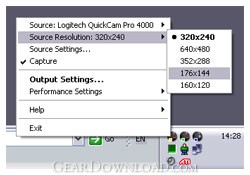
WebCamSplitter Pro - WebCamSplitterPro duplicates the video stream for multiple applications.
It's known that two or more applications cannot use the same stream from the same webcam at the same time. If one application captures a video source, another application cannot reach it because the source is locked. Typical example: you need to give a videoconference with two friends or partners at once. If your videoconference software does not support multiple conferences, you will have to start two instances of the same software. Unfortunately, in this case you may get into trouble because one application will translate video, and the other one will not. What is the solution? It's simple - just use WebCamSplitterPro. Features: 1) Customization of input/output resolutions. You can use a video stream of any resolution mode from the list of webcam supported resolution modes, independently for input and output. This allows to customize your video as you wish. 2) Preview for every application that is used with WebCamSplitterPro. 3) Preview for the output video stream dependent application that is used by WebCamSplitter. 4) Digital Zoom and Pan for every application that is used by WebCamSplitterPro. 5) Desirable frame rate in a video stream. 6) Video stream desirable processing quality. 7) Ability to use Local Media File (AVI, WMV, MPG, BMP, JPG ...) as video source. 8) Virtual audio device. Now using local media file is possible to transfer audio stream to modern IM like MSN. 9) Intelligent Connect feature allows to use IYUV, MPEG4 and other input formats, instead of just RGB24-compatible devices in previous version. 10) Support of DV cameras. 11) One of fastest products on the market 12) User-friendly interface and detailed help. 13) User- friendly interface for color correction control. 14) Text overlay option.15) Brightness and contrast leveling. 16) Added grab still image function and screen capture as video source. Besides, WebCamSplitter is always available via system tray just like your ICQ, AIM or Yahoo IM.
What's New: + RTMP network source support (via RTMPDUMP library and FLVSPLITTER external demuxer project); * Output resolutions customization available in Options
Limitations: Unregistered version shows nag screen.
It's known that two or more applications cannot use the same stream from the same webcam at the same time. If one application captures a video source, another application cannot reach it because the source is locked. Typical example: you need to give a videoconference with two friends or partners at once. If your videoconference software does not support multiple conferences, you will have to start two instances of the same software. Unfortunately, in this case you may get into trouble because one application will translate video, and the other one will not. What is the solution? It's simple - just use WebCamSplitterPro. Features: 1) Customization of input/output resolutions. You can use a video stream of any resolution mode from the list of webcam supported resolution modes, independently for input and output. This allows to customize your video as you wish. 2) Preview for every application that is used with WebCamSplitterPro. 3) Preview for the output video stream dependent application that is used by WebCamSplitter. 4) Digital Zoom and Pan for every application that is used by WebCamSplitterPro. 5) Desirable frame rate in a video stream. 6) Video stream desirable processing quality. 7) Ability to use Local Media File (AVI, WMV, MPG, BMP, JPG ...) as video source. 8) Virtual audio device. Now using local media file is possible to transfer audio stream to modern IM like MSN. 9) Intelligent Connect feature allows to use IYUV, MPEG4 and other input formats, instead of just RGB24-compatible devices in previous version. 10) Support of DV cameras. 11) One of fastest products on the market 12) User-friendly interface and detailed help. 13) User- friendly interface for color correction control. 14) Text overlay option.15) Brightness and contrast leveling. 16) Added grab still image function and screen capture as video source. Besides, WebCamSplitter is always available via system tray just like your ICQ, AIM or Yahoo IM.
What's New: + RTMP network source support (via RTMPDUMP library and FLVSPLITTER external demuxer project); * Output resolutions customization available in Options
Limitations: Unregistered version shows nag screen.
Feature List:
- Customization of input/output resolutions. You can use a video stream of any resolution mode from the list of webcam supported resolution modes, independently for input and output. This allows to customize your video as you wish
- Preview for every application that is used with WebCamSplitter
- Preview for the output video stream dependent application that is used by WebCamSplitter
- Digital Zoom and Pan for every application that is used by WebCamSplitter
- Desirable frame rate in a video stream
- Video stream desirable processing quality
- Ability to use Local Media File (AVI, WMV, MPG, BMP, JPG ...) as video source
- Virtual audio device. Now using local media file is possible to transfer audio stream to modern IM like MSN
- Intelligent Connect feature allows to use IYUV, MPEG4 and other input formats, instead of just RGB24-compatible devices in previous version
- Support of DV cameras
- One of fastest products on the market
- User-friendly interface and detailed help
100% Clean:
 WebCamSplitter Pro 1.5 is 100% clean
This download (wcspro_1.5.154_setup_en.exe) was tested thoroughly and was found 100% clean. Click "Report Spyware" link on the top if you found this software contains any form of malware, including but not limited to: spyware, viruses, trojans and backdoors.
Related Software:
- WebCamSplitter 1.5 - WebCamSplitter duplicates the video stream for multiple applications.
- WebVideoStreamer 1.1 - WebVideoStreamer is a flash encoder and streaming media server application.
- webcamXP 5.3.4.295 - webcams and network cameras monitoring, recording and streaming software.
- AV Webcam Morpher 2.0.53 - Webcam chat software helps you taking control over your image in cyberspace
- CamZoomer 2.7 - Software adds pan, tilt and zoom to your static USB webcam
- AV Webcam Morpher Gold 1.0.75 - Webcam chat software helps disguise your identity in video and voice chat rooms
- Willing Webcam Lite 5.53 - Tell webcam to snap pictures at specified intervals with the Picture option.
- H264 WebCam Pro 3.99 - 8-ch H264 webcam surveillance software. Broadcast audio and video to internet.
- Argus Surveillance DVR 4.0 - Video surveillance system with recording, remote monitoring, and face detection
- FlashCam Rebroadcasting server 1.0 - This package includes Rebroadcasting server for FlashCam client and PHP scripts.
top 10 most downloaded


recommended software
-
- GroupMail :: Lite Edition
- This group email software and marketing solution takes the time and effort out of sending email newsletters, announcing new products or services to yo...
-
- MaxBulk Mailer
- MaxBulk Mailer is a full-featured and easy-to-use bulk email software and mail-merge tool for Macintosh and Windows that allows you to send out custom...