Index >> Communications >> Web/Video Cams >> Video Booth
Report SpywareVideo Booth 2.7.7.6

 Click to enlarge screenshot
Software Description:
Take funny snapshots and videos by adding built-in effects with Video Booth.
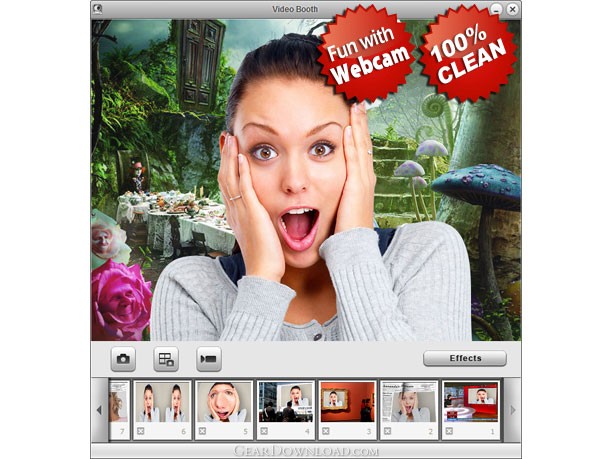
Video Booth is a fun and free application that enables you to take snapshots and record video clips quickly and easily. You can add cool effects which are embedded in Video Booth to your photos and videos and even directly upload them to Facebook, sharing the fun with family, friends and more people.
With a webcam, taking snapshots and videos is easy by using Video Booth. Open Video Booth, look into the lens, adjust your look and click the Snap button. Video Booth counts down for 3 seconds to capture and save the snapshot below the main window. Click the thumbnail to preview it, upload it to Facebook directly or export it to local folders. Recording videos is as easy as taking pictures and the Continuous Shooting feature is more exciting!
All the standard effects that you can get from Video Booth, such as Negative Film, Pinch, Double, make your face look special and funny. The backdrops effect given by Video Booth is particularly fit in your images, and makes the scenes like real. Before you take snapshots, the main window allows you to preview your image which is transformed by the added effects or backdrops. Once you feel your photo is perfect, you can click the button to take the snapshot. And it is the same to record webcam video clips. With any computer-connected camera and using the built-in effects, such as Fall Forest, Outer Space, Dragon, you can design terrific videos, and then view them, directly upload to Facebook or export the files.
Video Booth is compatible with all webcam programs, all systems and all platforms. Quickly and easily, you can take fantastic snapshots or video clips and share your fun.
What's New: Some bugs fixed
Video Booth is a fun and free application that enables you to take snapshots and record video clips quickly and easily. You can add cool effects which are embedded in Video Booth to your photos and videos and even directly upload them to Facebook, sharing the fun with family, friends and more people.
With a webcam, taking snapshots and videos is easy by using Video Booth. Open Video Booth, look into the lens, adjust your look and click the Snap button. Video Booth counts down for 3 seconds to capture and save the snapshot below the main window. Click the thumbnail to preview it, upload it to Facebook directly or export it to local folders. Recording videos is as easy as taking pictures and the Continuous Shooting feature is more exciting!
All the standard effects that you can get from Video Booth, such as Negative Film, Pinch, Double, make your face look special and funny. The backdrops effect given by Video Booth is particularly fit in your images, and makes the scenes like real. Before you take snapshots, the main window allows you to preview your image which is transformed by the added effects or backdrops. Once you feel your photo is perfect, you can click the button to take the snapshot. And it is the same to record webcam video clips. With any computer-connected camera and using the built-in effects, such as Fall Forest, Outer Space, Dragon, you can design terrific videos, and then view them, directly upload to Facebook or export the files.
Video Booth is compatible with all webcam programs, all systems and all platforms. Quickly and easily, you can take fantastic snapshots or video clips and share your fun.
What's New: Some bugs fixed
User Reviews:
- I have found this program works as advertised where a couple others sure didn't
Bennett - August 27, 2012 - 5/5 stars - I have downloaded its trial and I must say that it has got something extra. The features are fairly easy to use and manage. There is limited access to its feature in trial version that is why I will opt for its full version for a better experience.
Trollpoe - February 10, 2012 - 5/5 stars - Super easy to use, intuitive interface, Good Support Video Booth was the easiest Video Recording software I have tried. with good advanced features as well.
Malthus - January 27, 2012 - 5/5 stars - I found it easy to set up and got good results quickly
Oscar - January 11, 2012 - 5/5 stars - Easy to use; great video and audio quality. I installed the demo and was up and running in seconds. It's simple to use. Will work great for my video tutorials!
Salome - December 27, 2011 - 5/5 stars - The purpose of the software is to create simple videos but very very fast and small in size. I can say for sure that this is the best software for that job.
Sainsbury - December 12, 2011 - 5/5 stars
100% Clean:
 Video Booth 2.7.7.6 is 100% clean
This download (VideoBoothSetup.exe) was tested thoroughly and was found 100% clean. Click "Report Spyware" link on the top if you found this software contains any form of malware, including but not limited to: spyware, viruses, trojans and backdoors.
Related Software:
- webcamXP 5.3.4.295 - webcams and network cameras monitoring, recording and streaming software.
- WebCamSplitter 1.5 - WebCamSplitter duplicates the video stream for multiple applications.
- AV Webcam Morpher 2.0.53 - Webcam chat software helps you taking control over your image in cyberspace
- CamZoomer 2.7 - Software adds pan, tilt and zoom to your static USB webcam
- AV Webcam Morpher Gold 1.0.75 - Webcam chat software helps disguise your identity in video and voice chat rooms
- Willing Webcam Lite 5.53 - Tell webcam to snap pictures at specified intervals with the Picture option.
- H264 WebCam Pro 3.99 - 8-ch H264 webcam surveillance software. Broadcast audio and video to internet.
- Argus Surveillance DVR 4.0 - Video surveillance system with recording, remote monitoring, and face detection
- FlashCam Rebroadcasting server 1.0 - This package includes Rebroadcasting server for FlashCam client and PHP scripts.
- StickerCam 3.2.41 - The fun way to capture and broadcast your webcam with Yahoo & MSN messenger
top 10 most downloaded


recommended software
-
- GroupMail :: Lite Edition
- This group email software and marketing solution takes the time and effort out of sending email newsletters, announcing new products or services to yo...
-
- MaxBulk Mailer
- MaxBulk Mailer is a full-featured and easy-to-use bulk email software and mail-merge tool for Macintosh and Windows that allows you to send out custom...