Index >> Business >> Project Management >> WorkTime
Report SpywareWorkTime 5.22

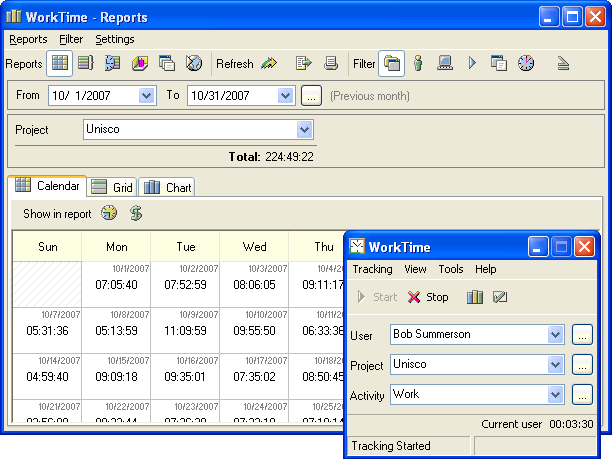 Click to enlarge screenshot
Software Description:
WorkTime - Fully automated PC usage/Project tracker surveys the time spent on the PCs
Fully automated PC usage/Project tracking software that surveys the time spent on the PC.
WorkTime gathers statistics about projects you work on, applications you run, documents you open, web-sites you visit and time spent for every of these activities. WorkTime tracking is very precise and flexible: it can pause for the keyboard/mouse or screensaver inactivity, automatically change projects depending on the active application/document, track certain applications only and more.
WorkTime offers informative reports that are perfect to analyze or bill your time: tables and graphical charts can be printed or exported to various formats. Reports are highly customizable: projects, users, workstations can be grouped, filtered, compared. For example, you can easily see how much time was spent working on any particular day, week, month on the whole and with particular software.
WorkTime is a unique combination of simplicity and usefulness; it suits from a home user to a large company.
Home users - control how much time you spend browsing the web, checking emails, playing games or keep an eye on your kids with WorkTime Hidden mode.
Self-employed or contract workers - bill clients for the job, provide exact reports on how much time you spent working.
Small teams/large companies - deploy WorkTime on the workstations in your local network, gather statistics from your remote and laptop employees and generate reports on your server.
What's New: major update
Limitations: 30 Days Trial
Fully automated PC usage/Project tracking software that surveys the time spent on the PC.
WorkTime gathers statistics about projects you work on, applications you run, documents you open, web-sites you visit and time spent for every of these activities. WorkTime tracking is very precise and flexible: it can pause for the keyboard/mouse or screensaver inactivity, automatically change projects depending on the active application/document, track certain applications only and more.
WorkTime offers informative reports that are perfect to analyze or bill your time: tables and graphical charts can be printed or exported to various formats. Reports are highly customizable: projects, users, workstations can be grouped, filtered, compared. For example, you can easily see how much time was spent working on any particular day, week, month on the whole and with particular software.
WorkTime is a unique combination of simplicity and usefulness; it suits from a home user to a large company.
Home users - control how much time you spend browsing the web, checking emails, playing games or keep an eye on your kids with WorkTime Hidden mode.
Self-employed or contract workers - bill clients for the job, provide exact reports on how much time you spent working.
Small teams/large companies - deploy WorkTime on the workstations in your local network, gather statistics from your remote and laptop employees and generate reports on your server.
What's New: major update
Limitations: 30 Days Trial
Feature List:
- ability to work in client-server mode collecting data from other computers in your LAN and producing individual report for all of them
- hidden (spy) mode ? use it to track all unsolicited activities on you computer
- powerful reminder
- multi-language interface
- also WorkTime can remind you to take regular breaks to prevent computer-related injuries
- total working time
- summary of activities within a specified period of time
- time spent working on a specific project (document) or in a specific application
- various types of data presentation (tables, graphs, diagrams, pie-charts, etc)
- The main feature that makes WorkTime stand out in a long row of time/project trackers is its simplicity and user-friendliness. You don't need to spend much time learning how to use this utility ? just install it and start working
100% Clean:
 WorkTime 5.22 is 100% clean
This download (worktime.exe) was tested thoroughly and was found 100% clean. Click "Report Spyware" link on the top if you found this software contains any form of malware, including but not limited to: spyware, viruses, trojans and backdoors.
Related Software:
- WorkTime Corporate 5.20 - Automatic invisible employee time tracking records computer related activities.
- WorkTime Time Tracking Software 5.21 - WorkTime - automatic time tracking software. Track computer activities time.
- Office Manager 12.0 - The Office Manager is a versatile, easy-to-configure and powerful DMS.
- Simple Scheduling Calendar 1.24 - Schedule your employees to shifts and tasks on a simple calendar for a month.
- Schedule Multiple Shifts Automatically 7.11 - Automatic Monthly Shift Schedules for 10 Shifts and 50 Employees with Excel.
- Rotating Shift Schedules for Your People 5.24 - Rotating or Fixed Shift Schedules for 10 People for 52 Weeks with Excel.
- Complex Shift Schedules for 25 People 6.72 - Complex Shift Schedules for 25 People with Excel.
- Assign Multiple Daily Tasks to 20 People 8.15 - Assign Multiple Daily tasks to 20 Employees with Excel
- Schedule Split Shifts for 25 Employees 6.8 - Assign Daily Split Shifts to 25 Employees with Excel.
- Daily Shifts and Tasks for 25 Employees 3.98 - Create daily shift and task schedules for one week with Excel spreadsheet.
top 10 most downloaded


recommended software
-
- A VIP Organizer
- VIP Organizer is a time and task management software which uses To Do List method to help you get through more work spending less time. It increases y...

-
- Salon Calendar
- Salon Calendar is a software tool designed specially for hair salons, beauty, manicure or aesthetic shops, tanning salons, fitness studios, wedding sa...
