Index >> Business >> Accounting & Finance >> WordPipe Search and Replace for Word
Report SpywareWordPipe Search and Replace for Word 9.8

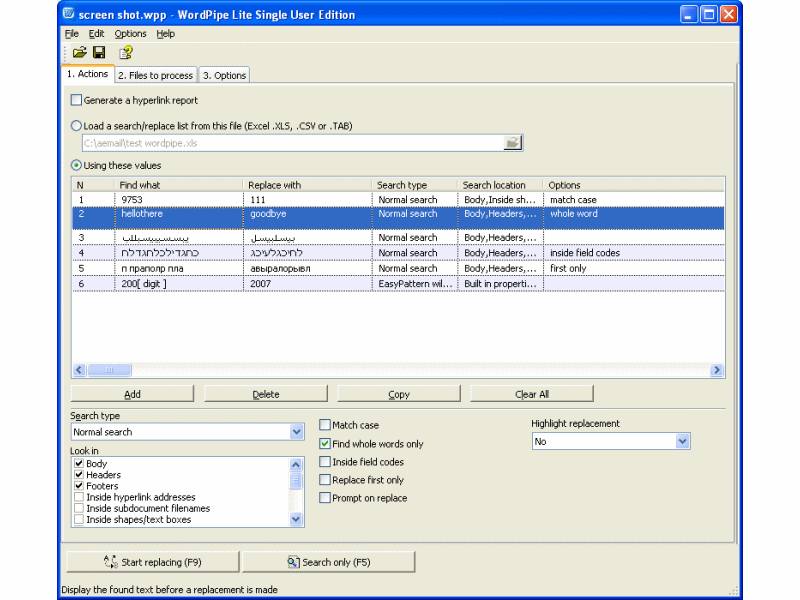 Click to enlarge screenshot
Software Description:
WordPipe Search and Replace for Word - Search and Replace multiple Microsoft Word documents, change links and addresses
Search and Replace multiple Microsoft Word documents. Change hyperlinks and UNC paths when servers get renamed; update contact details such as names, addresses and phone numbers; translate documents with find/replace lists; update Microsoft SharePoint documents or Microsoft Namespace Server mappings.
Using WordPipe is simple. 1) Drag and drop files from Windows Explorer to WordPipe, or right-click the files or folders to process in Windows Explorer and choose WordPipe. 2) Add one or more search/replace pairs. 3) Go!
WordPipe can change thousands or millions of documents, and can make multiple changes simultaneously to save time. It automatically handles read-only files, passwords and other protection, and it can be automated to run overnight or over a weekend. No user interaction is required. It even includes restart recovery in case Microsoft Word crashes!
WordPipe offers many more search and replace options than Microsoft Word; such as hyperlinks, bookmark names, text boxes, shapes, drop down fields, document properties (such as Title, Subject, Author, Company etc) and more. EasyPatterns and Perl regex patterns can also be used. VBA Code Modules can be updated - even if protected with a password.
Unlike competing products, WordPipe is fully Unicode compliant (allowing Find and Replace with international character sets), and can handle an unlimited number of documents and find/replace pairs. WordPipe can also update ISO-9001 version numbers. WordPipe can search/replace both .DOC and .DOCX Word document formats.
Try it today - and see why Microsoft recommends WordPipe to its customers!
What's New: Search and replace Fonts, Paragraphs, Languages and Frames. It also allows you to easily insert special characters such as Paragraph breaks, Special characters and more.
Limitations: 30 Days Trial
TAGS: search, replace, search and replace, find and replace, find, word, ms word, doc, multiple, microsoft word
Search and Replace multiple Microsoft Word documents. Change hyperlinks and UNC paths when servers get renamed; update contact details such as names, addresses and phone numbers; translate documents with find/replace lists; update Microsoft SharePoint documents or Microsoft Namespace Server mappings.
Using WordPipe is simple. 1) Drag and drop files from Windows Explorer to WordPipe, or right-click the files or folders to process in Windows Explorer and choose WordPipe. 2) Add one or more search/replace pairs. 3) Go!
WordPipe can change thousands or millions of documents, and can make multiple changes simultaneously to save time. It automatically handles read-only files, passwords and other protection, and it can be automated to run overnight or over a weekend. No user interaction is required. It even includes restart recovery in case Microsoft Word crashes!
WordPipe offers many more search and replace options than Microsoft Word; such as hyperlinks, bookmark names, text boxes, shapes, drop down fields, document properties (such as Title, Subject, Author, Company etc) and more. EasyPatterns and Perl regex patterns can also be used. VBA Code Modules can be updated - even if protected with a password.
Unlike competing products, WordPipe is fully Unicode compliant (allowing Find and Replace with international character sets), and can handle an unlimited number of documents and find/replace pairs. WordPipe can also update ISO-9001 version numbers. WordPipe can search/replace both .DOC and .DOCX Word document formats.
Try it today - and see why Microsoft recommends WordPipe to its customers!
What's New: Search and replace Fonts, Paragraphs, Languages and Frames. It also allows you to easily insert special characters such as Paragraph breaks, Special characters and more.
Limitations: 30 Days Trial
TAGS: search, replace, search and replace, find and replace, find, word, ms word, doc, multiple, microsoft word
Feature List:
- Search and replace inside the headers and footers of multiple sections
- Search and replace inside text boxes, shapes and inline shapes
- Search and replace inside hyperlinks and hyperlink addresses
- Search and replace inside field codes
- Search and replace with all Word's options such as Wildcards (pattern matching), Match Case, Whole Words only, Sounds Like, Find All Word Forms
- Handles any number of sub folders
- Control the document types used - so you can process .doc, .rtf, .html, .htm, .dot, .txt, .asc, .ans, .wri, .mcw, .wpd, .wps or any custom document type
- Can be automated via the command line
- Handles password-protected documents - these get flagged for manual follow-up
- Handles mail merge documents using a dummy mail merge data document
- Read only documents are automatically skipped
- Easy to install/uninstall
- The original file date and time stamp can be preserved
100% Clean:
 WordPipe Search and Replace for Word 9.8 is 100% clean
This download (wordpipe2.exe) was tested thoroughly and was found 100% clean. Click "Report Spyware" link on the top if you found this software contains any form of malware, including but not limited to: spyware, viruses, trojans and backdoors.
Related Software:
- DownloaderXL Package 6.1.39 - Download free stock quotes, options, investment portfolio in Microsoft Excel
- Rolling Stock 2.8 - Vehicle and trip expense accounting and reporting
- Ezy Invoice 13.0.0.12 - Create and manage your Invoices, Quotes etc. Manage Inventory & Receivables
- Excel Invoice Template 2.2 - An Excel invoice template with order and inventory tracking and sales reporting.
- Business2Go Small Business 2.15 - Manage and organize your accounting needs.
- Employee Expense Organizer 4.2 - Employee expense management software for Windows..
- AceMoney 4.35 - Simple and flexible Personal Accounting Software
- kBilling - Invoice Software 3.9.0 - Create and email invoices, do subscription billing, track customers and contacts
- Real Option Valuation 2.2 - Valuing the strategic options embedded in your business project proposal.
- Excel Invoice Manager Enterprise 2.221025 - Billing software & invoice software based on Excel invoice template & databases
top 10 most downloaded


recommended software
-
- A VIP Organizer
- VIP Organizer is a time and task management software which uses To Do List method to help you get through more work spending less time. It increases y...

-
- RazorSQL
- RazorSQL is a SQL database query tool, SQL editor, database browser, and administration tool with support for over 40 databases and built in connectio...