Index >> Business >> Accounting & Finance >> VISaldo
Report SpywareVISaldo 1.1

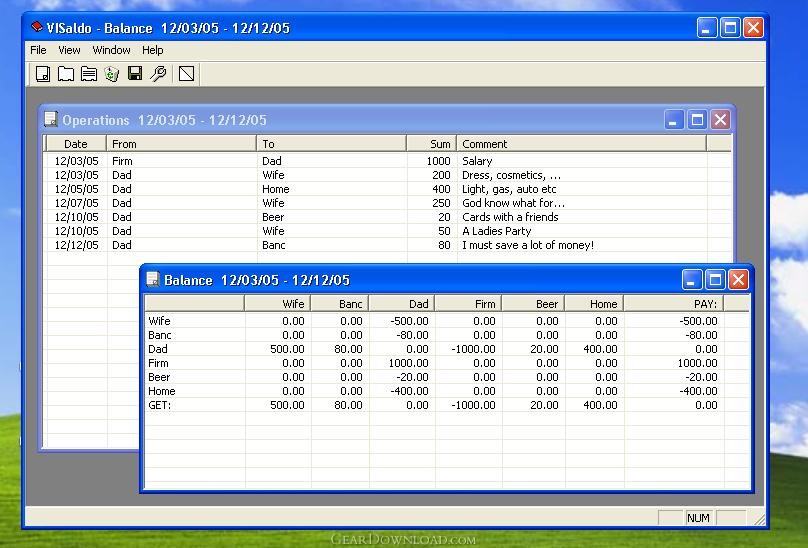 Click to enlarge screenshot
Software Description:
VISaldo - Banc balance for your Budget with support of MS Access database
Banc Balance for your Budget with support of MS Access database.
- saldo-balance (a "chess" table) for a private, family or firm budget;
- Operations are stored in a true database (MS Access mdb file);
- no limits for a number of Operations (millions and more);
- fields in an Operation record are: Date, From, To, Sum, Comment;
- no limits for a texts stored in a Comment Memo-field for every Operation;
- categories of Operations are stored automatically;
- possibility to set a Dates range for a list of Operations and Balance;
- possibility to save a list of Operations and Balance to a txt file;
- possibility to show a lot of Balances for the different periods simultaneously;
How to use it:
- press a button "Show Operations" and you will see an empty "Operations" table;
- double click on that table and you will see an Operation Add/Edit Dialog;
- select a date for Operation, input a Categories ("From" and "To") and a sum of Operation (example: 12/12/05, Firm, Dad, 1000.00);
- input a Comment for that Operation if you need;
- the categories you have entered will be shown in a comboboxes "From" and "To" automatically;
- input so many Operations as you need;
- press a button "Show Balance" and you will see a "Chess-like" Balance table for all inputed Operations;
- press a buton "Save as", input a file name with txt extention (example: "Balance.txt" or "Operations.txt") and you wiil get a txt-file for a list of Operations or Balance;
- press a button "Show Properties" and set a dates range to show.
- Open a new list of Operations and a Balance and it will be inside that dates range.
Limitations: No other Info
TAGS: balance, budget, Access
Banc Balance for your Budget with support of MS Access database.
- saldo-balance (a "chess" table) for a private, family or firm budget;
- Operations are stored in a true database (MS Access mdb file);
- no limits for a number of Operations (millions and more);
- fields in an Operation record are: Date, From, To, Sum, Comment;
- no limits for a texts stored in a Comment Memo-field for every Operation;
- categories of Operations are stored automatically;
- possibility to set a Dates range for a list of Operations and Balance;
- possibility to save a list of Operations and Balance to a txt file;
- possibility to show a lot of Balances for the different periods simultaneously;
How to use it:
- press a button "Show Operations" and you will see an empty "Operations" table;
- double click on that table and you will see an Operation Add/Edit Dialog;
- select a date for Operation, input a Categories ("From" and "To") and a sum of Operation (example: 12/12/05, Firm, Dad, 1000.00);
- input a Comment for that Operation if you need;
- the categories you have entered will be shown in a comboboxes "From" and "To" automatically;
- input so many Operations as you need;
- press a button "Show Balance" and you will see a "Chess-like" Balance table for all inputed Operations;
- press a buton "Save as", input a file name with txt extention (example: "Balance.txt" or "Operations.txt") and you wiil get a txt-file for a list of Operations or Balance;
- press a button "Show Properties" and set a dates range to show.
- Open a new list of Operations and a Balance and it will be inside that dates range.
Limitations: No other Info
TAGS: balance, budget, Access
Feature List:
- saldo-balance (a "chess" table) for a private, family or firm budget
- Operations are stored in a true database (MS Access mdb file)
- no limits for a number of Operations (millions and more)
- fields in an Operation record are: Date, From, To, Sum, Comment
- no limits for a texts stored in a Comment Memo-field for every Operation
- categories of Operations are stored automatically
- possibility to set a Dates range for a list of Operations and Balance
- possibility to save a list of Operations and Balance to a txt file
- possibility to show a lot of Balances for the different periods simultaneously
100% Clean:
 VISaldo 1.1 is 100% clean
This download (Setup_VISaldo.zip) was tested thoroughly and was found 100% clean. Click "Report Spyware" link on the top if you found this software contains any form of malware, including but not limited to: spyware, viruses, trojans and backdoors.
Related Software:
- DownloaderXL Package 6.1.39 - Download free stock quotes, options, investment portfolio in Microsoft Excel
- Rolling Stock 2.8 - Vehicle and trip expense accounting and reporting
- Ezy Invoice 13.0.0.12 - Create and manage your Invoices, Quotes etc. Manage Inventory & Receivables
- Excel Invoice Template 2.2 - An Excel invoice template with order and inventory tracking and sales reporting.
- Business2Go Small Business 2.15 - Manage and organize your accounting needs.
- Employee Expense Organizer 4.2 - Employee expense management software for Windows..
- AceMoney 4.35 - Simple and flexible Personal Accounting Software
- kBilling - Invoice Software 3.9.0 - Create and email invoices, do subscription billing, track customers and contacts
- Real Option Valuation 2.2 - Valuing the strategic options embedded in your business project proposal.
- Excel Invoice Manager Enterprise 2.221025 - Billing software & invoice software based on Excel invoice template & databases
top 10 most downloaded


recommended software
-
- A VIP Organizer
- VIP Organizer is a time and task management software which uses To Do List method to help you get through more work spending less time. It increases y...

-
- Salon Calendar
- Salon Calendar is a software tool designed specially for hair salons, beauty, manicure or aesthetic shops, tanning salons, fitness studios, wedding sa...
