Index >> Business >> PIMS & Calendars >> TrayDay
Report SpywareTrayDay 7.10

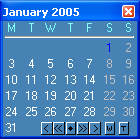 Click to enlarge screenshot
Software Description:
TrayDay - Date in the Windows tray with pop-up calendar; shows Julian Day and week numbers
TrayDay - date, calendar, week number and counter utility for the Windows tray, or Windows XP Notification area. TrayDay places an icon showing the date (day of the month) in the system tray. The icon resembles a page of a "tear-off" calendar. You can therefore see the date at a glance - often quicker and easier than resting your mouse over the clock, searching for an "Insert Date" menu, or having to reach for your diary. Move the mouse over the icon and the day of the week will appear; you can also have the Julian Day number in the Tooltip, and the "Internet Time" as defined by Swatch®. Left-click the icon and a pop-up menu appears showing the date in various formats - including up to ten user defined formats. Click one and it will automatically be inserted into your application (or copied to the clipboard, depending on the option checked in the right-click menu). Formats can include dates defined by calendar week and day number, as in 2008-W15-2 for April 8, 2008.
TrayDay also has a calendar option which displays a small calendar on your desktop. This calendar can display 1 or 3 months at a time, and has color scheme features. You can choose to have the calendar "on top" all the time for quick reference. Navigate months and years using the mouse or keyboard - or your mouse wheel - and type any date in the format of your choice. TrayDay can also display the week numbers on the calendar; press the W (or S) button on the calendar to switch week numbers on and off. Windows 7/8/10 compatible.
What's New: Windows 10 compatibility
Limitations: 120 Days Trial
TrayDay - date, calendar, week number and counter utility for the Windows tray, or Windows XP Notification area. TrayDay places an icon showing the date (day of the month) in the system tray. The icon resembles a page of a "tear-off" calendar. You can therefore see the date at a glance - often quicker and easier than resting your mouse over the clock, searching for an "Insert Date" menu, or having to reach for your diary. Move the mouse over the icon and the day of the week will appear; you can also have the Julian Day number in the Tooltip, and the "Internet Time" as defined by Swatch®. Left-click the icon and a pop-up menu appears showing the date in various formats - including up to ten user defined formats. Click one and it will automatically be inserted into your application (or copied to the clipboard, depending on the option checked in the right-click menu). Formats can include dates defined by calendar week and day number, as in 2008-W15-2 for April 8, 2008.
TrayDay also has a calendar option which displays a small calendar on your desktop. This calendar can display 1 or 3 months at a time, and has color scheme features. You can choose to have the calendar "on top" all the time for quick reference. Navigate months and years using the mouse or keyboard - or your mouse wheel - and type any date in the format of your choice. TrayDay can also display the week numbers on the calendar; press the W (or S) button on the calendar to switch week numbers on and off. Windows 7/8/10 compatible.
What's New: Windows 10 compatibility
Limitations: 120 Days Trial
Feature List:
- Calendar can stay "on top" if you like
- Choose Sunday or Monday as first day of week
- Display week numbers on the calendar - to your own, or ISO Standard
- Month and day letters appear in your own language
- Can use mouse wheel to scroll months/years
- Quickly type or paste any date in the format of your choice
- Julian Day number features
- Quickly work out number of days between two dates
- Swatch Internet Time feature
- User formats can include calendar week and day numbers
100% Clean:
 TrayDay 7.10 is 100% clean
This download (trayd710.exe) was tested thoroughly and was found 100% clean. Click "Report Spyware" link on the top if you found this software contains any form of malware, including but not limited to: spyware, viruses, trojans and backdoors.
Related Software:
- Life Organizer 1.0 - Life Organizer enables individuals and families to organize their lives.
- NaturCalendar ST - Intuitive Desktop Calendar and Scheduler for Your PC.
- A Better Calendar 2.1.8 - Keep your notes, schedules and audio in classic "paper calendar" format.
- m9P Phonebook2 2.1 - Advanced Phonebook Manager!
- Our Scheduler 2.1.8 - The EASIEST and BEST wide range scheduling software available. Network Ready
- Tree Notes 3.064 - Notes organizer. Hierarchical notes manager that has a tree with icons.
- Visual eNote Desktop Edition 1.59 - One of the most popular, virtual-sticky-notes & reminder software for windows !
- Visual eNote Standard Edition 1.59 - One of the most popular, virtual-sticky-notes & reminder software for windows !
- Aml Pages 9.73b2654 - Aml Pages keeps all your notes, information, web pages, passwords, and etc
- EssentialPIM Pro 5.55 - Full-featured PIM offering Email, Synchronization, Portability, Network Support
top 10 most downloaded


recommended software
-
- A VIP Organizer
- VIP Organizer is a time and task management software which uses To Do List method to help you get through more work spending less time. It increases y...

-
- Salon Calendar
- Salon Calendar is a software tool designed specially for hair salons, beauty, manicure or aesthetic shops, tanning salons, fitness studios, wedding sa...
