Index >> Business >> Accounting & Finance >> TeraCash
Report SpywareTeraCash 3.0
Software Description:
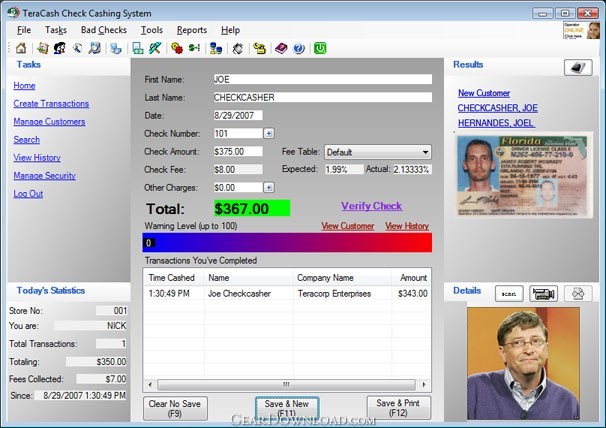
TeraCash - Check cashing software with ID Verification, Biometrics and Check Verification
Check Cashing Software that works for you!
TeraCash is a unique and affordable check cashing application designed to assist you in keeping up with all
aspects of your check cashing business. Utilizing state-of-the-art technologies, TeraCash delivers the quality and
performance you should expect in world-class business software. With features such as Biometric fingerprint
Identification, picture identification and a highly sophisticated method of verifying check integrity, you'll find that our
check cashing solutions is the one-stop solution you'll need to help you run a profitable business! With TeraCash ,
you'll have all the tools you need to help your company run a successful and profitable check cashing business!
With quick, easy to use screens, multi-lingual text, (English and Spanish) and an array of administration tools
backed by a highly scalable database engine, you can rest assured that you will be using these tools for years to
come! Included check fraud protections helps you keep track of bad check writers by using a highly sophisticated
mathematical algorithm which determines the risk - out of a possible 100 - as to whether or not the check you are
receiving will be valid. For an added level of protection, ask us about our CheckProtect Service! By subscribing to
our network of known check cashers, you will be able to determine with an even greater level of accuracy the
validity of each check. CheckProtect provides a full range of security measures including fraudulent check cashers
and known phony check writers! Try a fully functional evaluation of TeraCash today!
What's New: Added feature to bad check entry to have TeraCash save the front and back images of the returned check. Added Transaction Number field to TeraCash for searching, history viewing, and various transaction reports and receipt. Added the ability to detect multiple checks from the same company within a given number of days. Added new TeraCash native biometrics support using U.are.U brand fingerprint scanners. Added biometrics fingerprint login support. Added menu shortcuts to the customer screen to allow a user to remove a customer's photo, id card and fingerprint. Added user security so that administrators can allow/disallow users to remove customer photo's, id cards, and/or fingerprints. Added new online help file. Added new menu item to automatically direct you to TeraCorp's new online E-Learning Center. Added Tip of the Day at startup. Added the ability to choose selected checks to print on the deposit slip. Added the ability to abort, retry or ignore when verifying a customer's fingerprint. Added the ability to globally allow zero dollar check fees. Increased the speed in which the check image will display after scanning it for faster processing. Added the ability to restore a previously deleted customer. Added a new printer selection option specifically for deposit slips. Added the ability to print a deposit slip on 8.5" x 11" paper with more details. Added the ability to add additional notes to a transaction via the history screen. Quick-Insert now imports the check amount and the bank name (if in ABA) when you scan a check. Added several new charts and graphs to act as a visual representation on the performance of various aspects of your . company. Added the ability to select which checks you wish to include on the deposit slip. Added new tie-in so you can export your transactions into QuickBooks 2005 or greater and Quicken 2004!. Added the option to apply fee to customer on the customer wizard screen. Added progress bar for fingerprint lookups during identification and duplication checks. TeraCash will now remember the column order and column width of all of the grids throughout the system. Added the ability to save the check images even if there was no MICR data on the check. Added the ability to view customer history from the "Transactions You've Completed Today" section of the main screen. Added the ability to scan and/or re-scan a customer's fingerprint from the transaction screen. Added the option to skip validation and still save the check images even if the manual MICR entry still fails. . Fixed object reference error received when scanning certain checks from the multiple-checks window. Fixed bug when cancelling out of the multi-check screen where the word MULTI would be grayed out in the check number. Fixed save bug which may occasionally result in the error Bank does not exist or Customer does not exist. Fixed backup bug which caused the backup to delete itself periodically. Fixed bug where the STX would lock up if a check got jammed forcing you to restart TeraCash. Fixed popup error when scanning a drivers license and the expire date or birth date is incorrectly formatted. Fixed bug which would erase the last 5 transactions after selecting the company if using the fingerprint module in . identification mode. Fixed bug when deleting a user who has a fingerprint before first removing the fingerprint, the fingerprint would remain in the . system. Fixed bug when deleting a customer without first removing the fingerprint, the fingerprint would remain in the system. Fixed column order bug when viewing a quick-added bad check list in history. Fixed bug which would attempt to allow you to flag a quick-added check as being good, pending, bad, or voided. Fixed bug when adding a new company or bank to an existing customer when loading the customer manually versus . scanning the check first. Fixed a bug where the last customer type (company or individual) would not save the last value from the customer wizard. Fixed a bug where the default fee table chosen does not save but rather always uses the table named 'Default'. This fix also . applies to the restricted fee option. Fixed a bug which would clear the transaction after adding a new customer using the Add New link. Fixed a security flaw with manage fees where an unauthorized employee could access the manage fees screen even if their . privileges were set to disallow. Fixed object reference bug when adding multiple checks to a single transaction. Fixed memory leak when printing multiple reports. Fixed the manual MICR screen so that it automatically centers itself. Fixed alignment of fields for the CTR and SAR reports. . Updated the Spanish version of TeraCash to reflect latest changes. Updated and fixed various issues related to transaction creation while using biometrics identification mode. Updated local help file. Updated ID scan which would not display name and address information if birth date or expiration date could not be read. Updated the error message generated when trying to cash a check for an employee who attempts to use their employee . fingerprint as their customer fingerprint during the identification process.Updated user stats and transactions completed list so . that any administrator that logs in will be able to see all of the stats and transactions for all of the users for that day and who . created it. Updated the customer wizard so that when you begin typing a new company, rather than it modifying the name of the . existing company, it will create a new one with the new name. Updated the customer wizard so that it would not assume to use the first company that matches the routing number . regardless of the account. Updated the fingerprint module to store only necessary information to minimize data consumption. Updated the import backup program to support the new fingerprint module data restore.
Limitations: 15 Days Trial
TAGS: cash, check, micr, fingerprint, biometric
Check Cashing Software that works for you!
TeraCash is a unique and affordable check cashing application designed to assist you in keeping up with all
aspects of your check cashing business. Utilizing state-of-the-art technologies, TeraCash delivers the quality and
performance you should expect in world-class business software. With features such as Biometric fingerprint
Identification, picture identification and a highly sophisticated method of verifying check integrity, you'll find that our
check cashing solutions is the one-stop solution you'll need to help you run a profitable business! With TeraCash ,
you'll have all the tools you need to help your company run a successful and profitable check cashing business!
With quick, easy to use screens, multi-lingual text, (English and Spanish) and an array of administration tools
backed by a highly scalable database engine, you can rest assured that you will be using these tools for years to
come! Included check fraud protections helps you keep track of bad check writers by using a highly sophisticated
mathematical algorithm which determines the risk - out of a possible 100 - as to whether or not the check you are
receiving will be valid. For an added level of protection, ask us about our CheckProtect Service! By subscribing to
our network of known check cashers, you will be able to determine with an even greater level of accuracy the
validity of each check. CheckProtect provides a full range of security measures including fraudulent check cashers
and known phony check writers! Try a fully functional evaluation of TeraCash today!
What's New: Added feature to bad check entry to have TeraCash save the front and back images of the returned check. Added Transaction Number field to TeraCash for searching, history viewing, and various transaction reports and receipt. Added the ability to detect multiple checks from the same company within a given number of days. Added new TeraCash native biometrics support using U.are.U brand fingerprint scanners. Added biometrics fingerprint login support. Added menu shortcuts to the customer screen to allow a user to remove a customer's photo, id card and fingerprint. Added user security so that administrators can allow/disallow users to remove customer photo's, id cards, and/or fingerprints. Added new online help file. Added new menu item to automatically direct you to TeraCorp's new online E-Learning Center. Added Tip of the Day at startup. Added the ability to choose selected checks to print on the deposit slip. Added the ability to abort, retry or ignore when verifying a customer's fingerprint. Added the ability to globally allow zero dollar check fees. Increased the speed in which the check image will display after scanning it for faster processing. Added the ability to restore a previously deleted customer. Added a new printer selection option specifically for deposit slips. Added the ability to print a deposit slip on 8.5" x 11" paper with more details. Added the ability to add additional notes to a transaction via the history screen. Quick-Insert now imports the check amount and the bank name (if in ABA) when you scan a check. Added several new charts and graphs to act as a visual representation on the performance of various aspects of your . company. Added the ability to select which checks you wish to include on the deposit slip. Added new tie-in so you can export your transactions into QuickBooks 2005 or greater and Quicken 2004!. Added the option to apply fee to customer on the customer wizard screen. Added progress bar for fingerprint lookups during identification and duplication checks. TeraCash will now remember the column order and column width of all of the grids throughout the system. Added the ability to save the check images even if there was no MICR data on the check. Added the ability to view customer history from the "Transactions You've Completed Today" section of the main screen. Added the ability to scan and/or re-scan a customer's fingerprint from the transaction screen. Added the option to skip validation and still save the check images even if the manual MICR entry still fails. . Fixed object reference error received when scanning certain checks from the multiple-checks window. Fixed bug when cancelling out of the multi-check screen where the word MULTI would be grayed out in the check number. Fixed save bug which may occasionally result in the error Bank does not exist or Customer does not exist. Fixed backup bug which caused the backup to delete itself periodically. Fixed bug where the STX would lock up if a check got jammed forcing you to restart TeraCash. Fixed popup error when scanning a drivers license and the expire date or birth date is incorrectly formatted. Fixed bug which would erase the last 5 transactions after selecting the company if using the fingerprint module in . identification mode. Fixed bug when deleting a user who has a fingerprint before first removing the fingerprint, the fingerprint would remain in the . system. Fixed bug when deleting a customer without first removing the fingerprint, the fingerprint would remain in the system. Fixed column order bug when viewing a quick-added bad check list in history. Fixed bug which would attempt to allow you to flag a quick-added check as being good, pending, bad, or voided. Fixed bug when adding a new company or bank to an existing customer when loading the customer manually versus . scanning the check first. Fixed a bug where the last customer type (company or individual) would not save the last value from the customer wizard. Fixed a bug where the default fee table chosen does not save but rather always uses the table named 'Default'. This fix also . applies to the restricted fee option. Fixed a bug which would clear the transaction after adding a new customer using the Add New link. Fixed a security flaw with manage fees where an unauthorized employee could access the manage fees screen even if their . privileges were set to disallow. Fixed object reference bug when adding multiple checks to a single transaction. Fixed memory leak when printing multiple reports. Fixed the manual MICR screen so that it automatically centers itself. Fixed alignment of fields for the CTR and SAR reports. . Updated the Spanish version of TeraCash to reflect latest changes. Updated and fixed various issues related to transaction creation while using biometrics identification mode. Updated local help file. Updated ID scan which would not display name and address information if birth date or expiration date could not be read. Updated the error message generated when trying to cash a check for an employee who attempts to use their employee . fingerprint as their customer fingerprint during the identification process.Updated user stats and transactions completed list so . that any administrator that logs in will be able to see all of the stats and transactions for all of the users for that day and who . created it. Updated the customer wizard so that when you begin typing a new company, rather than it modifying the name of the . existing company, it will create a new one with the new name. Updated the customer wizard so that it would not assume to use the first company that matches the routing number . regardless of the account. Updated the fingerprint module to store only necessary information to minimize data consumption. Updated the import backup program to support the new fingerprint module data restore.
Limitations: 15 Days Trial
TAGS: cash, check, micr, fingerprint, biometric
Feature List:
- Easy Navigation for Rapid Transaction Creation
- Multi-Lingual (English, Spanish)
- Customer Tracking
- History Logging
- Search by Customer/Bank/Company
- Automated Backup
- MICR Check scanning and MAG stripe reading
- Per-user security with individual user drawer support
- Custom fees for multiple transaction types
- Advanced algorithm to determine fraudulent check probability
- External Image Scanning
- Corporate Check Cashing
- Automatic AND manual bad check entry
- 3" Receipt Printing / 8.5 x 11 Reporting
- CheckGuard Service ready (optional)
- Network Capable (optional)
- Picture Recognition Module (optional)
- Biometric Fingerprint Recognition
- Check 21 Integration
- CTR Report
- SAR Report
- IRS Report
- Integrated Help File
- ABA Bank Data
100% Clean:

TeraCash 3.0 is 100% cleanThis download (setup.exe) was tested thoroughly and was found 100% clean. Click "Report Spyware" link on the top if you found this software contains any form of malware, including but not limited to: spyware, viruses, trojans and backdoors.
Related Software:
- Customer Invoice Template 2.0 - A customer invoice management system with order tracking and sales reporting.
- DownloaderXL 5.9.8 - Download stock quotes, options, investment portfolio and DDE in Microsoft Excel
- Employee Scheduler for Excel and OpenOffice 2.1 - Make monthly employee work schedules. Improves scheduling efficiency.
- TinyBooks Pro 7.0.6 - Simple, non-bloated small business accounting program for the Macintosh.
- AceMoney 4.19.1 - Simple and flexible Personal Accounting Software
- Real Option Valuation 2.0 - Valuing the strategic options embedded in your business project proposal.
- Rolling Stock 2.8 - Vehicle and trip expense accounting and reporting
- Financial Advisor for Excel (Standard) 3.0 - Take these 73 powerful financial calculators, directly to your Excel spreadsheet
- Online Functions - Stock Quotes 2.0 - Update automatically the stock quotes and market indexes into MS Excel.
- Online Functions - Exchange Rates 2.1 - Update automatically the currency exchange rates into your spreadsheets MS Excel
top 10 most downloaded
recommended software
-
- A-PDF Content Splitter
- A-PDF Content Splitter is a desktop utility program that lets you split Acrobat files into smaller pdf files base on location and text information wit...
-
- A VIP Organizer
- VIP Organizer is a time and task management software which uses To Do List method to help you get through more work spending less time. It increases y...