Index >> Business >> Databases & Tools >> Tabs for Access
Report SpywareTabs for Access 8.50

 Click to enlarge screenshot
Software Description:
Tabs for Access - Easily edit, read, and manage multiple databases with tabbed browser in Access
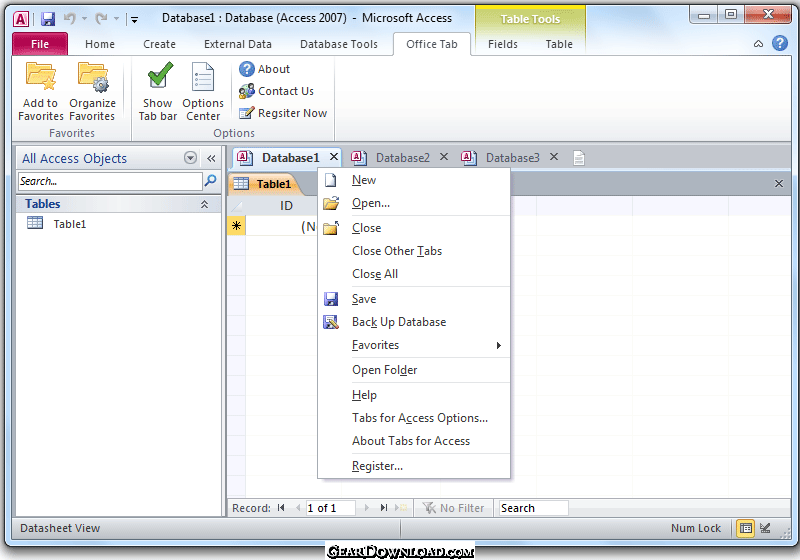
Tabbed viewing, editing, and managing multiple database files in single Window: Tabs for Access (is also named Access Tab).
Once the software is installed, you can find a tab bar in Microsoft Access as in Internet Explorer 7/8/9 and FireFox.
When you open or create Access file, there will be a corresponding tab in the tab bar. You can switch among Access files just by clicking the tabs.
Save all files in the tabbed window by one click.
Open current document or workbook in new window.
Open the relevant folder of current document.
Close all files in the tabbed windows (a confirmation dialog box will appear when you choose to close all files).
Close other files (exclude current file) in the tabbed windows.
What's New: Combine 32-bit and 64-bit supports into one single installation package, so that users don't need to know whether they are using 32-bit or 64-bit of Microsoft Office 2010.
Limitations: 30 Days Trial; After expiration, the Tabs for Visio will be disabled untill users register it.
Tabbed viewing, editing, and managing multiple database files in single Window: Tabs for Access (is also named Access Tab).
Once the software is installed, you can find a tab bar in Microsoft Access as in Internet Explorer 7/8/9 and FireFox.
When you open or create Access file, there will be a corresponding tab in the tab bar. You can switch among Access files just by clicking the tabs.
Save all files in the tabbed window by one click.
Open current document or workbook in new window.
Open the relevant folder of current document.
Close all files in the tabbed windows (a confirmation dialog box will appear when you choose to close all files).
Close other files (exclude current file) in the tabbed windows.
What's New: Combine 32-bit and 64-bit supports into one single installation package, so that users don't need to know whether they are using 32-bit or 64-bit of Microsoft Office 2010.
Limitations: 30 Days Trial; After expiration, the Tabs for Visio will be disabled untill users register it.
100% Clean:
 Tabs for Access 8.50 is 100% clean
This download (SetupAccessTab.exe) was tested thoroughly and was found 100% clean. Click "Report Spyware" link on the top if you found this software contains any form of malware, including but not limited to: spyware, viruses, trojans and backdoors.
Related Software:
- Tabs for Access x64 8.00 - Tabbed Browse, Edit and Manage Files of Microsoft Access Like IE8 and FireFox
- SQLite Analyzer 3.0.4.27 - Process SQLite databases visually with SQLite Analyzer! Free trial!
- Full Convert Professional SQL Server Ed. 1.3 - Full Convert provides powerful and comfortable way to convert databases.
- Full Convert Standard SQL Server Edition 1.3 - Full Convert provides powerful and comfortable way to convert databases.
- Full Convert Standard MySQL Edition 1.3 - Full Convert provides powerful and comfortable way to convert databases.
- Full Convert Professional MySQL Edition 1.3 - Full Convert provides powerful and comfortable way to convert databases.
- Mobile Database Viewer(Access,xls,Oracle)for UIQ 1.1 - View Access,Foxpro,dBase,Excel and any ODBC enable Database on UIQ mobile phone.
- Cornolius Database Application 1.4.300 - A secure multi-user database creator and manager for individuals and businesses!
- DBConvert for Access & MySQL 6.0.0 - Bi-directional db conversion tool for MS Access and MySQL databases
- SQL Data Examiner 2010 R2 4.1.0 - SQL compare and synchronization for SQL Server, Oracle, MySQL, SQL Azure, Acces.
top 10 most downloaded


recommended software
-
- A VIP Organizer
- VIP Organizer is a time and task management software which uses To Do List method to help you get through more work spending less time. It increases y...

-
- Salon Calendar
- Salon Calendar is a software tool designed specially for hair salons, beauty, manicure or aesthetic shops, tanning salons, fitness studios, wedding sa...
