Index >> Business >> Office Suites & Tools >> CloudScan
Report SpywareCloudScan 3.0

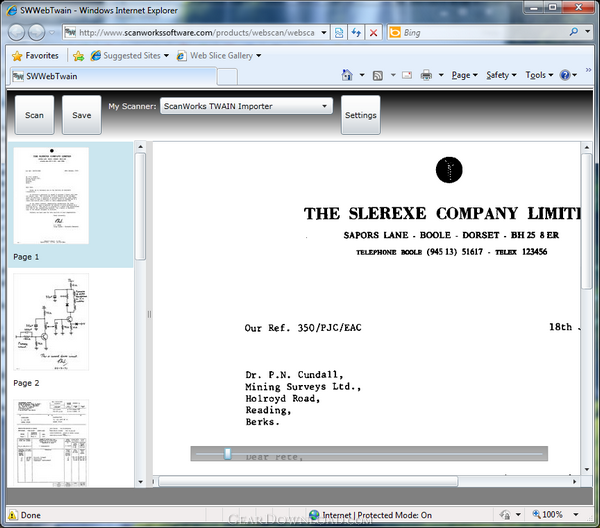 Click to enlarge screenshot
Software Description:
CloudScan - Share scanner and scan to PDF from any computers across network.
CloudScan is the only free scan application which most people need for taking images with a scanner. CloudScan allows scanning documents and pictures using Mac, PC, iPhone, iPad, Android-based smartphone. If you have just one computer, you will enjoy a simple interface. If you have more than one computer, remote scan feature allows avoiding driver installation on each your computer and sharing scanner to all home or office users. With the mobile remote scan you can scan from iPad or almost any smartphone (iPhone, Android) near your scanner or MFP and check the result immediately without trip back to the PC. It is especially helpful for wireless scanning. Very convenient and friendly menu allows getting required results with few clicks and still providing the option to select required parameters. CloudScan has many different options conveniently share the scanned images: save on a local disk in PDF or TIFF, upload to Google Docs, or send by internet fax. Premium features enable printing and sending by e-mail.
Key features:
- Scan documents, pictures, photos and edit them in online editor
- Work with any Twain compatible scanner (more than 1600 are available on market)
- Work inside a web browser: Internet Explorer, Firefox, Opera, and Google Chrome. CloudScan application can be used either from Windows or Mac computers
- No driver or other installation required on every computer (one installation for SharedScanner component for the entire network)
- Very easy to use. One click for scan, one more to save a multipage PDF or TIFF.
- One click to export to GoogleDocs or send by fax
- Create a hard copy of your document printing it from CloudScan
Favorite usage scenarios:
Home case: Just click install button on our download page and click the scan button in opened browser. That's all - you have your document scanned.
Office: Your colleagues often ask you to scan their documents with your scanner? Use CloudScan and they will never bother you with such request.
What's New: Print scanned documents Send scanned documents by Fax Send scanned documents by eMail Edit scanned documents in online editor Scan documents from iPhone, iPad and Android devices
CloudScan is the only free scan application which most people need for taking images with a scanner. CloudScan allows scanning documents and pictures using Mac, PC, iPhone, iPad, Android-based smartphone. If you have just one computer, you will enjoy a simple interface. If you have more than one computer, remote scan feature allows avoiding driver installation on each your computer and sharing scanner to all home or office users. With the mobile remote scan you can scan from iPad or almost any smartphone (iPhone, Android) near your scanner or MFP and check the result immediately without trip back to the PC. It is especially helpful for wireless scanning. Very convenient and friendly menu allows getting required results with few clicks and still providing the option to select required parameters. CloudScan has many different options conveniently share the scanned images: save on a local disk in PDF or TIFF, upload to Google Docs, or send by internet fax. Premium features enable printing and sending by e-mail.
Key features:
- Scan documents, pictures, photos and edit them in online editor
- Work with any Twain compatible scanner (more than 1600 are available on market)
- Work inside a web browser: Internet Explorer, Firefox, Opera, and Google Chrome. CloudScan application can be used either from Windows or Mac computers
- No driver or other installation required on every computer (one installation for SharedScanner component for the entire network)
- Very easy to use. One click for scan, one more to save a multipage PDF or TIFF.
- One click to export to GoogleDocs or send by fax
- Create a hard copy of your document printing it from CloudScan
Favorite usage scenarios:
Home case: Just click install button on our download page and click the scan button in opened browser. That's all - you have your document scanned.
Office: Your colleagues often ask you to scan their documents with your scanner? Use CloudScan and they will never bother you with such request.
What's New: Print scanned documents Send scanned documents by Fax Send scanned documents by eMail Edit scanned documents in online editor Scan documents from iPhone, iPad and Android devices
100% Clean:
 CloudScan 3.0 is 100% clean
This download (sharedscanner.zip) was tested thoroughly and was found 100% clean. Click "Report Spyware" link on the top if you found this software contains any form of malware, including but not limited to: spyware, viruses, trojans and backdoors.
Related Software:
- TWAIN Importer Pro 4.1 - TWAIN Importer is a virtual Twain driver for importing images from folder.
- RemoteTwain 4.3 - Makes any Twain compatible scanner as a network scanner.
- RemoteDesktopTwain 4.3 - Scan with locally connected scanner on remote server through RemoteDesktop.
- ExcelEverywhere for HTML 3.4.0 - Create WEB form that looks and functions the same as your MS Excel spreadsheet
- ONLYOFFICE Desktop Editor for Mac 4.1.1 - Open source office suite for working with text, spreadsheets and presentations.
- Grab Text 13.5 - Live text recognizer, capable of converting virtually anything to editable text!
- Amazing Visio for Microsoft Visio 4.0.2 - Add power to your Visio drawings with this tool set.
- novaPDF Lite 7.6.381 - novaPDF Lite allows you to easily create PDF files from any printable document.
- A-PDF Page Cut 5.1 - Break PDF pages to more pieces.
- ArtixMedia Menu Studio [Christmas Ed.] 3.71 - Create a gift multimedia CD-card to go with your presentations!
top 10 most downloaded


recommended software
-
- A VIP Organizer
- VIP Organizer is a time and task management software which uses To Do List method to help you get through more work spending less time. It increases y...

-
- Salon Calendar
- Salon Calendar is a software tool designed specially for hair salons, beauty, manicure or aesthetic shops, tanning salons, fitness studios, wedding sa...
