Index >> Business >> Office Suites & Tools >> PowerPointPipe Replace for PowerPoint
Report SpywarePowerPointPipe Replace for PowerPoint 5.7

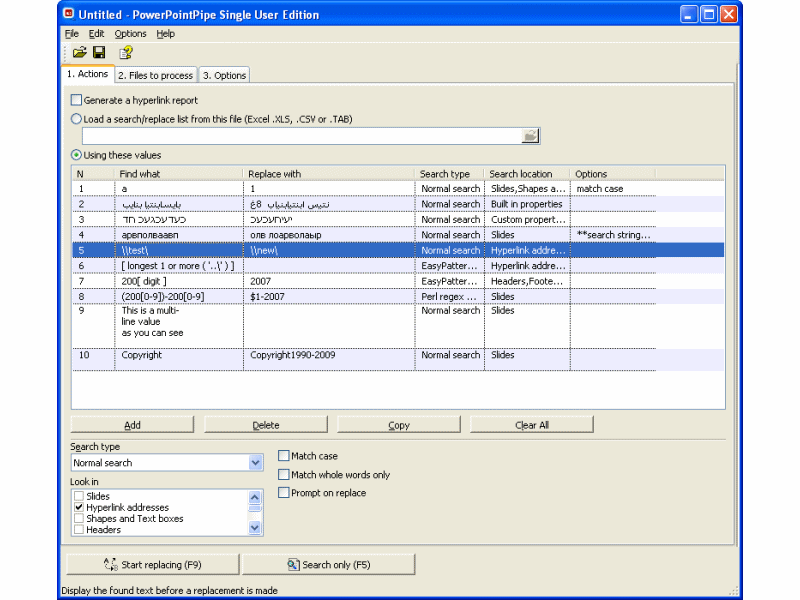 Click to enlarge screenshot
Software Description:
PowerPointPipe Replace for PowerPoint - Search and Replace Microsoft PowerPoint presentations, change hyperlinks
Search and Replace multiple Microsoft PowerPoint presentations. Change hyperlinks and UNC paths when servers get renamed; update contact details such as names, addresses and phone numbers; translate presentations with find/replace lists; update Microsoft SharePoint documents or Microsoft Namespace Server mappings.
Using PowerPointPipe is simple. 1) Drag and drop files from Windows Explorer to PowerPointPipe, or right-click the files or folders to process in Windows Explorer and choose PowerPointPipe. 2) Add one or more search/replace pairs. 3) Go!
PowerPointPipe can change thousands or millions of presentations, and can make multiple changes simultaneously to save time. It automatically handles read-only files, passwords and other protection, and it can be automated to run overnight or over a weekend. No user interaction is required. It even includes restart recovery in case Microsoft PowerPoint crashes!
PowerPointPipe offers many more search and replace options than Microsoft PowerPoint; such as hyperlinks, text boxes, shapes, document properties (such as Title, Subject, Author, Company etc) and more. EasyPatterns and Perl regex patterns can also be used.
Unlike the competing products that we reviewed, PowerPointPipe is fully Unicode compliant (allowing Find and Replace with international character sets), and can handle an unlimited number of presentations and find/replace pairs. PowerPointPipe can also update ISO-9001 version numbers. PowerPointPipe can search/replace .PPT, .PPTX PowerPoint formats and OpenDocument .ODP presentations.
Try it today - and see why Microsoft recommends PowerPointPipe to its customers!
What's New: * Updated editing grid to be more user-friendly. * Fixed error where evaluation files were deleted if backup mode was selected and the status window was closed without choosing to restore or delete the backup files.
Limitations: 30 Days Trial
TAGS: search, replace, search and replace, find and replace, find, powerpoint presentations, powerpoint, ms powerpoint, doc, multiple, microsoft
Search and Replace multiple Microsoft PowerPoint presentations. Change hyperlinks and UNC paths when servers get renamed; update contact details such as names, addresses and phone numbers; translate presentations with find/replace lists; update Microsoft SharePoint documents or Microsoft Namespace Server mappings.
Using PowerPointPipe is simple. 1) Drag and drop files from Windows Explorer to PowerPointPipe, or right-click the files or folders to process in Windows Explorer and choose PowerPointPipe. 2) Add one or more search/replace pairs. 3) Go!
PowerPointPipe can change thousands or millions of presentations, and can make multiple changes simultaneously to save time. It automatically handles read-only files, passwords and other protection, and it can be automated to run overnight or over a weekend. No user interaction is required. It even includes restart recovery in case Microsoft PowerPoint crashes!
PowerPointPipe offers many more search and replace options than Microsoft PowerPoint; such as hyperlinks, text boxes, shapes, document properties (such as Title, Subject, Author, Company etc) and more. EasyPatterns and Perl regex patterns can also be used.
Unlike the competing products that we reviewed, PowerPointPipe is fully Unicode compliant (allowing Find and Replace with international character sets), and can handle an unlimited number of presentations and find/replace pairs. PowerPointPipe can also update ISO-9001 version numbers. PowerPointPipe can search/replace .PPT, .PPTX PowerPoint formats and OpenDocument .ODP presentations.
Try it today - and see why Microsoft recommends PowerPointPipe to its customers!
What's New: * Updated editing grid to be more user-friendly. * Fixed error where evaluation files were deleted if backup mode was selected and the status window was closed without choosing to restore or delete the backup files.
Limitations: 30 Days Trial
TAGS: search, replace, search and replace, find and replace, find, powerpoint presentations, powerpoint, ms powerpoint, doc, multiple, microsoft
100% Clean:
 PowerPointPipe Replace for PowerPoint 5.7 is 100% clean
This download (powerpointpipe2.exe) was tested thoroughly and was found 100% clean. Click "Report Spyware" link on the top if you found this software contains any form of malware, including but not limited to: spyware, viruses, trojans and backdoors.
Related Software:
- ExcelPipe Find and Replace for Excel 8.2 - Batch Search and Replace Excel spreadsheets, change links/addresses/images
- ExcelEverywhere for HTML 3.4.0 - Create WEB form that looks and functions the same as your MS Excel spreadsheet
- ONLYOFFICE Desktop Editor for Mac 4.1.1 - Open source office suite for working with text, spreadsheets and presentations.
- Grab Text 13.5 - Live text recognizer, capable of converting virtually anything to editable text!
- Amazing Visio for Microsoft Visio 4.0.2 - Add power to your Visio drawings with this tool set.
- novaPDF Lite 7.6.381 - novaPDF Lite allows you to easily create PDF files from any printable document.
- A-PDF Page Cut 5.1 - Break PDF pages to more pieces.
- ArtixMedia Menu Studio [Christmas Ed.] 3.71 - Create a gift multimedia CD-card to go with your presentations!
- Adds for Outlook 2.4 - Make an Alarm Clock and MP3 player from your Outlook!
- artiw outlook converter 4.5 - converts outlook/outlook express mail,contacts to pdf,chm,html,rtf,txt,xml etc
top 10 most downloaded


recommended software
-
- Weeny Free PDF Cutter
- Weeny Free PDF Cutter is a free PDF cutter software to cut any PDF file into small ones by extracting any specific pages from the multi-page PDF file....
-
- A VIP Organizer
- VIP Organizer is a time and task management software which uses To Do List method to help you get through more work spending less time. It increases y...
