Index >> Business >> Office Suites & Tools >> Perspector Standard Edition
Report SpywarePerspector Standard Edition 4.2

 Click to enlarge screenshot
Software Description:
Perspector Standard Edition - Add WOW to your PowerPoint presentations! Includes instant library of 3D slides.
If you're looking for new ways to make your PowerPoint presentations stand out, Perspector will give you what you want.
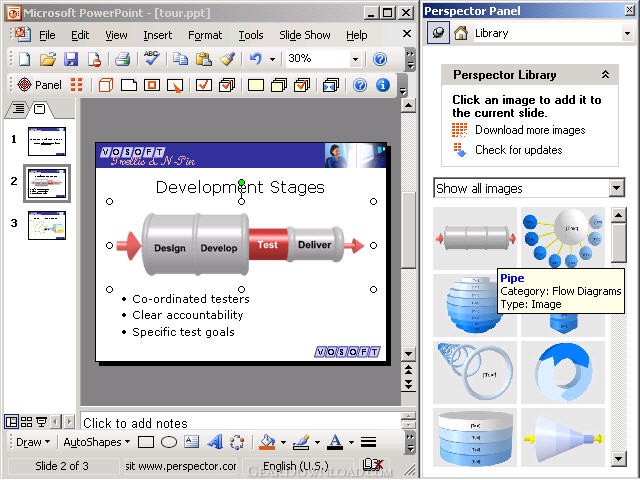
Perspector lets you add a variety of 3D effects to your slides, from individual shapes to full-blown 3D diagrams. There is a library with images in it that you can use to make an immediate difference to your presentations. If you want to make your bullet lists more interesting, try out one of the 3D lists!
Editing 3D images in Perspector is easy if you've ever used 2D shapes in PowerPoint before. It works the same way - dragging a shape moves it, dragging one of the handles resizes the shape or rotates it. If you get stuck, there are some short and snappy videos included to show you how to do these things.
Perspector is the only PowerPoint tool that lets you create 3D images. There are some PowerPoint tools that let you create 3D titles, but these don't let you create 3D images and diagrams. If you want 3D titles, Perspector can do these too.
There are 3D drawing programs such as Maya and 3ds Max that could be used to create 3D images for your presentations, but since they are designed for 3D artists they are not easy to learn. Perspector has been designed exclusively for PowerPoint users. The other 3D drawing programs also don't have the PowerPoint integration that Perspector has, so they don't let you edit your 3D image directly from inside PowerPoint. This is a really great feature of Perspector because it means the 3D effects are always at your fingertips when you are working on your presentations.
What's New: 1) More choice over use of presentation scheme colors.
Limitations: 30 Days Trial
If you're looking for new ways to make your PowerPoint presentations stand out, Perspector will give you what you want.
Perspector lets you add a variety of 3D effects to your slides, from individual shapes to full-blown 3D diagrams. There is a library with images in it that you can use to make an immediate difference to your presentations. If you want to make your bullet lists more interesting, try out one of the 3D lists!
Editing 3D images in Perspector is easy if you've ever used 2D shapes in PowerPoint before. It works the same way - dragging a shape moves it, dragging one of the handles resizes the shape or rotates it. If you get stuck, there are some short and snappy videos included to show you how to do these things.
Perspector is the only PowerPoint tool that lets you create 3D images. There are some PowerPoint tools that let you create 3D titles, but these don't let you create 3D images and diagrams. If you want 3D titles, Perspector can do these too.
There are 3D drawing programs such as Maya and 3ds Max that could be used to create 3D images for your presentations, but since they are designed for 3D artists they are not easy to learn. Perspector has been designed exclusively for PowerPoint users. The other 3D drawing programs also don't have the PowerPoint integration that Perspector has, so they don't let you edit your 3D image directly from inside PowerPoint. This is a really great feature of Perspector because it means the 3D effects are always at your fingertips when you are working on your presentations.
What's New: 1) More choice over use of presentation scheme colors.
Limitations: 30 Days Trial
100% Clean:
 Perspector Standard Edition 4.2 is 100% clean
This download (Install_Perspector.exe) was tested thoroughly and was found 100% clean. Click "Report Spyware" link on the top if you found this software contains any form of malware, including but not limited to: spyware, viruses, trojans and backdoors.
Related Software:
- Perspector Professional Edition 4.2 - Enhance your PowerPoint presentations. Instant library of 3D slides and charts.
- ExcelEverywhere for HTML 3.4.0 - Create WEB form that looks and functions the same as your MS Excel spreadsheet
- ONLYOFFICE Desktop Editor for Mac 4.1.1 - Open source office suite for working with text, spreadsheets and presentations.
- Grab Text 13.5 - Live text recognizer, capable of converting virtually anything to editable text!
- Amazing Visio for Microsoft Visio 4.0.2 - Add power to your Visio drawings with this tool set.
- novaPDF Lite 7.6.381 - novaPDF Lite allows you to easily create PDF files from any printable document.
- A-PDF Page Cut 5.1 - Break PDF pages to more pieces.
- ArtixMedia Menu Studio [Christmas Ed.] 3.71 - Create a gift multimedia CD-card to go with your presentations!
- Adds for Outlook 2.4 - Make an Alarm Clock and MP3 player from your Outlook!
- artiw outlook converter 4.5 - converts outlook/outlook express mail,contacts to pdf,chm,html,rtf,txt,xml etc
top 10 most downloaded


recommended software
-
- A VIP Organizer
- VIP Organizer is a time and task management software which uses To Do List method to help you get through more work spending less time. It increases y...

-
- Salon Calendar
- Salon Calendar is a software tool designed specially for hair salons, beauty, manicure or aesthetic shops, tanning salons, fitness studios, wedding sa...
